1.4 Remote Control
LED COLOR TV
4
(Here is only the sketch, please in kind prevail)
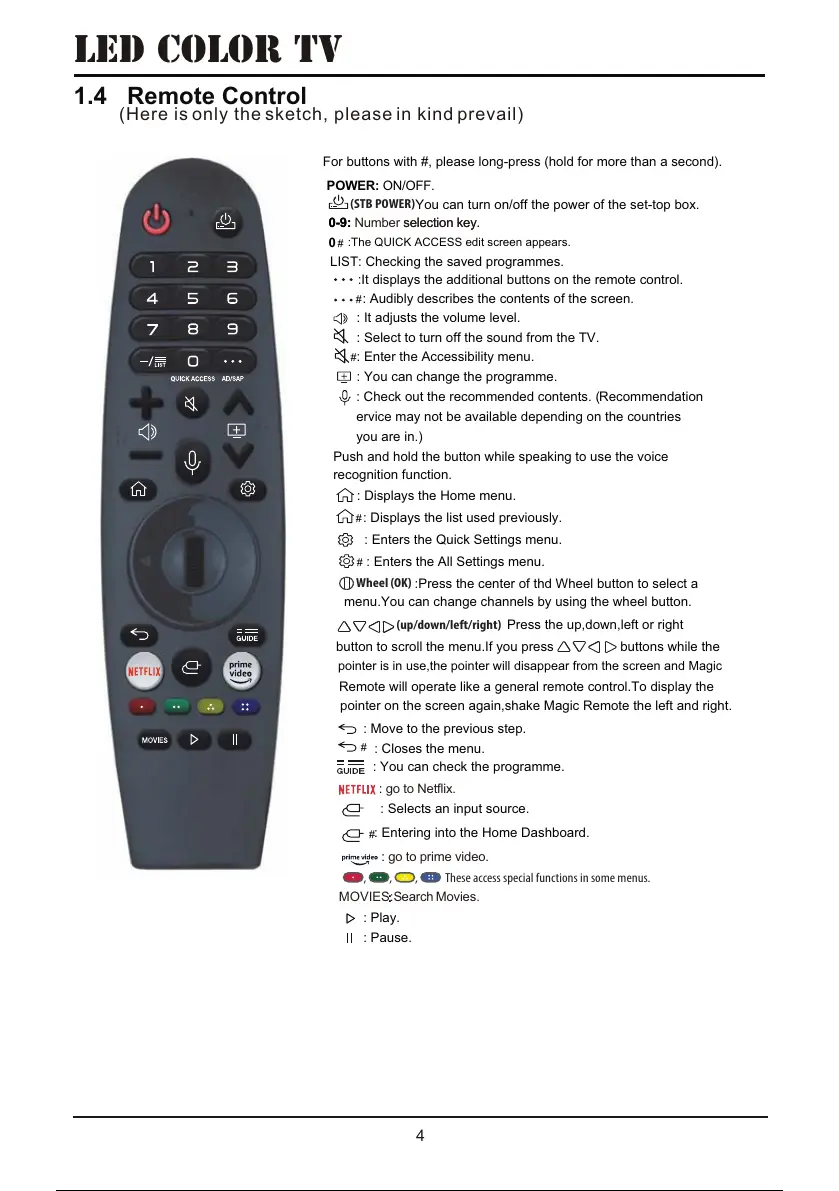
pointer on the screen again, shake Magic Remote the left and right.
earch
: Pause.
: Play.
button to scroll the menu.If you press buttons while the
:Press the center of thd Wheel button to select a
: Check out the recommended contents. ( Recommendation
:The QUICK ACCESS edit screen appears.
#
For buttons with #, please long-press (hold for more than a second).
: Entering into the Home Dashboard.
: Selects an input source.
: You can check the programme.
: Closes the menu.
: Move to the previous step.
: Enters the All Settings menu.
: Enters the Quick Settings menu.
: Displays the list used previously.
: Displays the Home menu.
Push and hold the button while speaking to use the voice
recognition function.
you are in.)
ervice may not be available depending on the countries
: You can change the programme.
: Enter the Accessibility menu.
: Select to turn off the sound from the TV.
: It adjusts the volume level.
: Audibly describes the contents of the screen.
:It displays the additional buttons on the remote control.
LIST: Checking the saved programmes.
POWER: ON/OFF
.
: go to Netflix.
: go to prime video.
Wheel (OK)
(up/down/left/right)
5IFTFBDDFTTTQFDJBMGVODUJPOTJOTPNFNFOVT
:
MOVIES:S Movies.
You can turn on/off the power of the set-top box.
(STB POWER)
0-9: Number selection key.0-9: selection key.
#
#
#
#
#
0
#
menu.You can change channels by using the wheel button.
pointer is in use,the pointer will disappear from the screen and Magic
Remote will operate like a general remote control.To display the
Press the up, down, left or right
37 / 56 36 / 54 37 / 56 36 / 54 37 / 56


 To Next Page