EasyManua.ls Logo

Fox 55WOS640E - Page 44

Fox 55WOS640E
56 pages
Print Icon
To Next Page IconTo Next Page
To Previous Page IconTo Previous Page
Loading...
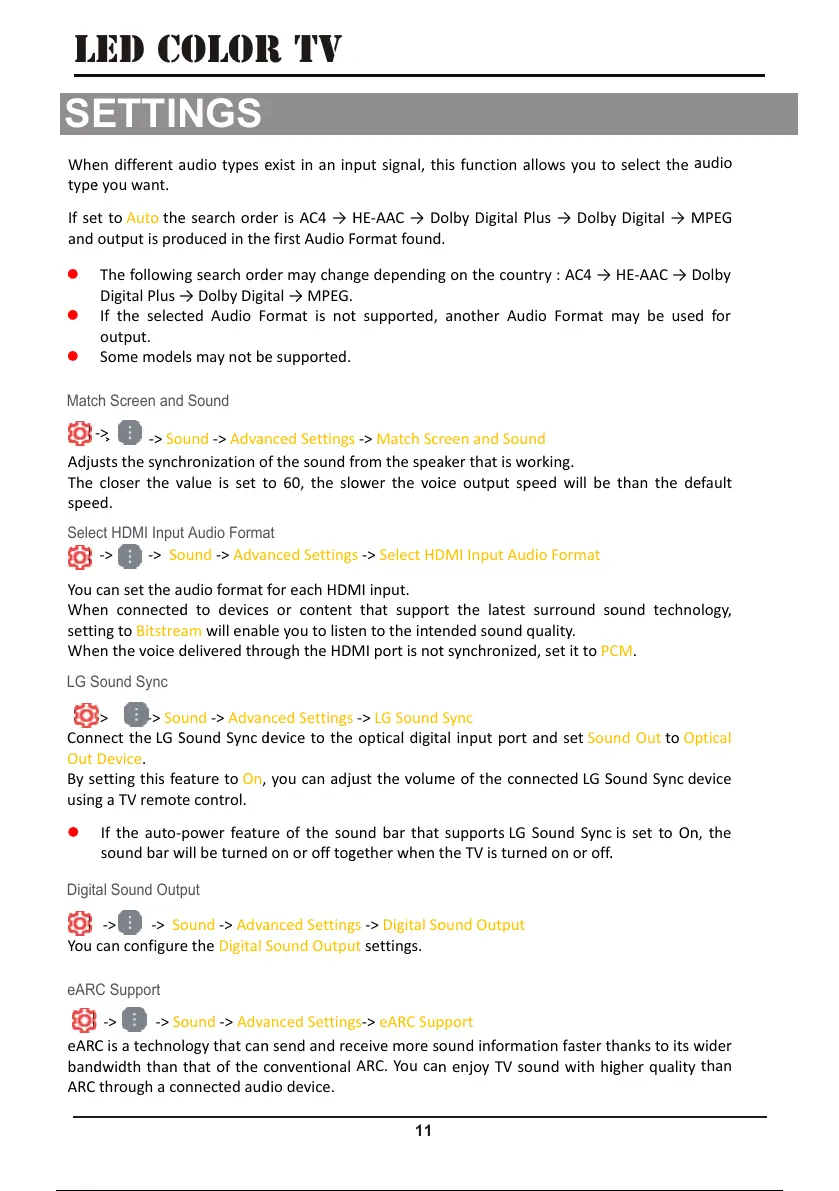
Digital Sound Output
LG Sound Sync
Select HDMI Input Audio Format
LED COLOR TV
You
Wh
e
sett
i
Wh
e
Con
n
Out
By s
usin
You
-> ->
S
can set the a
e
n connecte
d
i
ng to Bitstre
a
e
n the voice
d
-> -> S
o
n
ect the LG
S
Device.
etting this f
e
g a TV remo
t
If the auto-
sound bar
w
-> -> S
o
can configur
e
S
ound -> Adv
udio format
f
d
to device
s
a
m will enab
d
elivered thr
o
o
und -> Adv
a
S
ound Sync
d
e
ature to On,
t
e control.
power featu
w
ill be turned
o
und -> Adv
a
e
the Digital
S
anced Settin
g
f
or each HD
M
s
or content
le you to list
e
o
ugh the HD
M
a
nced Settin
g
d
evice to the
you can adj
u
re of the so
u
on or off to
g
a
nced Settin
g
S
ound Outp
u
g
s -> Select
H
M
I input.
that suppo
r
e
n to the int
e
M
I port is no
t
g
s -> LG Soun
d
optical digit
u
st the volu
m
u
nd bar that
g
ether when
g
s -> Digital S
o
u
t settings.
H
DMI Input A
r
t the latest
e
nded sound
t
synchroniz
e
d
Sync
al input por
t
m
e of the co
n
supports LG
t
he TV is tur
n
o
und Output
udio Format
surround s
o
quality.
e
d, set it to P
C
t
and set So
u
n
nected LG
S
Sound Syn
c
n
ed on or off
.
o
und techn
o
C
M.
u
nd Out to O
p
S
ound Sync d
c
is set to O
n
.
o
logy,
p
tical
e
vice
n
, the
11
eAR
C
ban
d
ARC
-> -> S
o
C
is a techno
d
width than
through a c
o
o
und -> Adv
a
logy that ca
n
that of the
c
o
nnected au
d
a
nced Settin
g
n
send and re
c
onventional
d
io device.
g
s-> eARC Su
p
ceive more s
ARC. You ca
n
p
port
o
und inform
a
n
enjoy TV s
o
a
tion faster t
o
und with h
i
hanks to its
w
i
gher quality
w
ider
than
eARC Support
Match Screen and Sound
Wh
e
typ
e
If s
e
and
Adj
u
The
spe
e
e
n different
a
e
you want.
e
t to Auto th
e
output is pr
o
The followi
n
Digital Plus
If the sele
c
output.
Some mod
e
-> -> S
o
u
sts the sync
h
closer the
v
e
d.
a
udio types
e
e
search ord
e
o
duced in th
e
n
g search or
d
Dolby Digi
c
ted Audio F
e
ls may not b
e
o
und -> Adv
a
h
ronization o
v
alue is set t
e
xist in an in
e
r is AC4
H
e
first Audio
F
d
er may chan
tal MPEG.
ormat is no
t
e
supported.
a
nced Settin
g
f the sound
f
o 60, the sl
o
put signal, t
h
H
E-AAC D
F
ormat foun
d
ge dependin
t
supported,
g
s -> Match S
c
f
rom the spe
a
o
wer the vo
i
h
is function
a
olby Digital
P
d
.
g on the cou
another Au
c
reen and So
a
ker that is
w
i
ce output s
p
a
llows you t
o
P
lus Dolb
y
ntry : AC4
dio Format
und
w
orking.
p
eed will be
o
select the
a
y
Digital
M
HE-AAC
D
may be use
d
than the d
e
a
udio
M
PEG
D
olby
d
for
e
fault
->
SETTINGS
44 / 56 43 / 54 44 / 56 43 / 54 44 / 56

Related product manuals