→ → Programmes→Programme Tuning &
→ → Programmes→Programme Tuning &
13
SETTINGS
SETTINGS
LED COLOR TV
Sett
Sho
-> ->
ings) -> Sign
s the MUX
Signal test i
Some mod
eneral -> Pr
l Test
nd Service i
only availa
ls may not b
grammes ->
formation e
le in Antenn
supported.
Programme
tc.
or Cable m
uning (Prog
de.
amme Tuni
g &
Signal Test
CI Information
Programme Manager
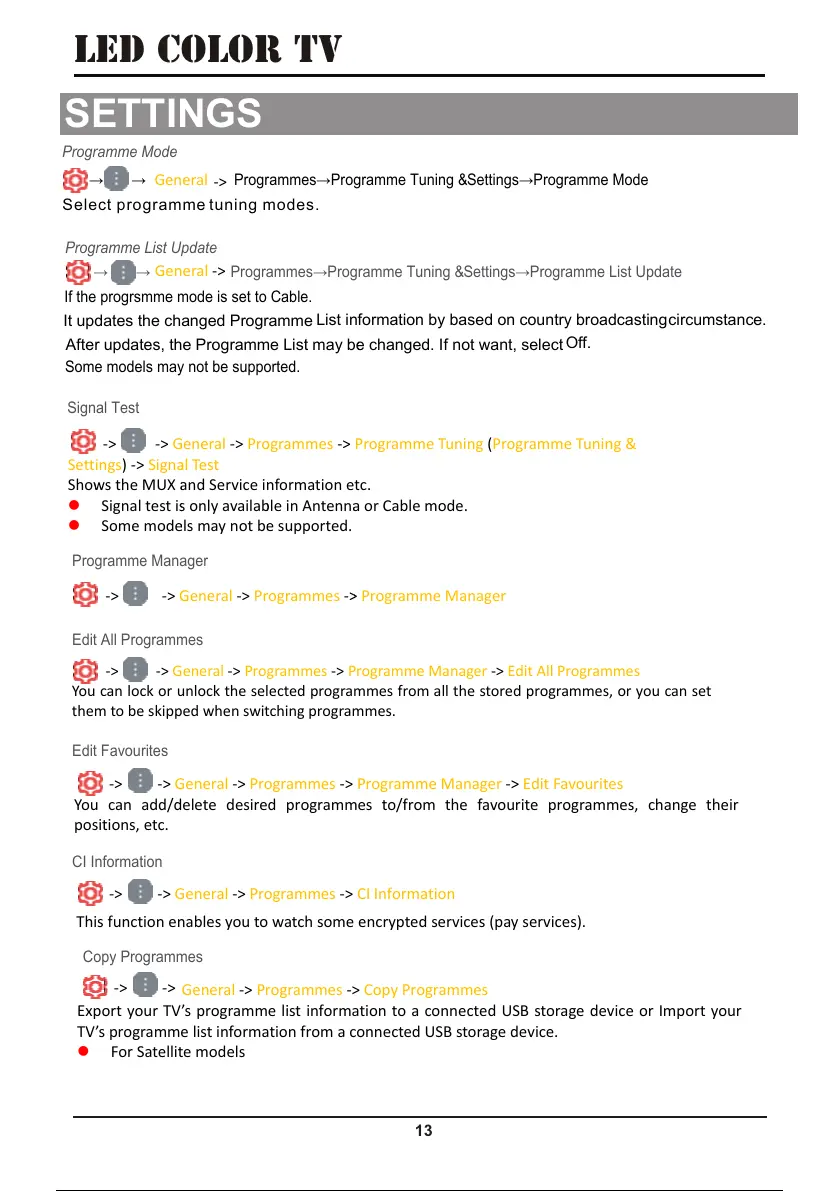
-> -> General -> Programmes -> Programme Manager -> Edit All Programmes
You can lock or unlock the selected programmes from all the stored programmes, or you can set
them to be skipped when switching programmes.
-> ->
eneral -> Programmes -
Programme Manager
Edit All Programmes
-> -> General -> Programmes -> Programme Manager -> Edit Favourites
You can add/delete desired programmes to/from the favourite programmes, change their
positions, etc.
Edit Favourites
-> -> General -> Programmes ->
CI Information
This function enables you to watch some encrypted services (pay services).
General -> Programmes -> Copy Programmes
Export your TV’s programme list information to a connected USB storage device or Import your
TV’s programme list information from a connected USB storage device.
For Satellite models
-> ->
Copy Programmes
Settings→Programme Mode
Programme Mode
If the progrsmme mode is set to Cable.
Settings→Programme List Update
Programme List Update
Some models may not be supported.
It updates the changed Programme
circumstance.
After updates, the Programme List may be changed. I
It updates the changed Programme
List information by based on country broadcasting
After updates, the Programme List may be changed. I
f not want, select
Off.
Select programme tuning modes.
->
eneral ->
eneral
46 / 56 45 / 54 46 / 56 45 / 54 46 / 56


 To Next Page