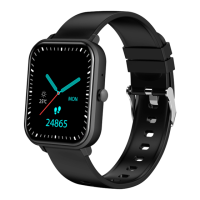
This document describes the Foxbox Quark | Proton Series Smartwatch.
Function Description
The Foxbox Quark | Proton Series Smartwatch offers a wide range of functions designed to enhance daily life and fitness tracking.
Clock Interface: The smartwatch automatically synchronizes its date and time with the connected phone via the app, ensuring accurate timekeeping.
Bluetooth Calls: To enable calling functionality, the smartwatch must be connected to Hry3.0 via the cell phone's Bluetooth.
- Dialing: Once connected, users can make calls directly from the watch by dialing numbers.
- Phonebook: After establishing a connection with the HryFine app, frequently used contacts can be added to the app. These contacts will then be displayed on the watch, allowing users to select them for making calls.
Multi-sport Mode: This feature allows users to track various physical activities.
- Running Mode: Records calories burned and duration during running sessions.
- Skipping Rope Mode: Records calories burned and duration during skipping activities.
- Cycling Mode: Records calories burned and duration during cycling activities.
- Climbing Mode: Records calories burned and duration during climbing activities.
Pedometer: Displays the daily step count, walking distance, and calories burned, helping users monitor their activity levels.
Sleep Mode: When worn during sleep, the device records sleep duration, distinguishing between deep and light sleep. Users can view detailed sleep data and set a specific sleep detection time range within the app.
Sedentary Reminder: This function reminds users about periods of inactivity. The notification ranges for sedentary times need to be configured in the app.
Heart Rate, Blood Pressure, and Blood Oxygen Monitoring: After a few seconds of measurement, the smartwatch displays current heart rate, blood pressure, and blood oxygen test results. Once measurements are complete, the data is uploaded and saved to the app. Note that mobile compatibility with the bracelet hardware is required for heart rate and blood pressure measurements.
Remote Camera: Selecting this function on the watch automatically opens the camera on the paired device. Users can shake the watch to take a photo. This feature requires granting the necessary permissions.
Find Mobile Phone: When the app is connected, entering this function and long-pressing the icon on the screen will cause the phone to emit a sound, helping users locate it.
Alarm: Users can add up to 5 alarms via the app and synchronize them with the watch for reminders.
Bluetooth Music: This function is available only when the device is connected via Bluetooth. It allows users to control music playback (play/pause) directly from the watch.
Message Reminder: By enabling permissions and selecting specific apps, users can receive notifications from their mobile phone directly on the watch.
Other Functions: The smartwatch includes various other utility features such as personal information management, a stopwatch, flashlight, general settings, device information, brightness adjustment, vibration control, language settings, "do not disturb" mode, and a factory reset option.
Important Technical Specifications
- Chipset: SYD8810+FR3029
- Flash Memory: 32MB
- Bluetooth Version: 3.0
- Battery Type: Lithium Polymer Battery
- Battery Capacity: 3.7V/195 mAh
- Battery Duration: 3-5 Days
- Charging Time: 1.5 Hours
- Appearance Material: Zinc Alloy
- Sensor: SC7A20
Usage Features
Wearing the Smartwatch:
- Adjust the watch to your wrist size using the buckle adjustment hole.
- Ensure the sensor is close to the skin to prevent movement, which can affect measurement accuracy.
Charging the Smartwatch:
- For the first use, confirm that the battery is in normal power.
- If the device does not power on normally, connect it to the charger, and the watch will power on automatically.
Installing the Smartwatch App:
- Install the "HryFine" app on your phone. It is available on the App Store (for iOS) and Google Play (for Android). QR codes are provided in the manual for easy access.
- Bluetooth Support: Compatible with Android 5.0 and above, and iOS 9.0 and above.
Device Connection:
- Crucial Note: To link the smartwatch with "HryFine," the connection must be established through the app by granting all required permissions, not directly through the phone's Bluetooth settings.
- When turning on the watch, activate Hry3.0 from the cell phone's Bluetooth to enable call functionality.
- First, connect the app with the "FOXBOX PRO" watch to synchronize devices.
- After downloading "HryFine," create a user account to access the watch's functions via the mobile application.
- Within "HryFine," locate the icon to link the watch with the phone.
- Upon successful connection, the watch will automatically synchronize with your cell phone's time zone.
- The app automatically saves the watch's Bluetooth connection. When the app is opened or running in the background, it will automatically search for and connect with the watch.
- For Android devices, ensure the app is running in the background and that all necessary permissions are granted in the mobile phone's system settings.
Smartwatch Functions Description (Interaction):
- Turning On: Press and hold the function button for more than 3 seconds.
- Turning Off: Find the "power off" icon in the menu and press and hold the button on the watch for 3 seconds.
- Reset: This function clears all data on the watch (e.g., step count).
- Waking the Screen: When the device is on, press any button to light up the screen.
- Accessing Menu: Press the button or touch the screen to open the menu and navigate through the different functions. If no interaction occurs for a moment, the screen will turn off automatically.
- Measurements: A waiting time of 60 seconds is required to obtain results for measurements like heart rate and blood pressure.
Maintenance Features
Device Maintenance:
- Sensor Protection: Do not damage the sensor; protect it from scratches and bumps.
- Cleaning: Clean the watch surface with a damp cloth and soapy water to remove oil or dust stains.
- Chemical Exposure: Do not expose the watch to strong chemicals such as gasoline, cleaning solvents, propanol, alcohol, or insect repellent. These chemicals can damage the watch's sealing ability and the surface of its case.
- Temperature and Shock: Avoid physical shocks and exposure to extreme temperatures.
Precautions:
- Charging: Use the appropriate charger for the smartwatch.
- Environmental Conditions: Do not expose the device to high moisture or extremely high or low temperatures for extended periods.
- Unexpected Restarts: If the watch restarts unexpectedly, check the phone's memory information to clear it and try again, or close and reopen the app.

 Need help?

 To Next Page
 General