EasyManua.ls Logo

Foxx FOXXD MIRO - 1.3.1 Status bar

Foxx FOXXD MIRO
54 pages
Print Icon
To Next Page IconTo Next Page
To Previous Page IconTo Previous Page
Loading...
7
1.3.1 Status bar
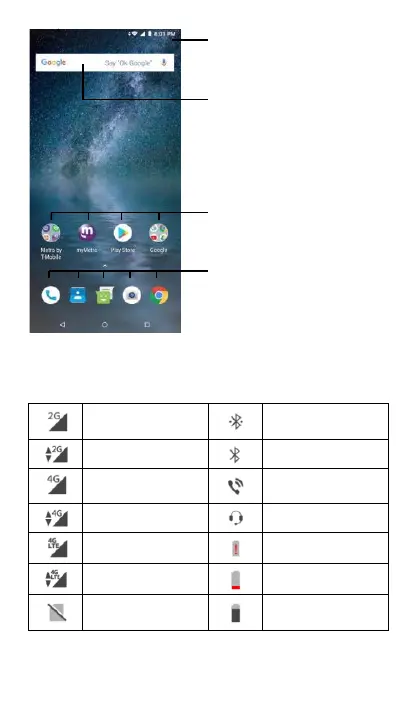
From the status bar you can view notification icons and current call, Wi-Fi
and signal status icons. Details are in the following figures.
2G connected
Connected to a
Bluetooth device
2G in use
Bluetooth is on
4G connected
Speakerphone is on
4G in use
Headset connected
4G LTE connected
Battery is very low
4G LTE in use
Battery is low
No SIM card
inserted
Battery is partially
drained
Status bar
Touch and drag down to open the notification
panel.
Search bar
Touch text box to enter text search screen.
Touch voice icon to enter voice search screen.
Application/Folder
Touch an icon to open an application, folder,
etc.
Favorite tray applications
Touch to open an application.
Touch and hold to move an application.