T8N
CARATTERISTICHE GENERALI / CARACTERISTIQUES GENERALES
GENERAL FEATURES / CARACTERÍSTICAS GENERALES
I: La tastiera T8N è un organo di comando e di programmazione del sistema Defender,
dispone di un display a cristalli liquidi retroilluminato ad alto contrasto dotato di 32
caratteri alfanumerici disposti su due righe, di 3 led di segnalazione dello stato dell’ im-
pianto, di 4 led liberamente configurabili per l’integrazione di ulteriori segnalazioni del
sistema, di 14 tasti retroilluminati per facilitare le operazioni di digitazione in ambiente
con scarsa illuminazione e di 4 tasti funzione anch’essi liberamente programmabili per
l’attivazione rapida di vari comandi opzionali. La presenza del display a cristalli liquidi
rende semplici le operazioni di programmazione dei parametri della centrale e di ge-
stione dell’impianto, consentendo di visualizzare messaggi, allarmi, e segnalazioni in
modo chiaro e completo. L’installatore può regolare a piacere, da tastiera, il contrasto
dei caratteri del display per ottenere la migliore visibilità, in funzione della posizione di
fissaggio della tastiera alla parete. Quando manca la tensione di rete per limitare i con-
sumi viene spenta sia la retroilluminazione del display che quella dei tasti. Si possono
collegare fino ad un massimo di 8 tastiere per ogni centrale, con ognuna il proprio in-
dirizzo di identificazione assegnato, in parallelo ad una distanza massima complessiva
di 1500 m dalla centrale.
F: Le clavier T8N est un dispositif de commande et programmation du système Defender, dispose de un écran à cristaux
liquides retro-éclairé à haute contraste avec 32 caractères alphanumériques sur 2 lignes. Il y a 3 LED de signalisation de
l’état du système, 4 LED librement configurable pour l’integration des ultérieures signalisations de l’état du système; on
trouve 14 boutons retro-éclairés pour faciliter la digitations s’il y a une faible lumière et 4 boutons-fonctions, librement
programmables, pour l’activation rapide des commandes optionales. L’ écran à cristaux liquides retro-éclairé facilite la
programmation et la gestion des paramètres de la centrale: on peut visualiser clairement messages, alarmes e signalisa-
tion. L’installateur peut règler, par le clavier, le contraste des caractères pour obtenir une meilleure visibilité. Si manqué
la tension d’alimentation, pour reduir la consommation, on éteinte le retro-éclairage de l’écran et des boutons. On peut
connecter jusu’à 8 claviers (qui ont leur unique adresse) par chaque centrale, en parallele jusu’à 1500 mètres de distance
de la centrale.
GB: T8N keypad is a device to controlling and programming system Defender. It has a back-lighted display LCD high-con-
trasted, 32 alphanumeric characters on 2 lines. It has 3 LEDs that indicate the status of the system and 4 programmable
LED to integrate more signalling. There are 14 buttons back-lighted to facilitate digiting if there is bad light and 4 pro-
grammable function-buttons for quick activation of optional functions. LCD display facilitate programming and managing
panel parameters: it is possible to visualize clearly messages, alarms and signalling. It is possible to set (by the keypad)
the contrast of characters to obtain better visibility. If power supply lacks , in order to reduce power consumption, display
and buttons back-lighting is turned off. It is possible to connect in parallel up to 8 keypads (with single address), with 1500
max. distance from the panel.
E: El teclado T8N es un organo de control y de programación del sistema Defender, dispone de un display a cristales
líquidos retroiluminado a alto contraste dotado de 32 caracteres alfanuméricos dispuesto sobre dos líneas, de 3 led de
señalización del estado de la instalación, de 4 led libremente configurables para la integración de más señalizaciones del
sistema, de 14 teclas retroiluminadas para facilitar las operaciones de digitalización en ambientes con escasa iluminación
y de 4 teclas función también libremente programables para la activación rápida de varios controles opcionales. La pre-
sencia del display a cristales líquidos hace simple las operaciones de programación de los parámetros de la central y de
gestión de la instalación, permite visulizar mensajes, alarmas, y señalizaciones de modo claro y completo. Los instalado-
res pueden regular según deseen, a teclado, el contraste de los caracteres del display para obtener la mejor visibilidad,
en fución de la posición de fijación del teclado a la pared. Cuando falta la tensión de red para limitar los consumos son
apagados tanto la retroiluminación del display como la de las teclas. Se pueden conectar hasta un máximo de 8 teclados
para cada central, cada una con su propia dirección de identificación asignada, en paralelo a una distancia máxima total
de 1500 m de la central.

 Need help?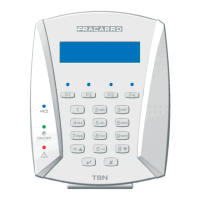

 To Next Page
 General