MODIFIERS & CONTROLLERS
124 Doc v11.03
To start, a WAH block is inserted on the grid. Pressing EDIT opens its EDIT menu. The modifier symbol
beneath the CONTROL knob indicates that a modifier can be added here. Selecting this parameter and then
pressing ENTER opens the MODIFIER screen. Selecting EXT1 for the SOURCE attaches this controller to our
parameter, and the wah pedal starts working! “Follow the bouncing ball” as the dot on the graph follows the
motion of your foot on the pedal.
If we change the modifier SOURCE to “ENVELOPE,” our wah is disconnected from the pedal and becomes
controlled instead by the level of the input signal to create a “touch wah”. Changing the source to one of the LFOs,
creates an oscillating “auto-wah.” Externals, Envelopes, LFOs, and other sources are detailed below in section 7.3.
Transformations 7.2.1
The MODIFIER screen also contains several parameters that enable you to set up a custom relationship between
changes at the source and changes in the destination parameter. This makes it possible to transform or “tune” the
feel and sound of a dynamic effect. This can be especially important when one control source is attached to
multiple different parameters.
The MIN and MAX parameters determine the range over which the controlled parameter will respond, using the
same units. For example, the MIN to MAX range for a LEVEL parameter might be set from -9 to +4 dB, while a delay
TIME might be set for 200–400 ms.
The START, MID, END, and SLOPE settings are used to re-map the ways in which parameters respond to changes in
the source.
The SCALE and OFFSET parameters allow you to vertically resize or shift the modifier curve.
Example 1: Creating a Custom Curve
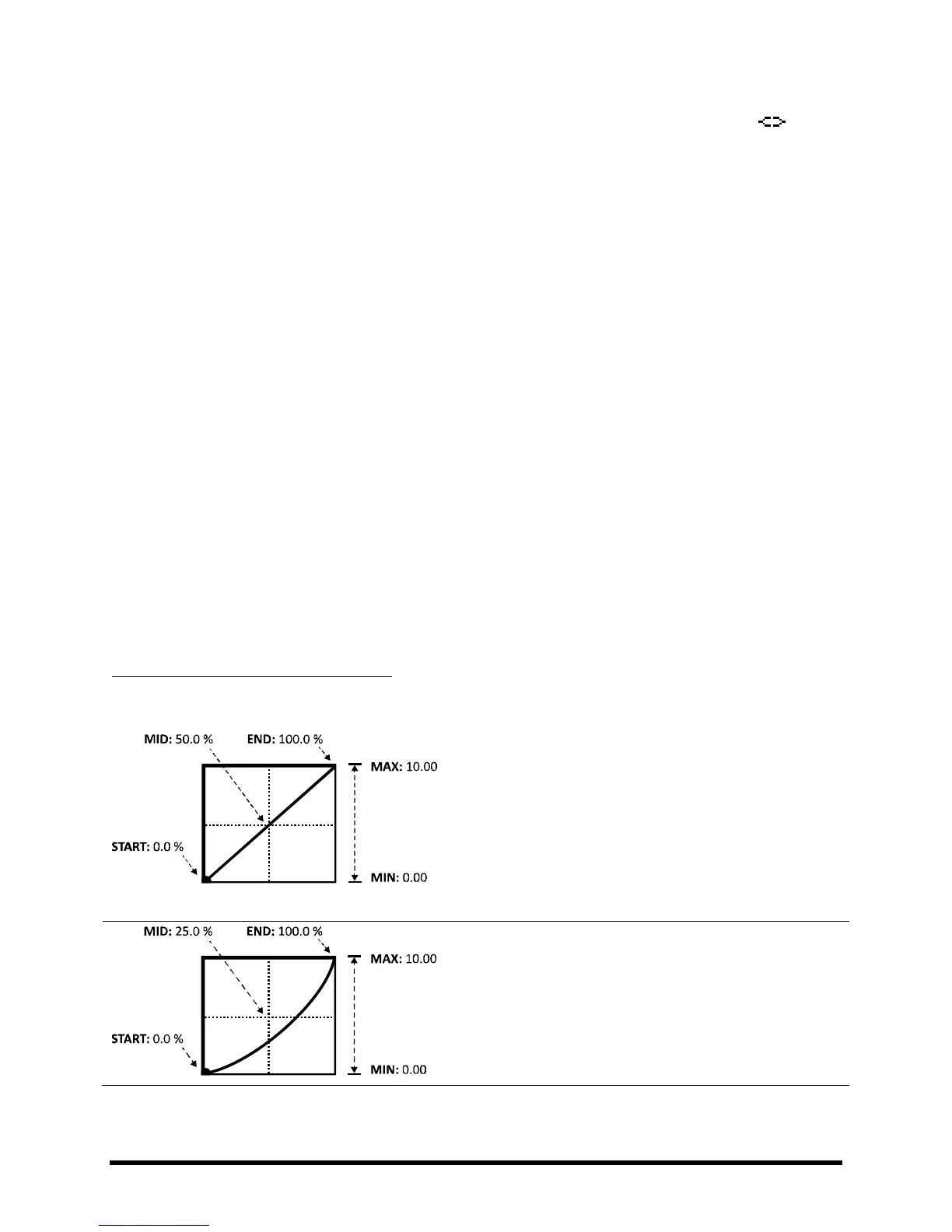
For the first example, let’s imagine a VOLUME parameter being controlled by a pedal (via EXT1/MIDI CC#16).
The default settings for START, MID, and END create a
perfectly linear relationship between the source and the
target. As the pedal is depressed, the volume increases in
direct proportion. MIN and MAX are set to their extreme
limits, so volume goes from 0.00-10.00 (OFF to FULL).
But linear response is generally unsatisfactory for volume
control because of the non-linear characteristics of our
hearing. Ears aren’t very good at math…
As we lower the value of MID, the response starts to take on
a more comfortable curve, closer to the classic log or audio
taper typically used for volume control. MIN and MAX are
still set to “0.0” and “10.0” so that volume goes from off to
full, but the way it swells has changed.



 To Next Page