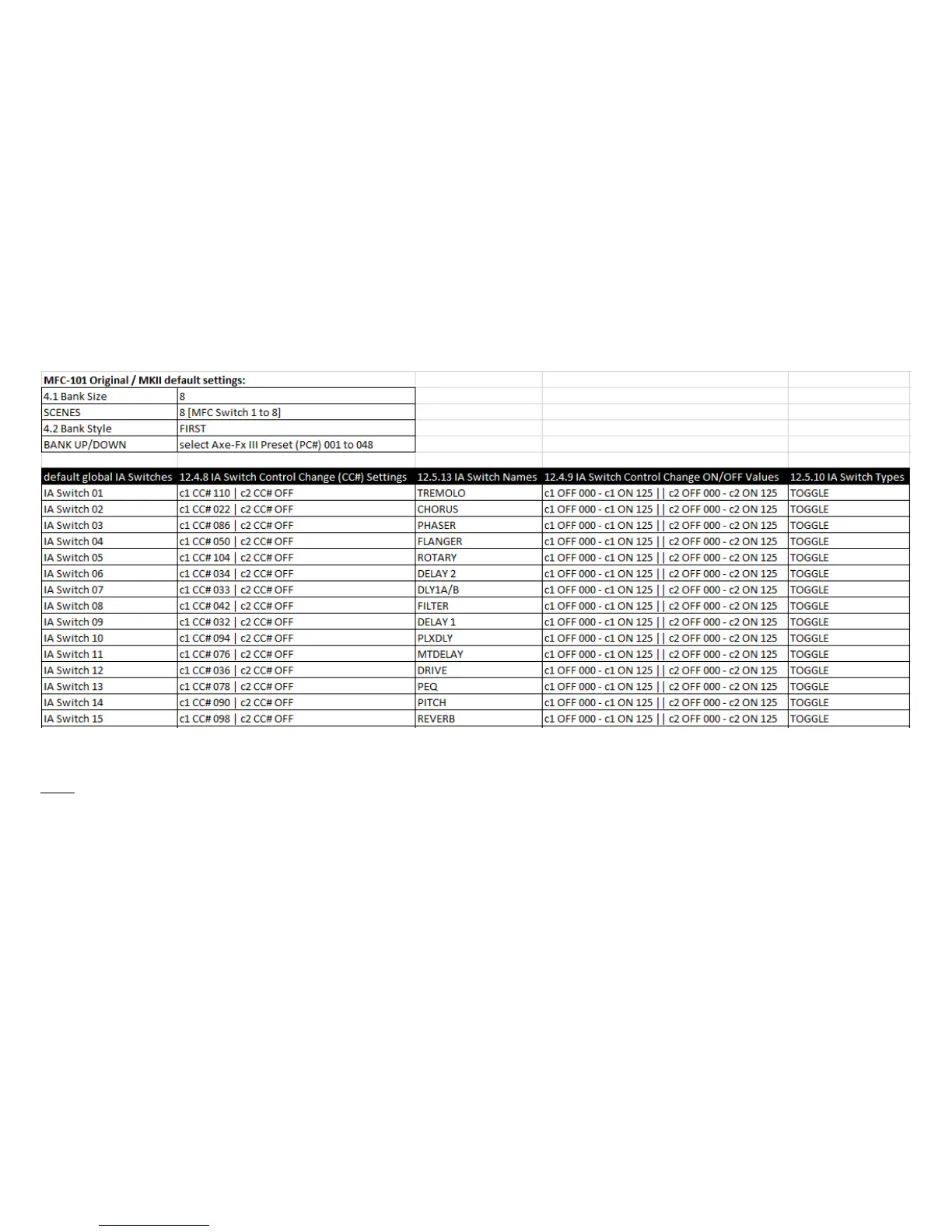
Default settings MFC101MKI_ORIGINAL_MKII_default_Axe-Fx3.syx:
Axe-Fx III System settings: AXEIII_MIDIRemote_defaults.syx : Contains all MIDI/Remote CC# presets listed in the tutorial above and corresponds to the
MFC101MKI_ORIGINAL_MKII_default_Axe-Fx3.syx configuration file. (Tested with Axe-Fx III and FW 1.10)
Notes:
• CC# OFF 000 and ON 125? Yes, because these values work equally for FX BYPASS switches (000 = bypass; 125 = engaged) and FX CHANNEL switches (000 = Ch. A; 125
= Ch. B)! So you don't have to change CC# values, but only select the c1 CC# value from the Axe-Fx III MIDI/Remote table whose function you want to switch. No
matter if it should be a FX BYPASS or FX CHANNEL or FX TUNER switch. Easy!
• You don't need preset (PC#) 2 on MFC-101 Bank 2, but another one? Use BANK UP/DOWN to select Preset 2 (= MFC-101 Bank 2, FIRST Preset). Click EDIT. Click PRESET.
Click 2x page right. Change the preset number (PC# Ch01). Done. Easy!



 To Next Page