Press the Multi-function button to end the call.
Redial The Last Number
Press and hold the Multi-function button for 2 seconds or until it beeps. It will
then dial you last number called.
To Play Music Via BluetoothsMp3 Player
If you are using a dedicated Mp3 player, the player must be a Bluetooth,enable device and be paired
your Motorcycle Bluetoo~eceiver.
1. Setlect music to play direcUy from your music device (check your Mp3 player
instructions for how to do this).
2. Play music through the headset press the Multi-function button once.
3. Pause music press the Multi-function button again.
4. Skip songs forward by quickly Dicking the Jog Wheel in a clockwise direction.
5. Rewind songs backward by quickly Ricking the Jog Wheel In a anticlockwise direction.
6. Volume Up by turning the Jog Wheel anticlockwise and holding until the volume is at the right
level.
7. Volume Down by turning the Jog Wheel clockwise and holding until the volume is at the right level.
you will hear a long beep if the volume is at the highest or lowest level.
Tip: To improve the performance of your headset, make sure the volume is set to the highest on
your music device.
To Answer A Call While Listening to Music
1. Calls will automatically come through the headset while music is playing. To reject a call hold the
multi function button down until you hear a beep.
2. Music will hold over the call duration and resume automatically once the call has ended.
To Use FM Function
1. Headset idle status, press Multi-function button twice to tum FM on.
2. When FM is on, tum the Multi-function button clockwise or counterclockwise and it will seek out the
next or previous FM station and begin playing.
3. When FM is on, press Multi-function button twice to tum FM off.
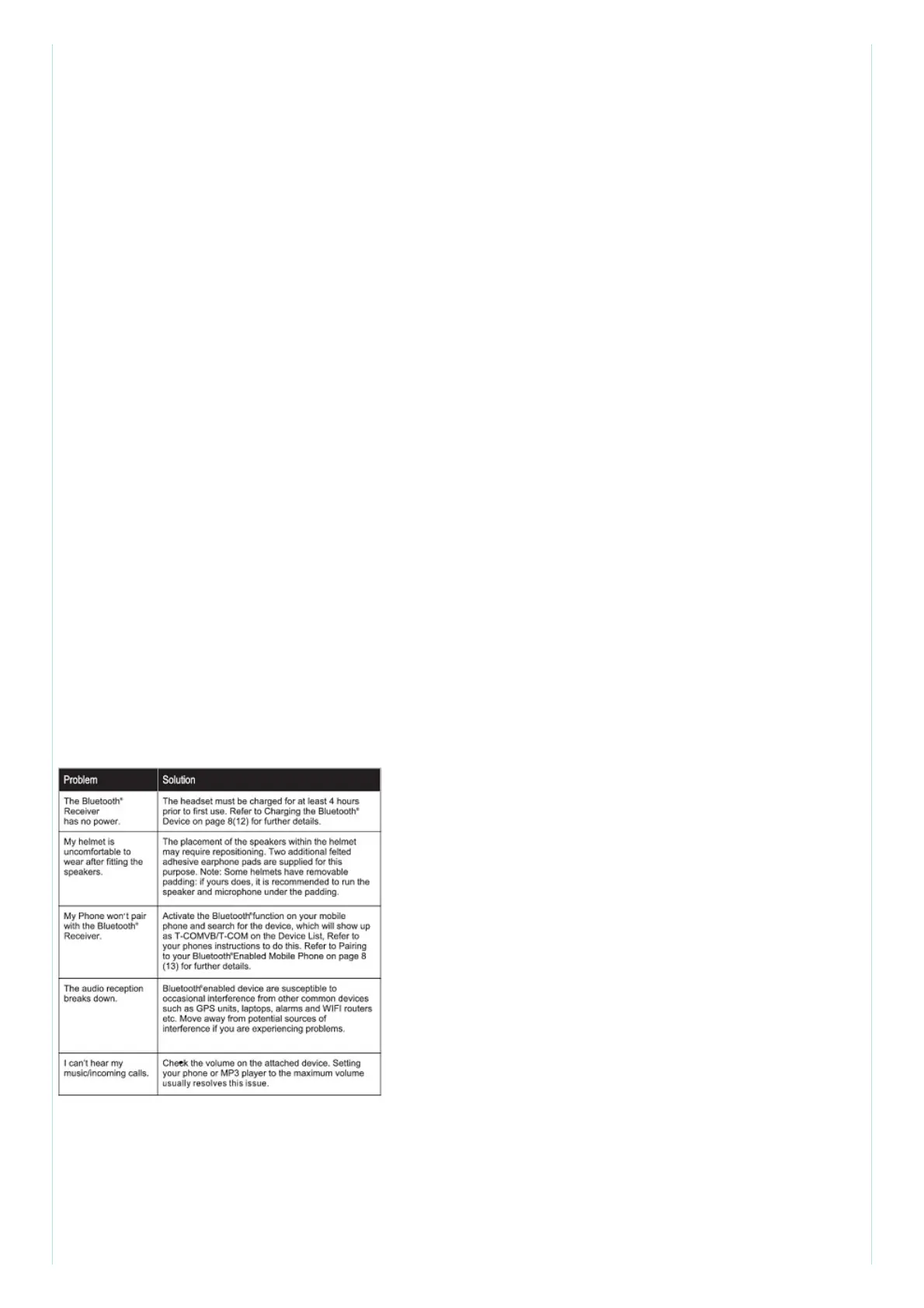
Tips & Troubleshooting
NOTE: This equipment has been tested and found to comply with the limits for a Class B digital
device, pursuant to part 15 of the FCC Rules. These limits are designed to provide reasonable
protection against harmful interference in a residential installation. This equipment generates, uses
and can radiate radio frequency energy and, if not installed and used in accordance with the
instructions, may cause harmful interference to radio communications. However, there is no
guarantee that interference will not occur in a particular installation. If this equipment does cause
harmful interference to radio or television reception, which can be determined by turning the



 To Next Page
 Loading...