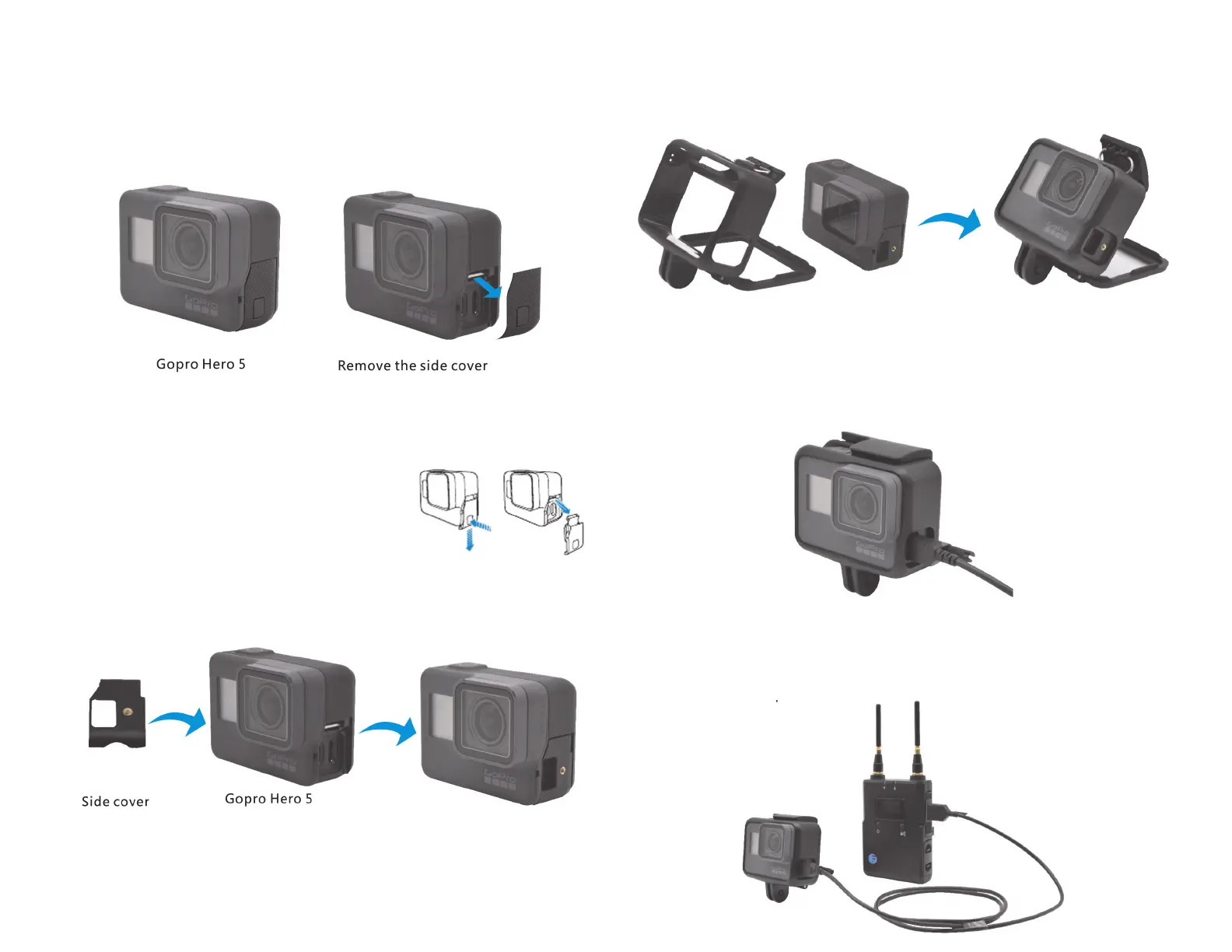
Connect the transmitter to Gopro5:
1. Remove the side cover of the Gopro Hero 5, and install the side
cover with screw hole which is provided with this product.
Remove the side cover:
1. Pinch latch release button, then open
the side cover by sliding away.
2. Pull the cover from the camera.
2. The side cover with screw hole will be fixed after placing the Gopro
Hero 5 into its frame.
3. Insert the Micro-HDMI male connector with screw lock into the
Micro-HDMI female base of Gopro Hero 5, then put the HDMI screw
into the screw hole of the side cover and tighten it.
4. Insert the Micro-HDMI male connector with screw lock into the
Micro-HDMI female base of FREESTREAM transmitter, then put the
HDMI screw into the screw hole of side cover and tighten it.


 To Next Page