Smartphone Installation & Balance
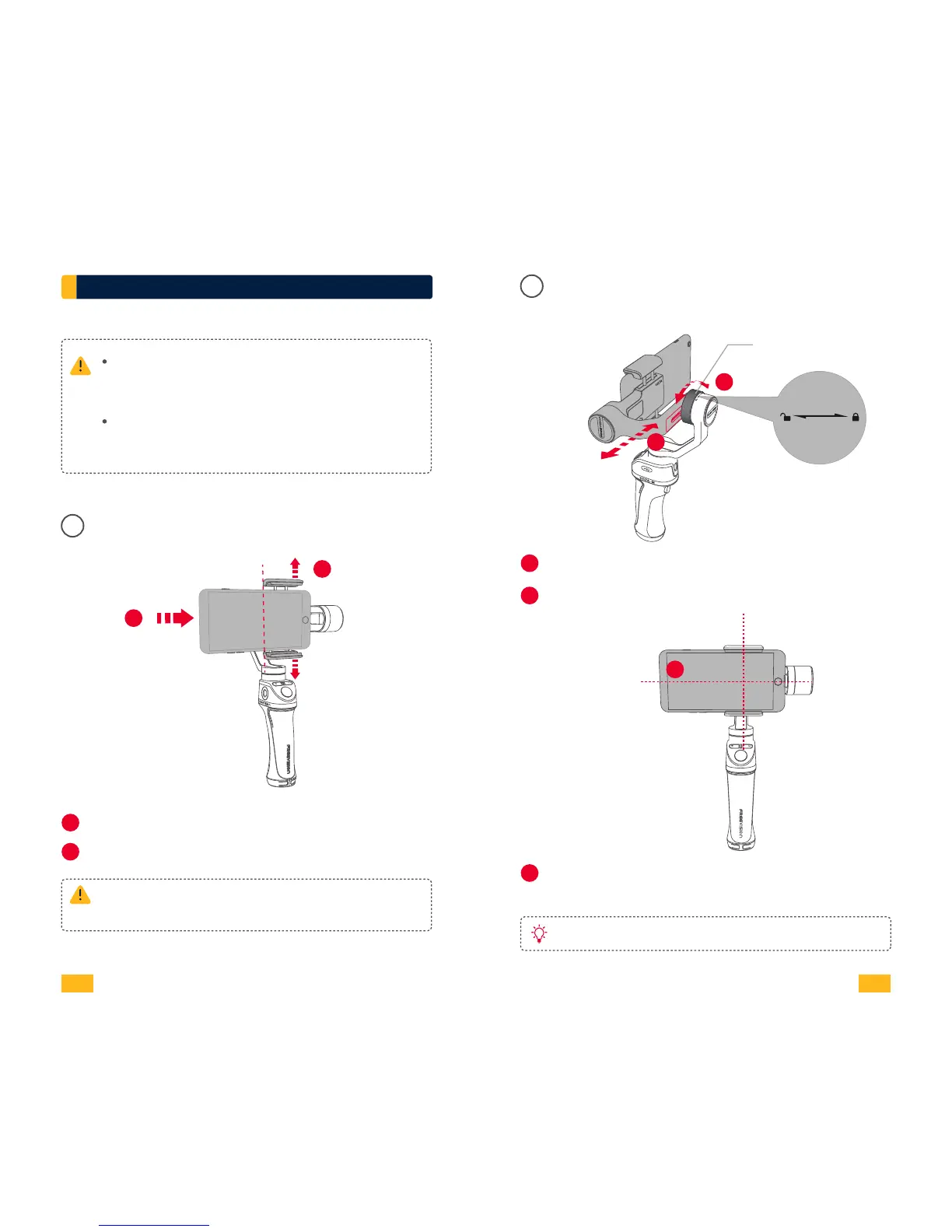
Smartphone Installation
01
VILTA Mobile won’t work unless mounting the
phone. Smartphone detection can be closed
in App.
Always keep your phone well balanced in level
prior to power on, or it will greatly affect
working performance.v
Outward
Inward
1
Pull open the smartphone mounting clip.
1
2
Please ensure back camera of phone is outward
and not covered.
2
Put your phone in and keep it close to the tilt axis motor.
Unscrew the balance adjustment knob
Slightly move the adjustment arm
When your phone can stay level and balanced,
screw up the balance adjustment knob.
Smartphone Balance
02
1
3
2
3
Balance
Adjustment Knob
2
1
Write scale of adjustment arm for easy reuse.
05 06
VILTA Mobile


 To Next Page