The FreeWire Boost Charger is a DC fast charging station designed for outdoor use, providing efficient and reliable charging for electric vehicles (EVs). It is intended for use by station owners or facility managers and is built to comply with local and national codes and standards.
Function Description
The Boost Charger facilitates rapid charging of electric vehicles. It operates by drawing power from the site's electrical panel and converting it to DC power suitable for fast charging. The system includes a battery pack (FreeWire Battery Pack 820-00114-01) that works exclusively with the Boost Charger to deliver high-power charging. The charger supports simultaneous charging of two EVs, with each vehicle receiving up to 60 kW. The system is designed to be powered on during installation by energizing the site's electrical panel and runs a series of self-tests to ensure safe operation. It does not have a separate on/off switch, relying on the electrical breaker at the main panel for power control. A remote shut-off switch option is also available, varying by site.
Important Technical Specifications
System:
- Max Output Power:
- CHAdeMO: 100 kW
- CCS: 120 kW
- Combined (two vehicles): up to 60 kW each
- Max Output Current:
- CHAdeMO: 200 A
- CCS: 300 A
- Dimensions: 40 in x 43 in x 96 in
- Weight: 3,800 lbs
- Output Voltage, Charging: 200 VDC – 500 VDC
Electrical Input:
- Input Rating:
- 240 (+/- 10%) VAC, split-phase, 4-Wire, 120 A, 60 Hz
- 208 (+/- 10%) VAC 3-phase, WYE, 5-Wire, 80 A, 60 Hz
- Wiring:
- For 240 V: 2 conductors (L1, L2) Ground
- For 208 V: 4 conductors (L1, L2, L3, Neutral) Ground
- Required Service Panel Breaker:
Interfaces:
- Supported Connector Types: CCS1 (SAE J1772™ Combo), CHAdeMO
- Charge Cable Length: 140 in
- User Interaction Display: Full-color 24-inch LCD display for driver interaction
- Authentication: RFID: ISO 15693, ISO 14443, NFC
Safety and Compliance:
- Safety Compliance (U.S.): UL 2202, UL 2231-1, UL 2231-2, UL 991, UL 1973 (battery pack)
- EMC Compliance (U.S.): FCC part 15 Class A
Environmental Requirements:
- Location: Outdoor
- Operating Temperature: -20° C to 55° C (-4°F to 131° F)
- Storage Temperature: -20°C to 55° C (-4° F to 131°F)
- Operating Humidity: Up to 95% at 55° C (131° F) non-condensing
- Enclosure Rating: IP54
Usage Features
The Boost Charger features a 24-inch ruggedized touchscreen that meets ADA accessibility requirements, providing an intuitive user interface. Below the screen, a credit card terminal with NFC and RFID capabilities is available for payment, along with an emergency stop button.
Operating the Charger:
- Powering On: The system powers on automatically when the electrical breaker is energized after installation and performs self-tests. Red indicator lights and a display message indicate errors, requiring assistance from EV Connect.
- Shutting Down: The charger is powered off via the electrical breaker at the main panel. No software commands are needed to turn off the station.
- User Interface: The home screen displays charger type (CHAdeMO and/or CCS) and availability, along with 'Help' and 'Pricing Details' buttons. A driver support phone number is also visible.
- Charging an EV (Pay, Plug, Go):
- Park the vehicle near the charge port.
- Open the vehicle charge port.
- Use the touchscreen to select the desired plug.
- Complete payment prompts (credit card, NFC, RFID card, or EV Connect app).
- Press the button on the connector handle to release the cable.
- Plug the connector into the vehicle's charge port. Charging initiates upon connection.
- Tap 'Stop Charging' on the screen to end the session.
- Unplug the vehicle by pressing the release button on the connector handle.
- Return the cable to the holster.
- Tap 'Exit' to return to the home screen.
- Active Charging Screen: During charging, the screen displays current charge percentage, time elapsed, energy delivered (kWh), current power (kW), and total cost.
- Dual Charging: The Boost Charger can charge two EVs simultaneously. The user interface guides the process for connecting a second vehicle.
- LED Status Indicators:
- Solid Green: Available for charging.
- Blinking Green: Charging session initiating.
- Red: Out of order or unavailable.
- Status Level Indicator: Two sets of LEDs per side fill from bottom to top to show the vehicle's state of charge (SOC).
- Customization: Site managers can customize pricing and access policies via the EV Connect Administrator Portal. The UI also offers space for custom branding.
Maintenance Features
The FreeWire Boost Charger is designed for minimal maintenance, with network connectivity monitoring system health and reporting error codes or faults.
Site Operator's Responsibilities (General Site Maintenance):
- Emergency Response: Call 9-1-1 for smoke or fire, referring to the Fire Department Tip Sheet.
- Emergency Stop: The red emergency stop button on the front of the unit or a remote e-stop can disable the charger. Pulling out an accidentally engaged button will reboot the unit.
- Clearance: Ensure the base and vents are clear of blockage, debris, and snow.
- Drainage: Keep the area free of standing water or blocked drainage systems.
- Cable Management: Ensure charge cables are returned to holsters to prevent vehicle damage.
- Monthly Cable Check: Verify charging cables for signs of wear or damage. Contact EV Connect Site Host Support for service if damage is found.
- Daily Station Check: Inspect for vandalism or damage. Contact EV Connect Site Host Support for service or parts replacement if damaged.
- Cleaning: Clean the Boost Charger with a damp cloth; do not pressure wash.
Preventative Maintenance (Included in Warranty):
Only qualified technicians or FreeWire-approved personnel should perform service. Unauthorized work voids the warranty.
- Years 1-4:
- Diagnostics / Inspection
- Input air filter replacement
- Top-off radiator fluid
- Year 5:
- Diagnostics / Inspection
- Input air filter replacement
- Cooling pump (1/3 HP, 120/240 VAC) replacement
- Battery (lithium, 25.6 V low voltage) replacement
Safety Warning:
- Risk of electric shock. No user-serviceable parts inside.
- Turn the main disconnect switch "OFF" and padlock before servicing equipment.
- Failure to follow instructions can result in serious injury or loss of life.
- Do not disconnect the charger connector while the EV is charging.
- Refer to the EV supplier's guide for proper EV care to prevent explosion, property damage, injury, or death during charging.

 Need help?
 General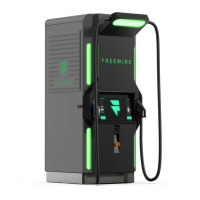

 To Next Page

