
 Need help?
Do you have a question about the Fresh 'N Rebel TWINS ELITE and is the answer not in the manual?
 General
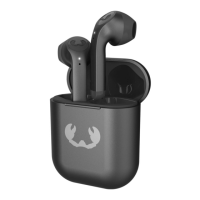
| Color name | Storm Grey |
|---|---|
| Control type | Buttons, Touch |
| Product type | Headset |
| Product color | Gray |
| Wearing style | In-ear |
| LED indicators | Yes |
| Recommended usage | Calls/Music |
| Protection features | Waterproof |
| International Protection (IP) code | IPX4 |
| Charging source | USB |
| Fast charging time | 15 min |
| Continuous audio playback time | 9 h |
| Battery recharge time (charging case) | 1.5 h |
| Continuous audio playback time (with ANC) | 6 h |
| Continuous audio playback time (with charging case/with ANC) | 15 h |
| Continuous audio playback time (with charging case/without ANC) | 20 h |
| Quantity | 1 |
| Cables included | USB Type-A to USB Type-C |
| Accessories included in set | 3 sizes silicone eartips |
| Bluetooth version | 5.3 |
| Bluetooth profiles | AAC, SBC |
| Connectivity technology | Wireless |
| Ear coupling | - |
| Headphone sensitivity | 35 dB |
| Microphone type | Built-in |
| Number of microphones | 3 |
| Charging time | 1.5 min |
 Weight and Dimensions
| Weight | 50 g |
|---|---|
| Left earpiece weight | 8 g |
Remove the protective plastic film from the earbuds and case.
Press and hold the reset button for 5 seconds to reset the earbuds.
Connect your Twins Elite earbuds to your device via Bluetooth.
Scan QR code to download the app for personalized sound profiles.
Allows playback switching between multiple connected devices.
Control music playback (play, pause, skip, volume) with button presses.
Manage phone calls (answer, end, reject) using earbud buttons.
Switch between ANC and Ambient Sound modes during calls.
Earbuds blink to indicate searching for a connection.
Case LEDs show battery status from 0% to 100%.
Details playtime with and without Active Noise Cancelling.
Shows combined playtime of earbuds and charging case.
Provides information on quick charging capabilities.
Explains the function of in-ear sensors for automatic playback.
Details methods for charging the earbuds and case.
Model number, manufacturer, and general declaration details.
Declares compliance with EU directives and provides frequency band.
Instructions on proper disposal of the electronic equipment.
Information on environmentally friendly and recyclable packaging materials.
Guidance on sorting and disposing of packaging materials by type.
 To Next Page