Open
Use the toilet:
Toilet Use
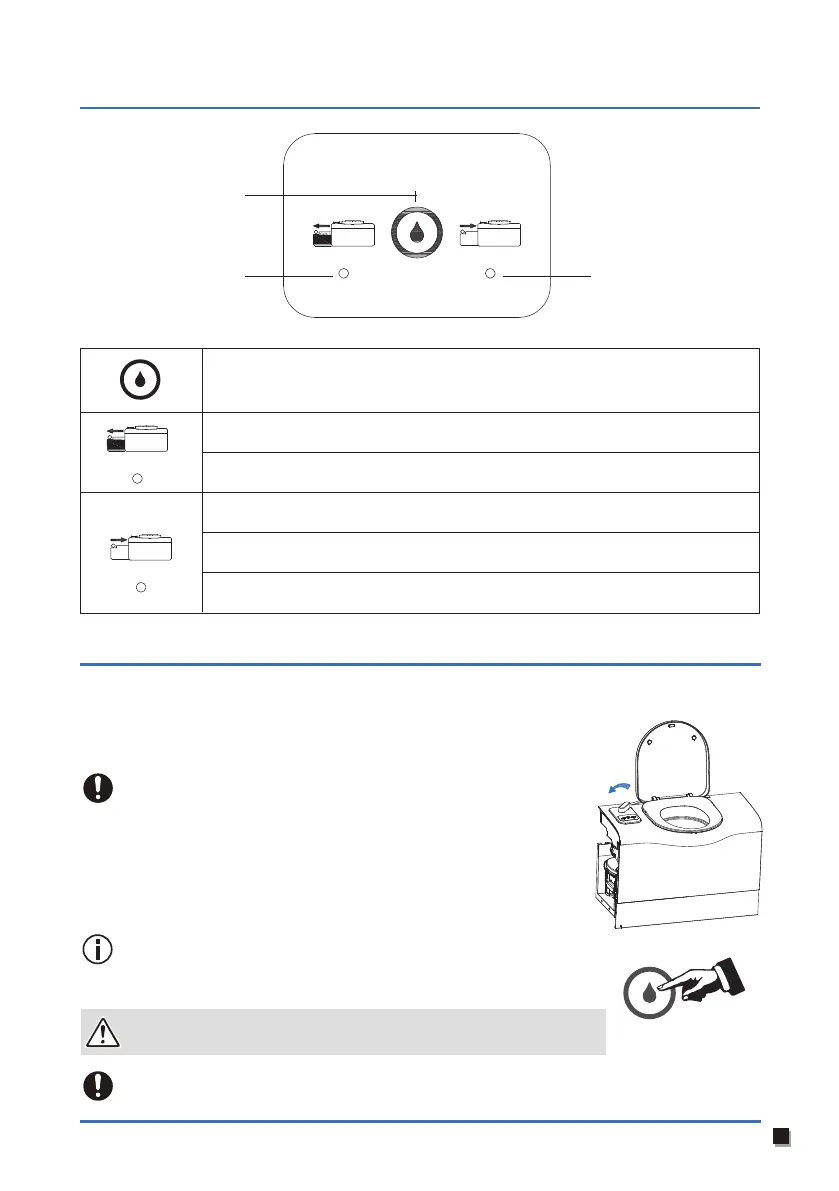
Control panel logo & indicator
Flushing the toilet:
1. Make sure the blade is open (Righthand light on the control panel
indicates green light).
2. Press the flush button and hold it for several seconds to flush the toilet.
Close the blade if the toilet is not being used. Do not leave water in the toilet bowl.
The toilet can withstand a maximum load of 125kg.
Make sure you do not overload the toilet.
Under special circumstances, such as the electric pulverizer is
installed or the valve is closed for flushing, the free flushing mode
can be entered after 12 times of continuous flushing within 5S.
And repeat the above operation to exit this mode.
To prevent water leaking damaging your caravan, do not travel
with water in the toilet bowl.
Status light
Flush button
Status light
Light off: Indicates the holding tank is not full and it can be used normally.
Flush button: Press and hold it to flush the toilet. Release it to stop flushing.
Flashing red light: Indicates the holding tank is full, need to empty it on time.
Light off: Indicates the holding tank is in place and the blade handle is in the
closed position. Meaning the toilet is closed.
Solid green light: The blade handle is in the open position. Meaning the toilet
is open.
Flashing red light: The holding tank is removed or not in place. Meaning the
toilet cannot be used.
06
1. Turn the
Blade
handle to the ON position and fully open the
Blade
(the
indicator on the right side of the control panel is always on in green).
2. Open the toilet cover.



 To Next Page