EasyManua.ls Logo

FRIDEN STW - Page 134

Default Icon
161 pages
Print Icon
To Next Page IconTo Next Page
To Previous Page IconTo Previous Page
Loading...
Page
3
:
FRIDEN
CALCULATING
MACHINE
CO..
INC.
FRIDEN
CALCULATING
MACHINE
TEST
ITE
7
AUTO.
KEYROARD
CLEAR
-
7.
.
°°,
With
Add
Key
down,
check
the
machine
in
all
operations:
The
Keyboard
should
only
clear
at
the
completion
of
every
operation
except
Multi-
plier
Clear.
With
the
Add
Key
up,
the
machine
should
not
clear
the
Keyboard
in
any
operation.
The
Keyboerd
sbould
elso
not
clear
during
any
operation
when
the
Aad
Key
is
down.
Imm
8
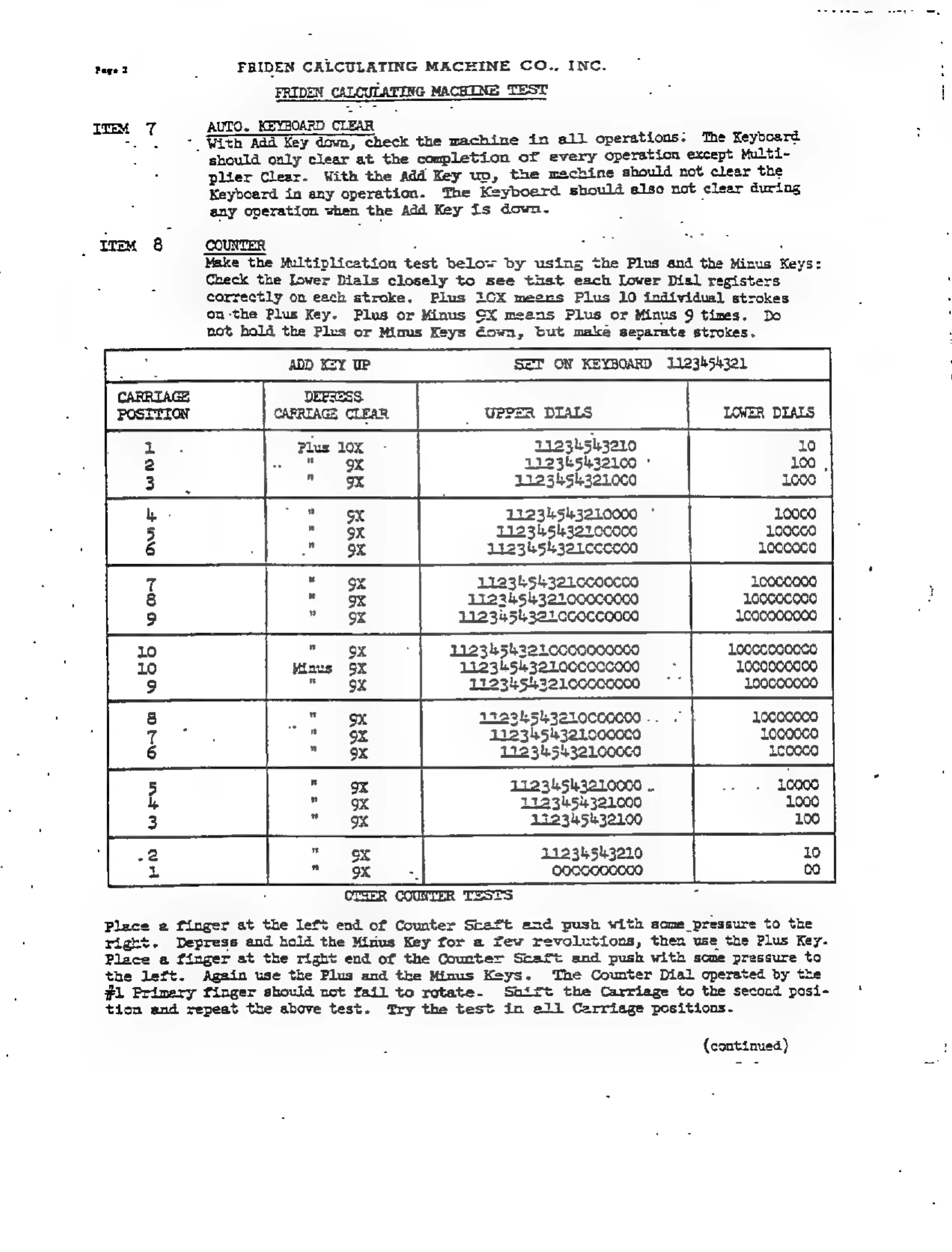
COUNTER
: i :
Make
the
Multiplication
test
below
by
using
the
Plus
and
the
Minus
Keys:
Check
the
lower
Dials
closely
to
see
thst
each
Lower
Dil
registers
correctly
on
each
stroke.
Plus
1CX
meers
Plus
10
individual
strokes
on-the
Plus
Key.
Plus
or
Minus
CX
meens
Plus
or
Minus
9
times.
Do
not
hold
the
Plus
or
Minus
Keys
Gown,
but
make
separate
strokes.
SET
ON
KEYBOARD
1123k54321
i
:
i
UPPER
DIALS
Plus
10x
21234543210
“9x
1r23ks5ha2100
*
7
"
%
11234543210C0
11234543210000
11234
5i3270co00
Liz3hsh321cccc00
11234543210c00c00
122345432200000000
11234543210c0cco00e
66
|
won
|ours
[wor
i
1123454321Lc0c0000000
12234543210C0CC0C000
12123454221000Cc0000
12234543210C00000
..
412345h3210000c0
Locooco
1223454321000c0
11234543210000
..
ht
1123454321000
1000
122345432100
Nw
|
AAG
[Oo
;
11234543210
ox
zs
oocceceoco
CTSER
COUNTER
TESTS
a
Place
a
finger
at
the
left
end
of
Counter
Shaft
and
push
with
some
pressure
to
the
Ht,
Depress
and
hold
the
Mirus
Key
for
a
Yew
revolutions,
then
use
the
Plus
Key.
Place
a
finger
at
the
right
end
of
the
Counter
Scaft
and
push
with
scone
pressure
to
the
left.
Again
use
the
Plug
and
the
Minus
Keys.
The
Counter
Dial
operated
by
the
.#L
Primery
finger
shovld
uct
fail
to
rotate.
Snitt
the
Carriage
to
the
second
posi-
tion
and
repeat
the
above
test.
Try
the
test
in
ell
Carriage
positions.
(continued)