EasyManua.ls Logo

FRIDEN STW - Page 36

Default Icon
161 pages
Print Icon
To Next Page IconTo Next Page
To Previous Page IconTo Previous Page
Loading...
Page
38
FRIDEN
CALCULATING
MACHINE
CoO.,
INC.
615-59
MODEL
STW
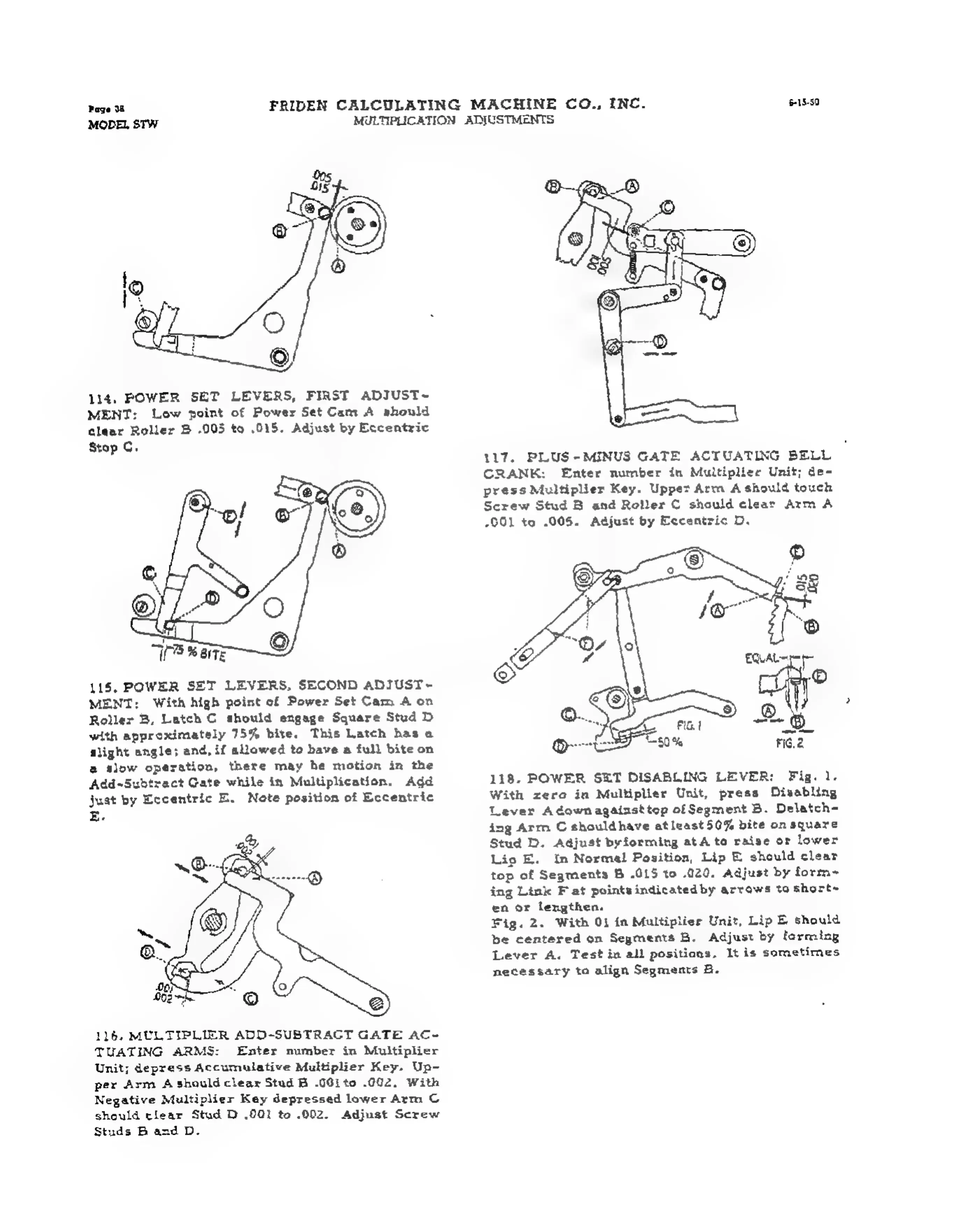
1i4.
POWER
SET
LEVERS,
FIRST
ADIUST~
MENT:
Low
point
of
Power
Set
Cam
A
should
clear
Roller
B
005
to
015.
Adjust
by
Eccentric
Stop
C.
115,
POWER
SET
LEVERS,
SECOND
ADIUST~
MENT:
With
high
point
of
Power
Set
Cam
4
on
Roller
B,
Latch
C
should
engage
Square
Stud
D
with
approximately
75%
bite.
This
Latch
has
a
slight
angle;
and,
if
allawed
to
have
a
full
bite
on
a
slow
operation,
there
may
he
motion
in
the
Add~Subtract
Gate
while
in
Multiplication.
Add
just
by
Eccentric
E.
Note
position
of
Eccentric
Eg.
116.
MULTIPLIER
ADD-SUBTRAGT
GATE
AC-
TUATING
ARMS:
Enter
number
in
Multiplier
Unit;
depress
Accumulative
Multiplier
Key.
Up-
per
Arm
A
should
clear
Stud
B
.0Gito
.002,
With
Negative
Multiplier
Key
depressed
lower
Arm
©
should
clear
Stud
D
.001
to
.002.
Adjust
Screw
Studs
B
and
D.
MULTIPLICATION
ADJUSTMENTS
117.
PLUS-MINUS
GATE
ACTUATING
BELL
CRANK:
Enter
number
in
Multiplier
Unit;
de-
press
Multiplier
Key.
Uppet
Arm
A
should
touch
Screw
Stud
B
and
Roller
©
should
clear
Arm
A
001
to
.005.
Adjust
by
Eccentric
D,
118.
POWER
SET
DISABLING
LEVER:
Fig.
1.
With
zero
in
Multiplier
Unit,
press
Disabling
Lever
Adown
against
tep
of
Segment
B.
Delatch-
ing
Arm
C
shouldhave
at
least50%
bite
on
square
Stud
D.
Adjust
byforming
atA
to
raise
or
lower
Lip
E.
tn
Norma!
Position,
Lip
E
should
clear
top
of
Segments
B
.015
to
020.
Adjust
by
form~
ing
Link
F
at
points
indicatedby
arrows
to
short~
en
or
lengthen.
Fig.
2.
With
01
in
Multiplier
Unit,
Lip
E
should
be
centered
on
Segments
B.
Adjust
by
forming
Lever
A.
Test
in
all
positions,
It
is
sometimes
necessary
to
align
Segments
B.