11
LCD
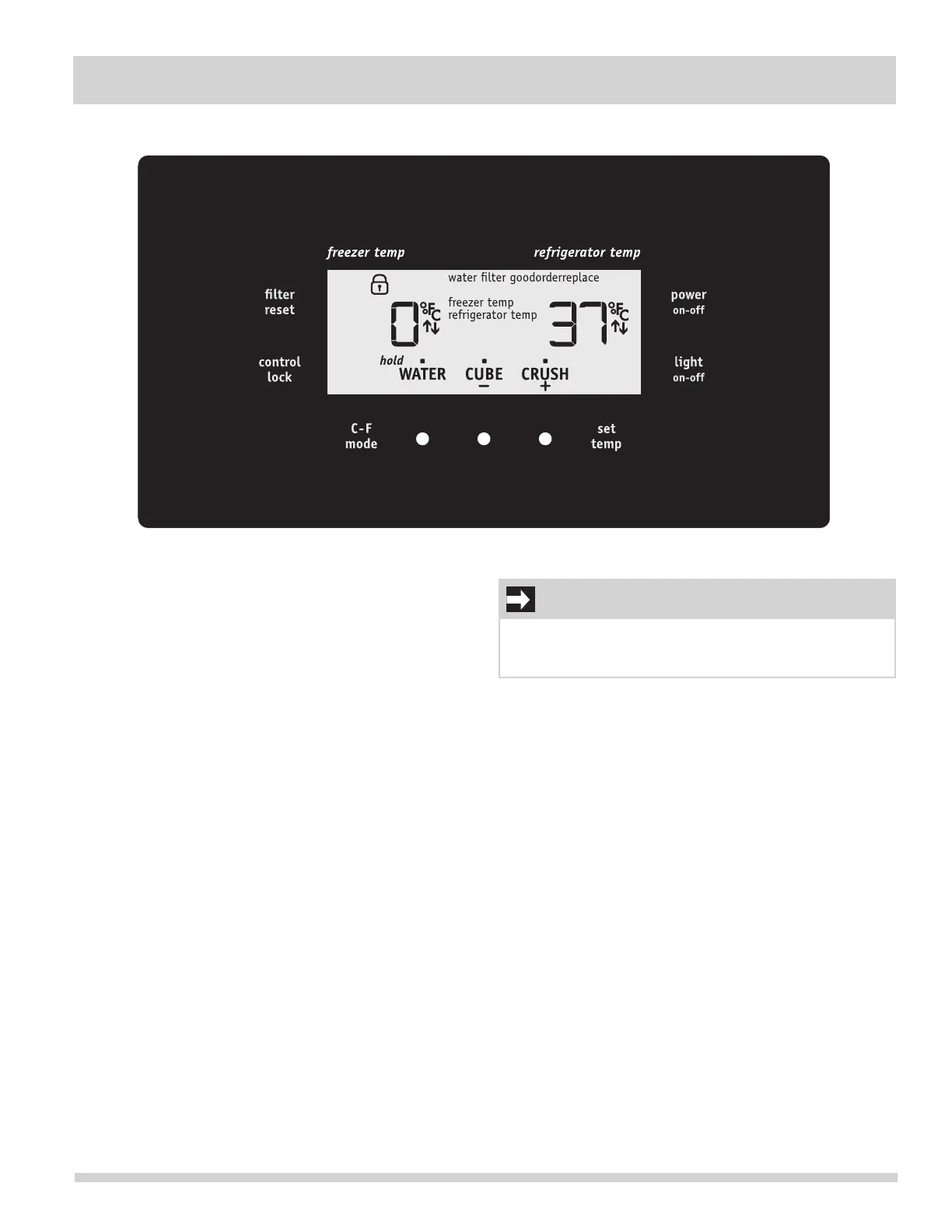
Your refrigerator is equipped with a user interface display.
It is only necessary to touch the glass. There is no need
to press with force.
Touch an icon (//) to activate the
desired dispenser mode.
Press and hold for three (3) seconds
to activate and deactivate. The
Lock icon will be displayed in the
LCD window. This restricts unde-
sired changes to the refrigerator’s
settings and prevents use of the ice
and water dispenser.
Touchtodisplayltercondition
status. Press and hold for three (3)
seconds to reset.
Touch to toggle display from
to .
Press and hold for three (3) seconds
to turn off the cooling system to
clean the refrigerator. It also turns
off all dispenser functions. The tem-
perature display will read OFF.
IMPORTANT
Pressing the icon does not turn off power to
your refrigerator. You must unplug the power cord from
the wall outlet.
Press to choose which compartment,
refrigerator or freezer, to adjust. The temperature display
willbegintoblinkwiththersttouch.Touchbuttonnext
to + or - to adjust the temperature to the desired setting.
Afterve(5)secondsofinactivity,thedisplaywillbeepto
accept the new temperature.




 To Next Page