Surface Cooking (continued)
Ceramic Glass Cooktop (somemodels)(continued)
Models with Electronic Surface Element Controls (ESEC)
Hot Element Indicator Message (HE)
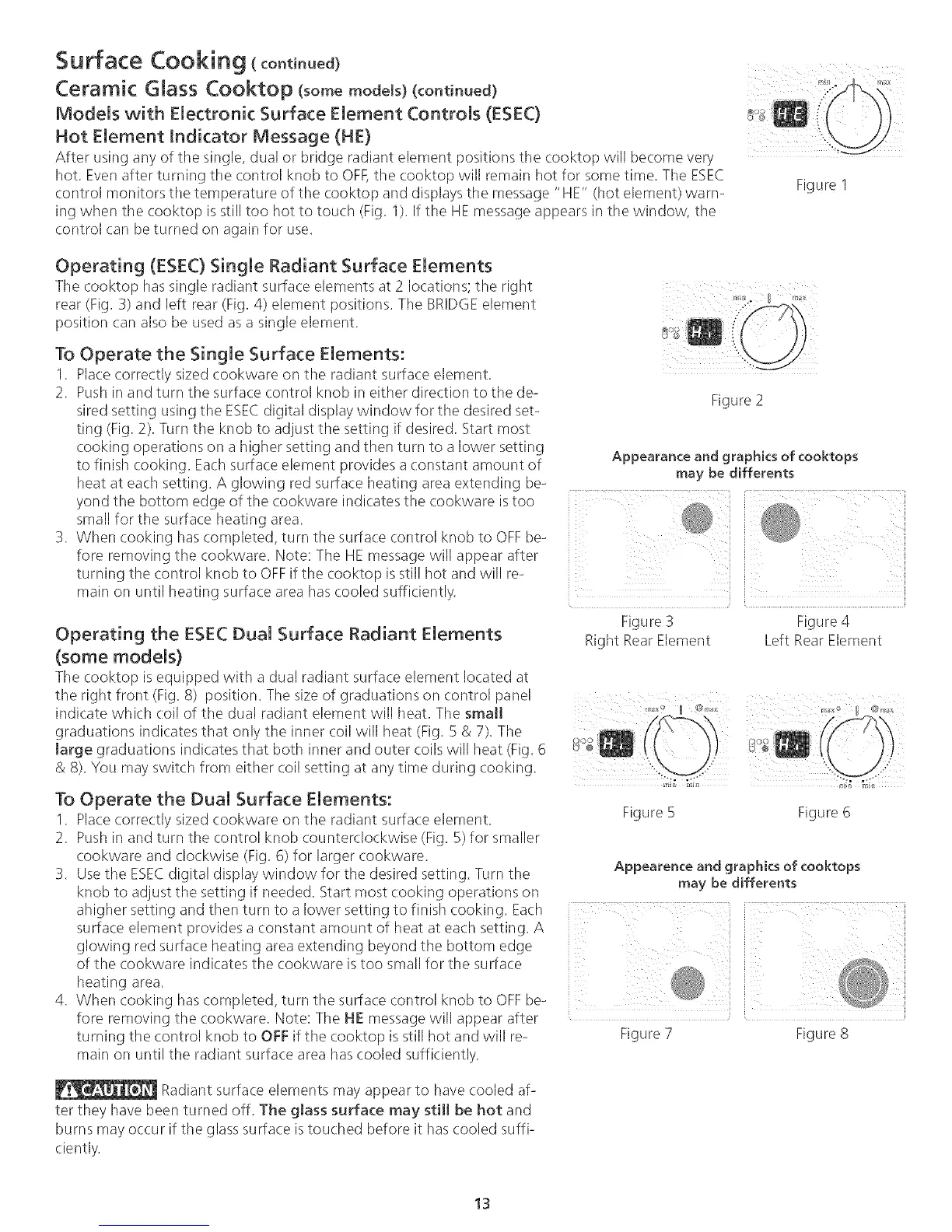
After using any of the single, dual or bridge radiant element positions the cooktop will become very
hot. Evenafter turning the control knob to OFF,the cooktop will remain hot for some time. The ESEC
control monitors the temperature of tile cooktop and displays the message "HE" (hot element) warn-
ing when tile cooktop is still too hot to touch (Fig. 1). If the HE message appears in the window, the
control can be turned on again for use.
},
Figure 1
Operating (ESEC) Single Radiant Surface Elements
The cooktop has single radiant surface elements at 2 locations; tile right
rear (Fig. 3) and left rear (Fig. 4) element positions. The BRIDGEelement
position can also be used as a single element.
To Operate the Single Surface Elements:
1. Place correctly sized cookware on tile radiant surface element.
2. Push in and turn the surface control knob in either direction to the de- Figure 2
sired setting using the ESECdigital display window for the desired set-
ting (Fig. 2). Turn the knob to adjust tile setting if desired. Start most
cooking operations on a higher setting and then turn to a lower setting
to finish cooking. Each surface element provides a constant amount of Appearance and graphics of cooktops
heat at each setting. A glowing red surface heating area extending be- may be differents
yondsmalltl/eforttlebOtt°rnsurfaceedgeheating°ftile area.C°°kwareindicates tkle cookware istoo
3. When cooking has completed, turn the surface control knob to OFFbe-tumingfOreremovingtllecontroltl/ecookware.knobto oFFN°te:iftheTtlecooktopHEmessageisstill hotWillandappearwillre-after
main on until heating surface area has cooled sufficiently ....
Figure 3 Figure 4
Operating the ESEC Dual Surface Radiant Elements Right RearElement Left Rear Element
(some models)
Tile cooktop is equipped with a dual radiant surface element located at
the right front (Fig. 8) position. The size of graduations on control panel
indicate which (:oil of tile dual radiant element will heat. The small ' ...... _..... " _
graduations indicates that only the inner coil will heat (Fig. 5 & 7). The
large graduations indicates that both inner and outer (:oils will heat (Fig. 6
& 8). You may switch from either coil setting at any time during cooking.
To Operate the Dual Surface Elements:
1. Place correctly sized cookware on the radiant surface element. Figure 5
2. Push in and turn the control knob counterclockwise (Fig. 5) for smaller
cookware and clockwise (Fig. 6) for larger cookware.
3. Usethe ESECdigital display window for tile desired setting. Turn the
knob to adjust the setting if needed. Start most cooking operations on
ahigher setting and then turn to a lower setting to finish cooking. Each
surface element provides a constant amount of heat at each setting. A
glowing red surface heating area extending beyond the bottom edge
of the cookware indicates tile cookware is too small for the surface
heating area.
4. When cooking has completed, turn the surface control knob to OFFbe-
fore removing the cookware. Note: The HE message will appear after
turning the control knob to OFF if the cooktop is still hot and will re-
main on until the radiant surface area has cooled sufficiently.
Figure 6
Appearence and graphics of cooktops
may be differents
Radiant surface elements may appear to have cooled af-
ter they have been turned off. The glass surface may still be hot and
burns may occur if the glass surface istouched before it has cooled suffP
ciently.
Figure 7 Figure8
13



 To Next Page