10
USING YOUR ICE MAKER
How to set the timer
Timer's Delay Range: 0-24 hours Press once to change: 1H
When the unit is running, you can set the unit with OFF-TIMER to let the unit stop
running after your setting delay time.
And when the unit is at the standby mode, you can set the unit with ON-TIMER to
let the unit start to run automatically after your setting delay time. Then when you go
back home or have a dinner, you can enjoy a happy life accompanied by this ice maker.
12. Press the“TIMER" button “▲” or “▼” to start setting time. Press the “▲” button to
increase the time, and press the “▼” button to decrease the time. Press the
“TIMER” button at the standby mode and it will start after the countdown (as
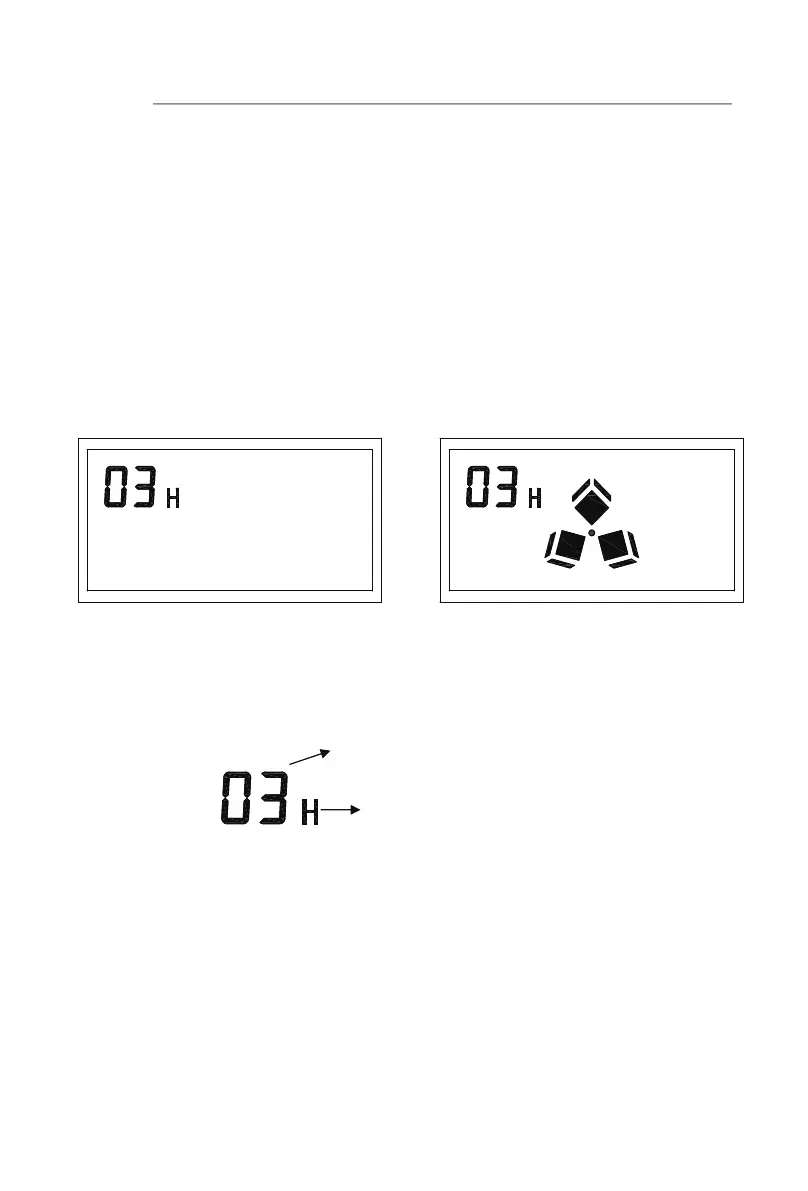
shown in the figure a); Press the“TIMER” button at the ice-making mode and it
will shut down after the countdown (as shown in the figure b).
13. When the unit has been set with the timer, press the TIMER button, then the delay
time digit and “H” letter display will disappear, which means the timer set has been
canceled.
Tips: The background light on the screen automatically goes out after 30 seconds
without operation. lf you want to keep the light on, press the“TIMER” button “▲”
for 5 seconds; and if you want to cancel the constant light, press the“TIMER”button
“▲” for 5 seconds again.
Timer delay time
a. (Start ice making in three hours) b. (Exit ice making after three hours)
Means Hour, and timer setting duration




 To Next Page