25
CHANGING THE FILTER
Locating the Filters
Yourrefrigeratorisequippedwithwaterlteringsystem.
Thewaterltersystemltersalldispenseddrinking
water, as well as the water used to produce ice.
Water Filter
Thewaterlterislocatedatthetoprightsideofthe
fresh food compartment.
Ordering Replacement Filters
Toorderyourreplacementlters,pleasevisitouronline
store at www.frigidaire.com/store, by calling toll-free
at 877-808-4195, or by visiting the dealer where you
purchased your refrigerator. Frigidaire recommends
thatyouorderextralterswhenyourstinstallyour
refrigerator,andthatyoureplaceyourltersatleastonce
every six months.
Here is the product number to request when ordering:
PureSource Ultra
TM
Water Filter
Part #ULTRAWF
Replacing the Water Filter
Ingeneral,youshouldchangethewaterltereverysix
months to ensure the highest possible water quality.
Water Filter Status on the user interface prompts you
toreplacethelterafterastandardamountofwater
(200 gallons/757 liters for PureSource Ultra
TM
)
has
owedthroughthesystem.
If your refrigerator has not been used for a period of time
(duringmovingforexample),changethelterbefore
reinstalling the refrigerator.
Filter Cartridge
Do not use with water that is microbiologically unsafe or
of unknown quality without adequate disinfection before
orafterthesystem.Systemscertiedforcystreduction
may be used on disinfected waters that may contain
lterablecysts.
Test & certication results:
• Rated Capacity - 200 gallons/757 liters for
PureSource Ultra
TM
iceandwaterlter
• Ratedserviceow-.50gallonsperminute
• Operating Temp: Min. 33°F, Max. 100°F
• Maximum Rated Pressure - 100 pounds per square inch
• Recommended Minimum Operating Pressure:
30 pounds per square inch
To replace your PureSource Ultra
TM
water lter:
It is not necessary to turn the water supply off to change
thelter.Bereadytowipeupanysmallamountsofwater
releasedduringthelterreplacement.
1 Turn Off the ice maker power switch.
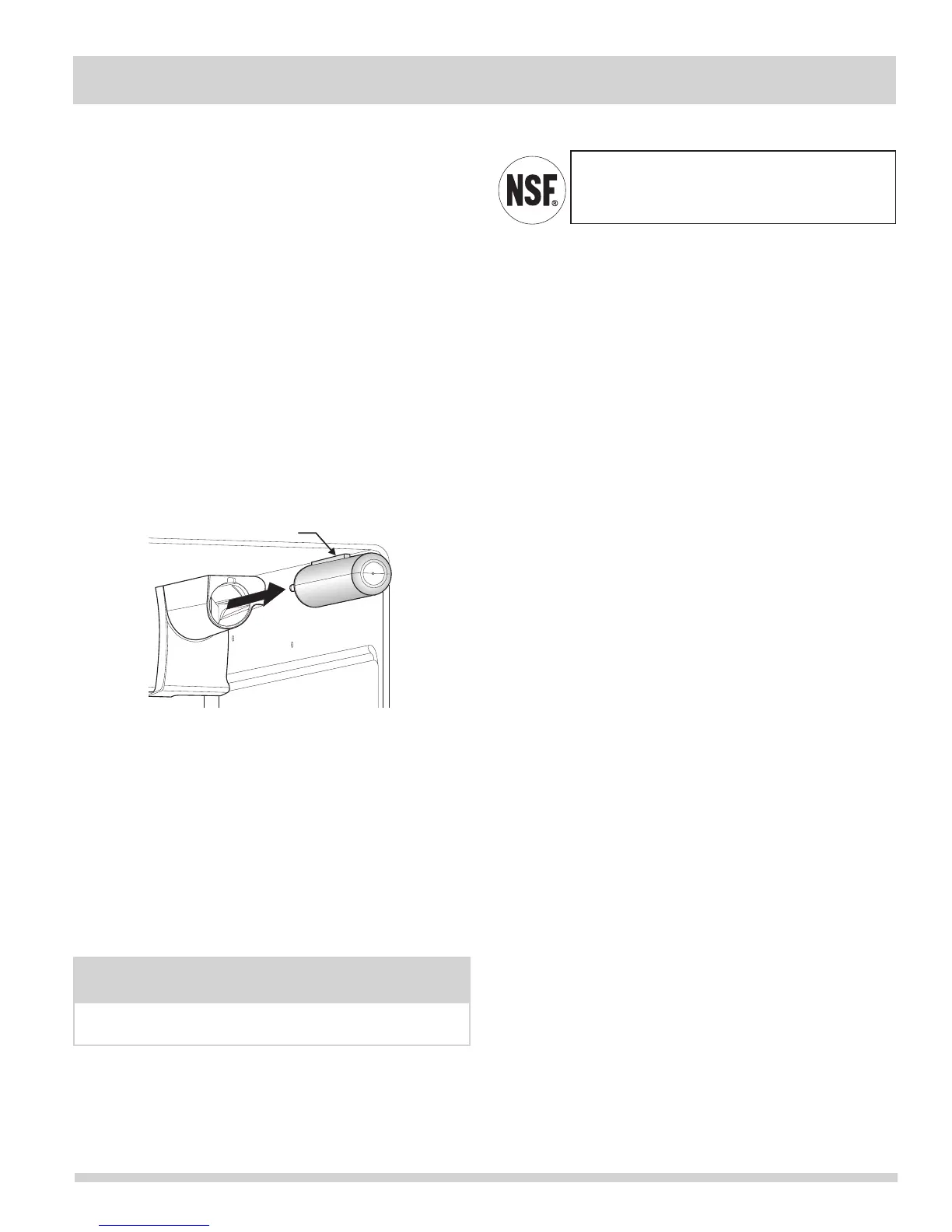
2 Removethelterbypushingontheend/faceofthelter.
3 Slidetheoldwaterltercartridgestraightoutofthe
housing and discard it.
4 Unpackagethenewltercartridge.Usingthe
alignmentguide,slideitgentlyintothelterhousing
until it stops against the snap-in connector at the
back of the housing.
5 Push rmly until the cartridge snaps into
place (you should hear a click as the cartridge
engages the snap-in connector).
6 Press a drinking glass against the water dispenser
whilecheckingforanyleaksatthelterhousing.
Any spurts and sputters that occur as the system
purges air out of the dispenser system are normal.
7 Afterllingoneglassofwater,continueushingthe
system for about four minutes.
8 Turn On the ice maker.
9 Press and hold the Water Filter button on the Ice
& Water Dispenser control panel for three seconds.
When the display changes from Red to Green, the
status has been reset.
The PureSource Ultra
TM
iceandwaterlter
systemistestedandcertiedtoNSF/ANSI
Standards 42 and 53 for the reduction of claims
speciedontheperformancedatasheet.
More about your Advanced Water Filter
NOTE
Whenorderingyourreplacementlter,pleasereorder
thesameltertypethatiscurrentlyinyourrefrigerator.



 To Next Page