8
Adjusting Flipper Mullion Screw
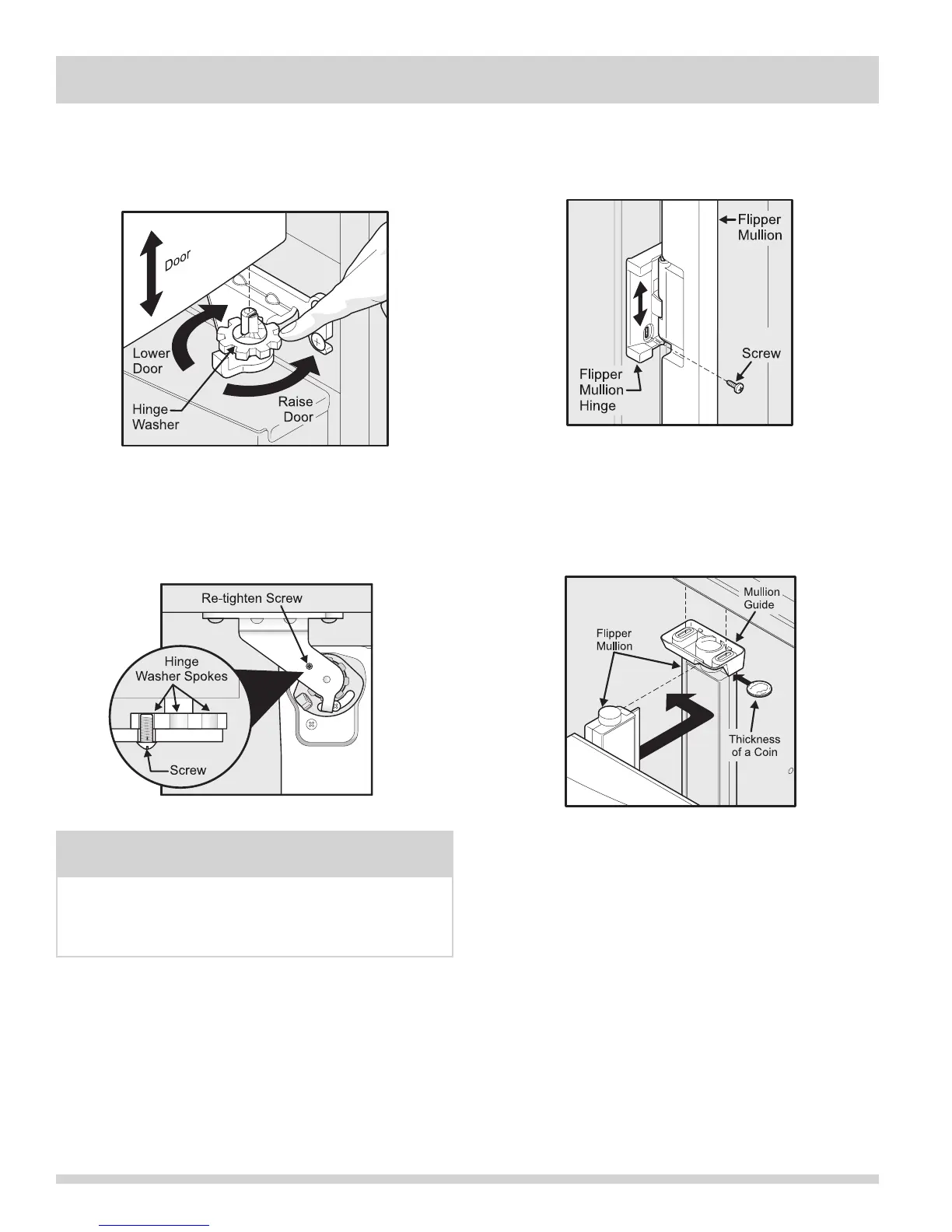
To adjust the ipper mullion:
1 Loosenthescrewlocatedontheippermullion
hinge.
2 Adjustippermullionheight.Forproper
connectionwiththeippermullionguide,there
should be a separation about the thickness of a
coin (0.060 inches, or 1.5 mm) between the guide
andippermullion.
3 Retighten screw.
4 Lift the door while adjusting the washer. To raise
the door, rotate washer clockwise (when viewed
from the bottom). To lower door, rotate washer
counterclockwise (when viewed from the bottom).
5 Re-tighten the screw (where applicable), ensuring
it is between the spokes of the washer. Screw will
notbetight,justinsertuntilitisushwiththe
hinge.
Adjusting Flipper Mullion Height
Raising/Lowering Door
Screw (where applicable)
NOTE
If after adjusting doors higher the door makes a
popping/clicking sound, remove screw and replace with
the longer one supplied in the handle package (select
models).
INSTALLATION



 To Next Page