18
CONTROLS AND SETTINGS
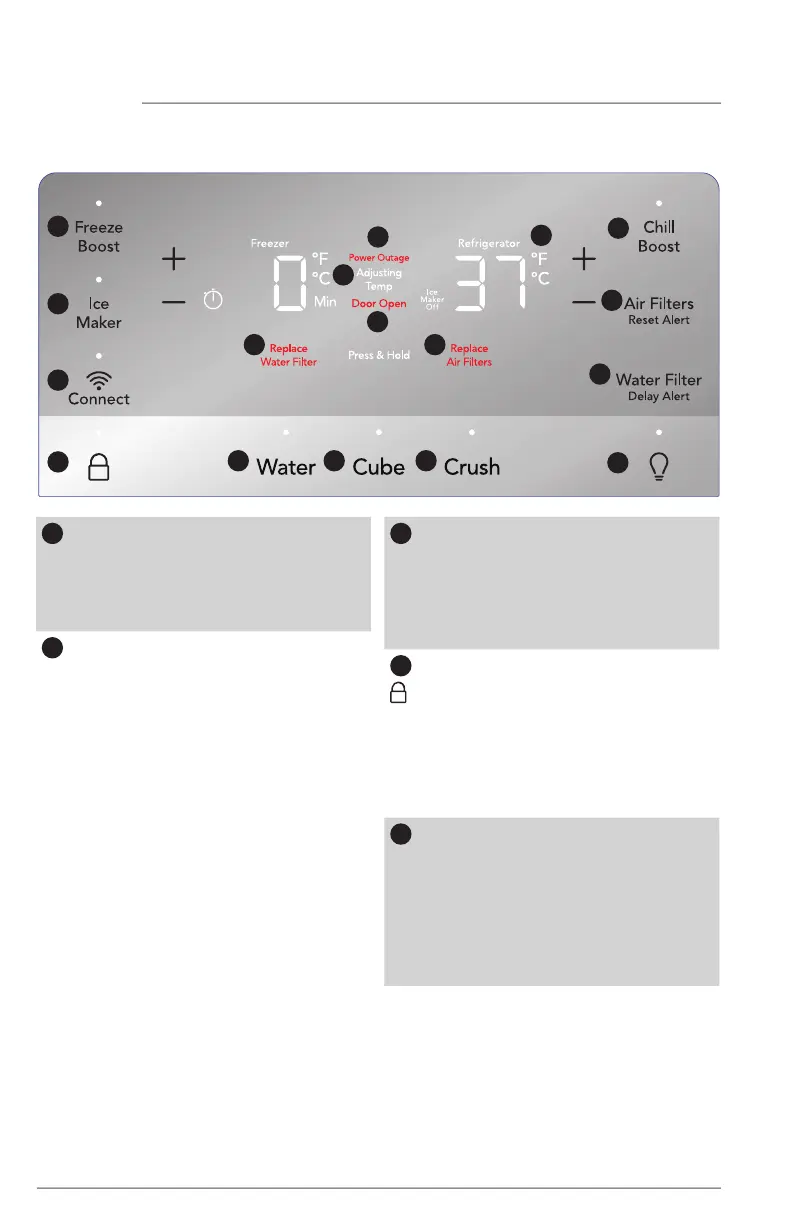
External Dispenser Display
1
Freeze Boost (on/o)
Prior to grocery shopping, activate
Freeze Boost so newly purchased
food designated for the freezer will
be preserved as quickly as possible. It
automatically deactivates after 12 hours.
2
Ice Maker
Press and hold for 3 seconds to
turn the ice maker on/o. When the
indicator is lit, the ice maker is on.
When the ice maker is OFF, the Ice
Maker O indicator is lit. When the
ice maker is OFF, it will stop making
ice. When the sleep mode is enabled,
wake the display to confirm the ice
maker is on/o (see Sleep Mode
section). While o, ice dispensing
can continue as long as there is ice
in the bucket. When the ice maker
is o and ice is dispensing, the
indicator above Ice Maker and Ice
Maker O will both blink.
3
Connect
The Connect button connects the
refrigerator to your Wi-Fi enabled
mobile device. (See To connect the
refrigerator to your home internet
in CONTROLS AND SETTINGS for
more information”.)
4
The lock button can be used to lock
the display preventing it from being
used in certain situations. Press and
hold for 3 seconds to enable/dis-
able. While locked, no changes can
be made to settings on the display.
Dispensing ice and water will be
disabled. The indicator will flash and
an audible warning will sound.
5
Power Outage
In the event of a power failure,
Power Outage will illuminate once
power has been restored and
a tone will sound. The alert will
only illuminate if the refrigerator
or freezer reached unsafe
temperatures during the outage.
Press any button to silence the tone.
10
1
2
3
4
5
6
7
9
8
11 12
13
14
15
16
17




 To Next Page