Thetemperatureintheovenhasbeenpre-setatthefactory.Whenfirstusingtheoven,
besuretofollowrecipetimesandtemperatures.Ifyouthinktheoveniscookingtoohot
ortoocoolforthetemperatureyouselect,youcanadjusttheactualoventemperatureto
be moreor lessthanwhatis displayed.Beforeadjusting,test a recipeby usinga
temperaturesettingthatis higheror lowerthanthe recommendedtemperature.The
bakingresultsshouldhelpyoutodecidehowmuchofanadjustmentisneeded.
Note: The oven
temperatureadjustments
madewiththisfeaturewill
notchangetheSelf-Clean
cycletemperatureor the
Broiltemperature.
iNSTRUCTiONS
To adjust the oven temperature higher
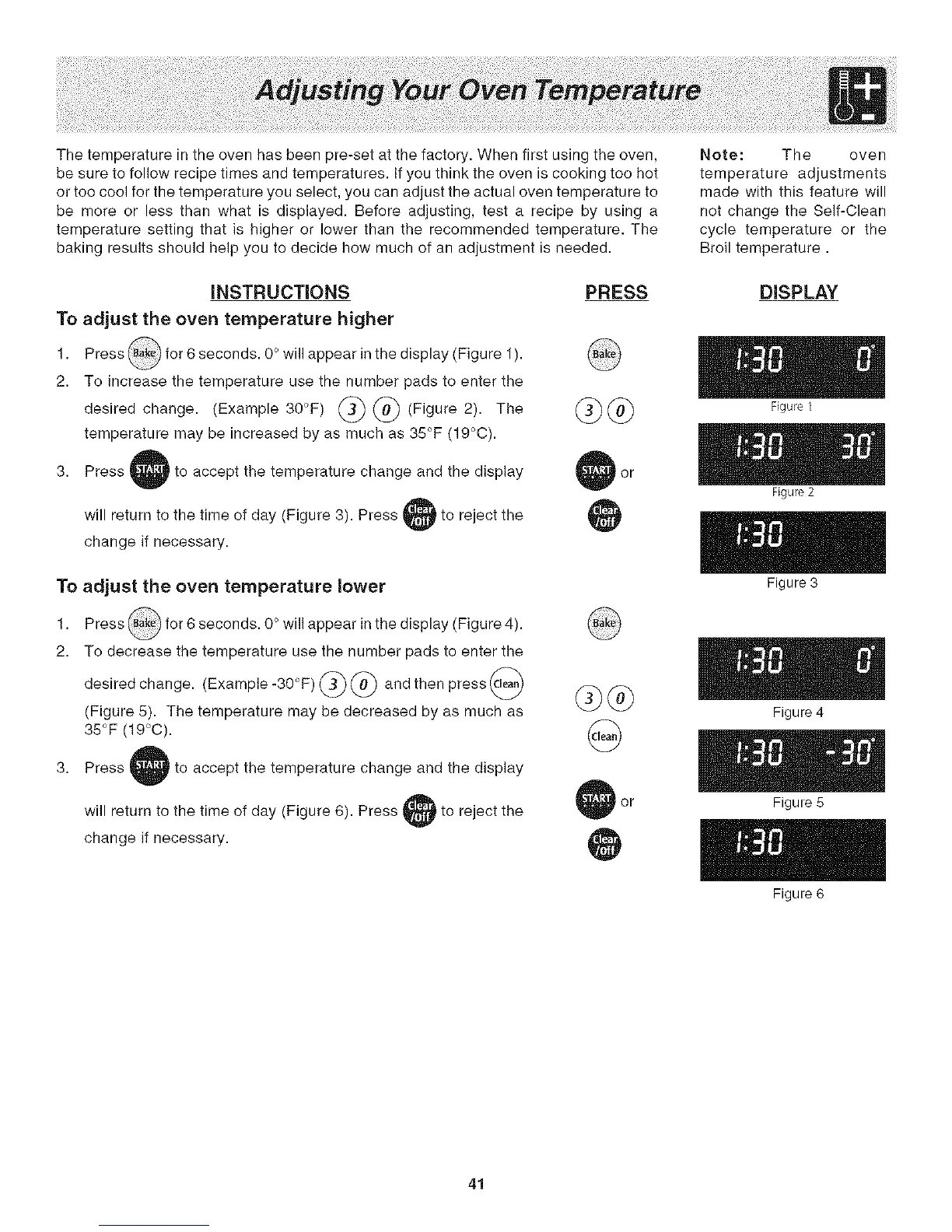
1. Press @ for S seconds. O°will appear in the display (Figure 1).
2. To increase the temperature use the number pads to enter the
change. (Example 30°F) @ @ (Figure 2).
desired The
temperature may be increased by as much as 35°F (19°C).
3. Press ' to accept the temperature change and the display
will return to the time of day (Figure 3). Press
change if necessary.
Ito reject the
To adjust the oven temperature lower
1. Press @ for 6 seconds. O° will appear in the display (Figure 4).
2. To decrease the temperature use the number pads to enter the
desired change. (Example-30°F) @ @ and then press @
(Figure 5). The temperature may be decreased by as much as
35°F (19°C).
3. Press ' to accept the temperature change and the display
will return to the time of day (Figure 6). Press 4
change if necessary.
Ito reject the
PRESS DISPLAY
Figure 1
Figure 2
Figure 3
Figure 4
Figure 5
Figure 6
41




 To Next Page