Setting Oven Controls
Setting the Keep Warm Feature
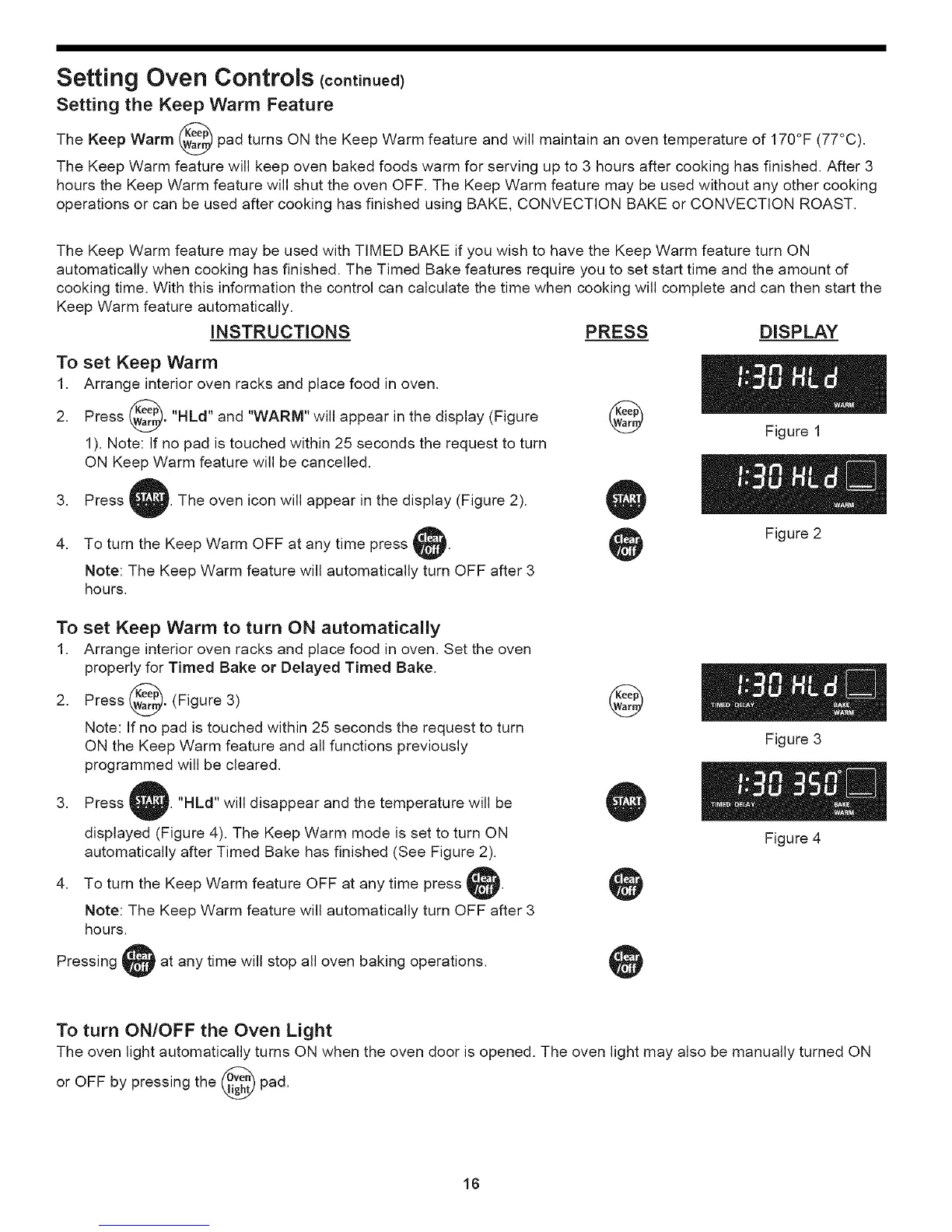
The Keep Warm _ereP_ pad turns ON the Keep Warm feature and will maintain an oven temperature of 170°F (77°C).
The Keep Warm feature will keep oven baked foods warm for serving up to 3 hours after cooking has finished. After 3
hours the Keep Warm feature will shut the oven OFF. The Keep Warm feature may be used without any other cooking
operations or can be used after cooking has finished using BAKE, CONVECTION BAKE or CONVECTION ROAST.
The Keep Warm feature may be used with TIMED BAKE if you wish to have the Keep Warm feature turn ON
automatically when cooking has finished. The Timed Bake features require you to set start time and the amount of
cooking time. With this information the control can calculate the time when cooking will complete and can then start the
Keep Warm feature automatically.
INSTRUCTIONS PRESS DISPLAY
To set Keep Warm
1. Arrange interior oven racks and place food in oven.
2. Press _eep_."HLd" and "WARM" will appear in the display (Figure
A
1). Note: If no pad is touched within 25 seconds the request to turn
ON Keep Warm feature will be cancelled.
3. Press The oven icon will appear in the display (Figure 2).
©
Figure 1
4. To turn the Keep Warm OFF at any time press p.
Note: The Keep Warm feature will automatically turn OFF after 3
hours.
Figure 2
To set Keep Warm to turn ON automatically
1. Arrange interior oven racks and place food in oven. Set the oven
properly for Timed Bake or Delayed Timed Bake.
2. Press @ereP_. (Figure 3)
A
Note: If no pad is touched within 25 seconds the request to turn
ON the Keep Warm feature and all functions previously
programmed will be cleared.
,
,
Press "HLd" will disappear and the temperature will be
displayed (Figure 4). The Keep Warm mode is set to turn ON
automatically after Timed Bake has finished (See Figure 2).
To turn the Keep Warm feature OFF at any time press _.
Note: The Keep Warm feature will automatically turn OFF after 3
hours.
Pressing Iat any time will stop all oven baking operations.
©
Figure 3
Figure 4
To turn ON/OFF the Oven Light
The oven light automatically turns ON when the oven door is opened. The oven light may also be manually turned ON
or OFF by pressing the _ve% pad.
16






 To Next Page