12
OPERATION
OPERATING TIPS
• For best results, remove fish, shellfish,meat, and
poultry from its original closed paper or plastic
package (wrapper). Otherwise, the wrap will
hold steam and juice close to the foods, which
can cause the outer surface of the foods to
cook.
• For best results, roll your ground meat into a ball
before freezing. During the DEFROST cycle, the
microwave will signal when it is time to turn the
meat over. Scrape off any excess frost from the
meat and continue defrosting.
• Place foods in a shallow containers or on a
microwave roasting rack to catch drippings.
NOTE
The oven will beep during the DEFROST cycle.
At this time, open the door and turn, separate, or
rearrange the food. Remove any portions that
have thawed. Return frozen portions to the oven
and touch START to resume the defrost cycle.
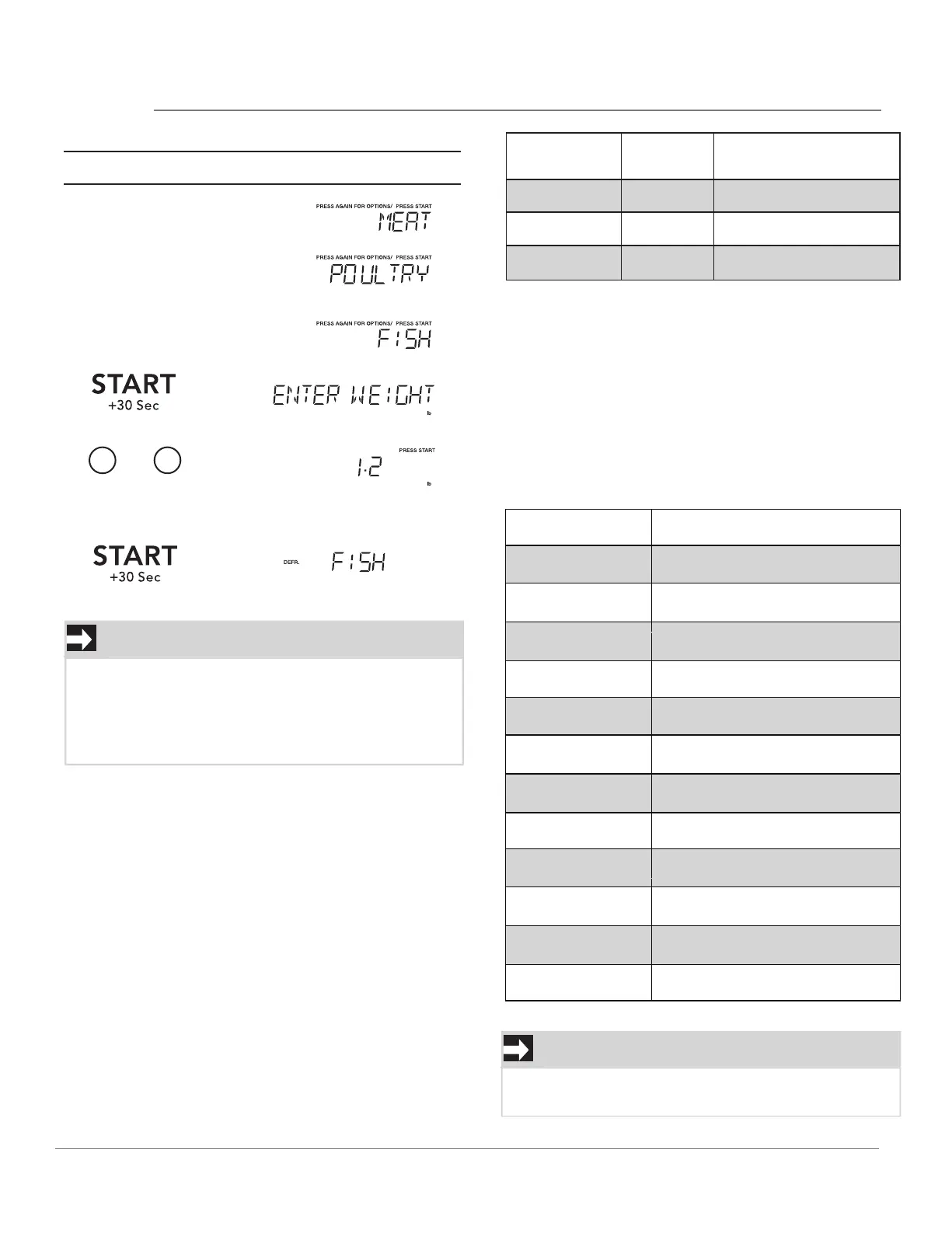
This table shows food type selections and the
weights you can set for each type. For best
results, loosen or remove covering on food.
NOTE
If between two decimal weights, choose the lower
weight for the best defrosting results.
• Suppose you want to defrost 1.2 Ibs of fish.
Weight conversion table
You are probably used to measuring food in
pounds and ounces that are fractions of a pound
(for example, 4 ounces equals 1/4 pound). Howev-
er, in order to enter food weight in Auto Defrost,
you must specify pounds and tenths of a pound.
If the weight on the food package is in fractions of
a pound, you can use the following table to con-
vert the weight to decimals.
Equivalent Weight
1.
.
1
2
To enter weight
and
2.
3.
4.
5.
6
DEFROST
DEFROST
DEFROST
Then time will count down
0.1 to 6.0
Category
MeatDefrost
Defrost
Defrost
0.1 to 6.0
Poultry
0.1 to 6.0
Fish
KEY PRESS
DECIMAL WEIGHT
OUNCES
I.6
3.2
4.0
4.8
6.4
8.0
9.6
11.2
12.0
12.8
14.4
16.0
.10
.20
.25 One-Quarter Pound
.30
.40
.50 One-Half Pound
.60
.70
.75 Three-Quarters Pound
.80
.90
1.0 One Pound
Touch: Display Shows:
WEIGHTSYOU CAN SET
(tenths of apound)



 To Next Page