CAUTION
SURFACE LIGHT REPLACEMENT
22
CLEANING AND CARE
Disconnect the power cord or leave the door open to deactivate the oven during
cleaning. Disconnect the power cord before replacing filters and lights.
To avoid risk of personal injury or property
damage, do not operate oven hood without
filters properly in place.
To avoid risk of personal injury or property
damage, wear gloves when replacing the light
bulbs.
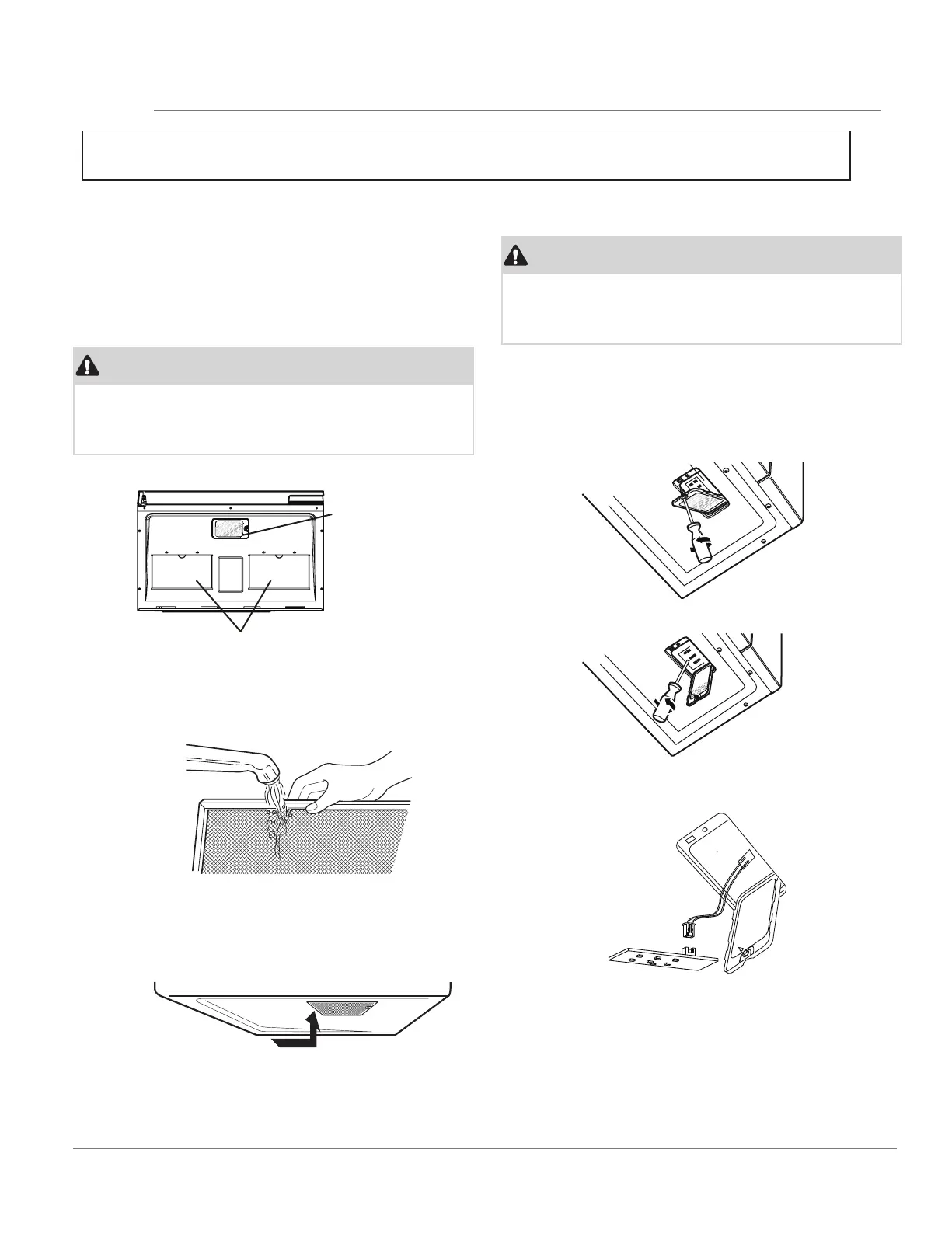
CLEANING THE EXHAUST FILTERS
The oven ventilation exhaust filters should be
removed and cleaned often; generally at least once
every month.
Vent exhaust filter part number 5304478913
To order parts call 800-599-7569
• To remove the exhaust ventilation filters, slide the
filter to the rear. Then pull filter downward and
push to the other side. The filter will drop out.
• Unplug the microwave oven or turn off power at
the main circuit breaker.
• Remove theLED lightcover mounting screws at
both light positions under the microwave.
• Remove the LED light mounting screw.
• Unplug the LED light from the harness, replace
with LED light of part# 5304499540. To order
parts call 800-599-7569. Then reconnect the
harness.
• Soak the ventilation filters in hot water using a mild
detergent. Rinse well and shake to dry or wash in a
dishwasher. Do not use ammonia. The aluminum on
the filter will corrode and darken.
• To reinstall the exhaust ventilation filter, slide it into
the side slot, then push up and toward oven to lock.
Reinstall the 2nd filter using the same procedure.
• Re-instjall LED light and mounting screw. When
re-installing mounting screw be careful not to
damage the LED light.
• Re-install LED light cover and mounting screw.
• Plug the microwave back into the power supply
or turn the power back on atthe main circuit
breaker.
Surface lights
Grease filter
(Rear of microwave oven)
(Front of microwave oven)
BOTTOM VIEW
CAUTION



 To Next Page