CUSTOMER INSTRUCTION
Setting up your FRITZ!Box on a connection with ONT
Step 3: Set up internet access in the FRITZ!Box
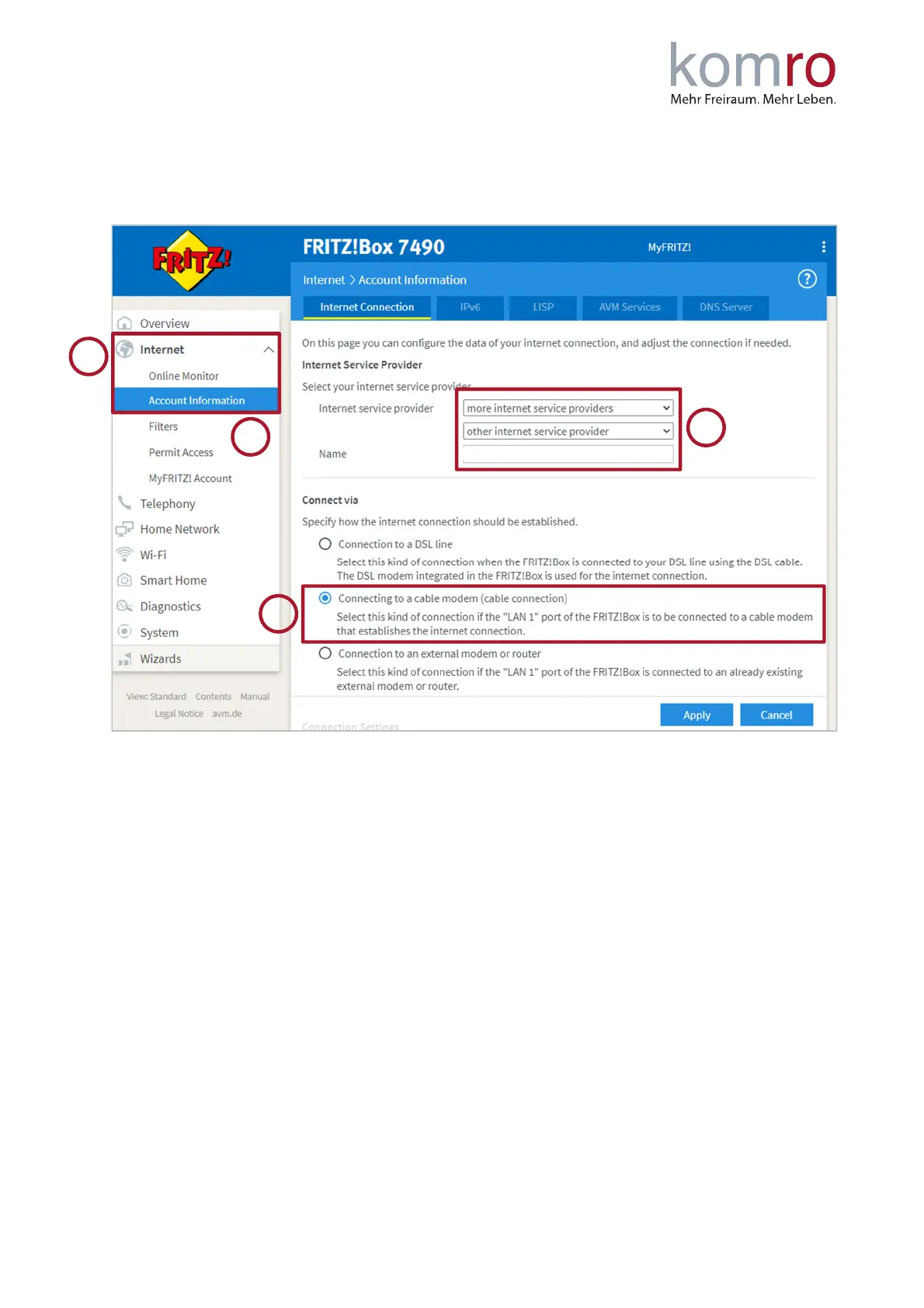
In the left menu click on Internet (1) and then on the Account Information (2) submenu.
You will now be asked for the Internet provider (3). Select “more Internet provider” in the first line
and also “other Internet provider” below. Please enter “komro GmbH” in the text field.
Now select “Connect to a cable modem” under “Connection”.
N
OTE
: If only "Connection to a DSL connection" can be selected here and there are no other options,
you cannot use this FRITZ!Box.
Enter the transmission speed (5) of your tariff in the “Downstream” and “Upstream” input fields (see
screenshot next page). You can find your tariff in your contract documents.
Please use the values that match the tariff you have booked (in the example: 150 Mbit/s in
download/downstream and 50 Mbit/s in upload/upstream).
We recommend removing the tick (6) next to “Check Internet access after applying”. Then click on
Apply (7) to confirm.



 To Next Page