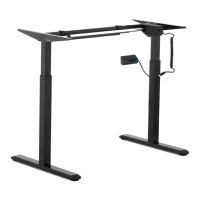
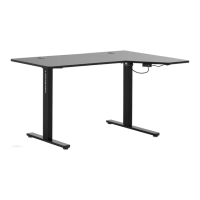
This document describes the CORNER ELECTRIC SIT STAND DESK FRAME, models STAR_ATFE_09 and STAR_ATFE_32, designed for supporting and adjusting the height of a desk top. It emphasizes safe and reliable use, adhering to technical specifications, modern technology, and high-quality standards. The manufacturer reserves the right to make changes for quality improvement, with noise emission risk minimized.
Function Description
The primary function of this device is to provide support for a desk top and allow for electric height adjustment. It enables users to switch between sitting and standing positions, promoting a more ergonomic and dynamic work environment. The desk frame is operated via a control panel with dedicated buttons for upward and downward height adjustment, as well as memory functions for storing preferred height positions. It also includes an anti-collision sensitivity feature to prevent damage and a reminder function to prompt users to change positions.
Important Technical Specifications
- Product Name: CORNER ELECTRIC SIT STAND DESK FRAME
- Models: STAR_ATFE_09, STAR_ATFE_32
- Supply Voltage / Frequency: 230V~ / 50Hz
- Rated Power: 450 W
- Protective Class: II (double insulation)
- Dimensions (Width x Depth x Height):
- Left side: 900x680x580 mm
- Right side: 1100x680x580 mm
- Weight: 43 kg
- Number of Legs: 3
- Maximum Load: 150 kg
- Height Adjustment Range: 580–1230 mm
- Width Adjustment Range:
- Left side: 900–1500 mm
- Right side: 1100–1900 mm
- Maximum Travel: 650 mm
- Working Cycle (on/off): 2/18 minutes (After 2 minutes of continuous operation, the motor must cool down and remain idle for at least 18 minutes).
- Maximum Adjustment Speed: 34 mm/s
Usage Features
The desk frame is designed for intuitive operation via a control panel with seven buttons:
- ▲ (Up Arrow): Height adjustment up.
- ▼ (Down Arrow): Height adjustment down.
- 1, 2, 3: Buttons for storing and recalling three user-defined height positions.
- M (Memory): Function button to save current height settings.
- A (Alarm): Button to set a reminder alarm for changing positions.
Height Adjustment:
Users can adjust the desk height by pressing the ▲ or ▼ buttons. The current height is displayed on the LED screen.
Altitude Memory Function:
To save a desired height, adjust the desk using ▲ or ▼, then press the M button (S- will appear on the display), and finally press 1, 2, or 3 to assign the height to that button (S-1, S-2, or S-3 will be displayed). Pressing 1, 2, or 3 will automatically move the desk to the stored height.
Reminder Function:
- Activate by pressing the A button (ON or on will appear).
- After two seconds, press ▲ or ▼ while the display is flashing to set the reminder time. The default is 45 minutes (⁻̱45 displayed). Press any button to save, or wait 5 seconds for automatic saving. Any operation during the countdown will restart the timer. When the countdown ends, ⁻̱00 will be displayed, and a 10-second beep will sound.
- During the 10-second beep, pressing any button reactivates the countdown. If no action is taken, another reminder sounds after 5 minutes. No action during the second signal deactivates the function.
- To deactivate, press and hold A for three seconds (OFF or oFF will be displayed).
Anti-Collision Sensitivity Setting:
- Press and hold ▲ and ▼ simultaneously for 5 seconds to adjust sensitivity. Four levels are available: A-3 (high), A-2 (medium), A-1 (low), and A-0 (off). The factory default is A-3.
- When adjusting height, if the desk top contacts an object, it will stop and retract to prevent damage.
- If the display does not show an anti-collision code after holding ▲ and ▼ for 5 seconds, the function is inactive.
Reset Function:
- If ASꓩ or rSt is displayed, press and hold ▼. The desk will move to its lowest or highest position, then reverse direction until it stops. The height number will be displayed; release ▼. The desk can then be used normally.
- For error codes, briefly press ▼ to enter ASꓩ or rSt state and perform the reset.
- If issues persist, contact customer service.
Maintenance Features
Cleaning:
- Always disconnect the power plug and allow the device to cool completely before cleaning, adjusting, or replacing accessories, or when not in use.
- Use only non-corrosive cleaning products.
- Thoroughly dry all components after cleaning before reuse.
- Do not spray the device with water or immerse it in water.
- Use a soft, damp cloth for cleaning. Avoid sharp or metallic objects (e.g., wire brushes, metal spatulas) as they can damage the surface.
Storage:
- Store the device in a cool, dry place, protected from moisture and direct sunlight.
Regular Inspections:
- Regularly inspect the device for proper functioning and any damage.
- Check for general damage or damage to moving parts (cracks, etc.) that could affect safe operation. If damaged, have it repaired by qualified personnel using original spare parts before use.
Disposal:
- At the end of its service life, the product must not be disposed of with normal household waste. It should be taken to a collection point for recycling electrical and electronic equipment, as indicated by the symbol on the product, instructions, or packaging. The materials used are recyclable according to their labeling, contributing to environmental protection. Contact local authorities for appropriate disposal points.

 Need help?
 General

 To Next Page