9
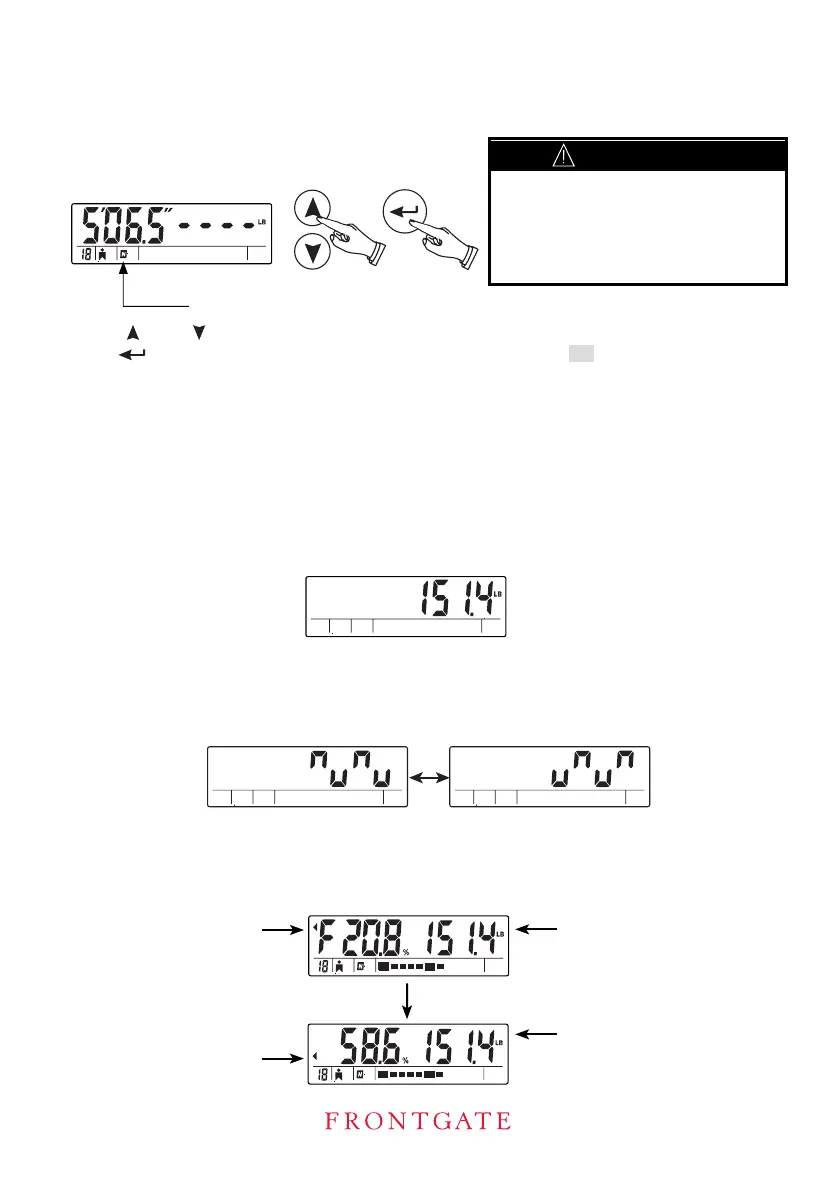
A long beep tone sounds when the process is completed. Stay on the scale. The weight,
Body fat percentage
Weight
Weight
Total body water
percentage
BODY FAT SCALE – INSTRUCTION MANUAL
4. Set Normal or Athlete Mode
Press button to con
under, this step is automatically by-passed (See section: "Why is the Athlete Mode
necessary in a Body Fat Analyzer?")
¿rm all the settings with a long beep.
R icon will be displayed.
MEASURING
5. Measuring
Step on the scale with bare feet. Stand still and the screen displays the weight in around
2 seconds.
6. Stay on the scale. Then the scale starts to compute body fat and total body water.
!
At this stage, settings are not
stored in memory. To store,
please refer to the section “To
Store Settings into Memory”
Press to toggle between normal (N) and athlete (A) mode icons.
ormalN
[ ] or [ ]
[]
PRE CAUTION
The screen displays the measurement pattern while computing.
.
percentage body fat and percentage total body water will be displayed
alternately
Athlete mode selection is only available to those aged 18 or . For those age 17 or
above


 To Next Page