EN
9
Basic Operation
Cable Connection
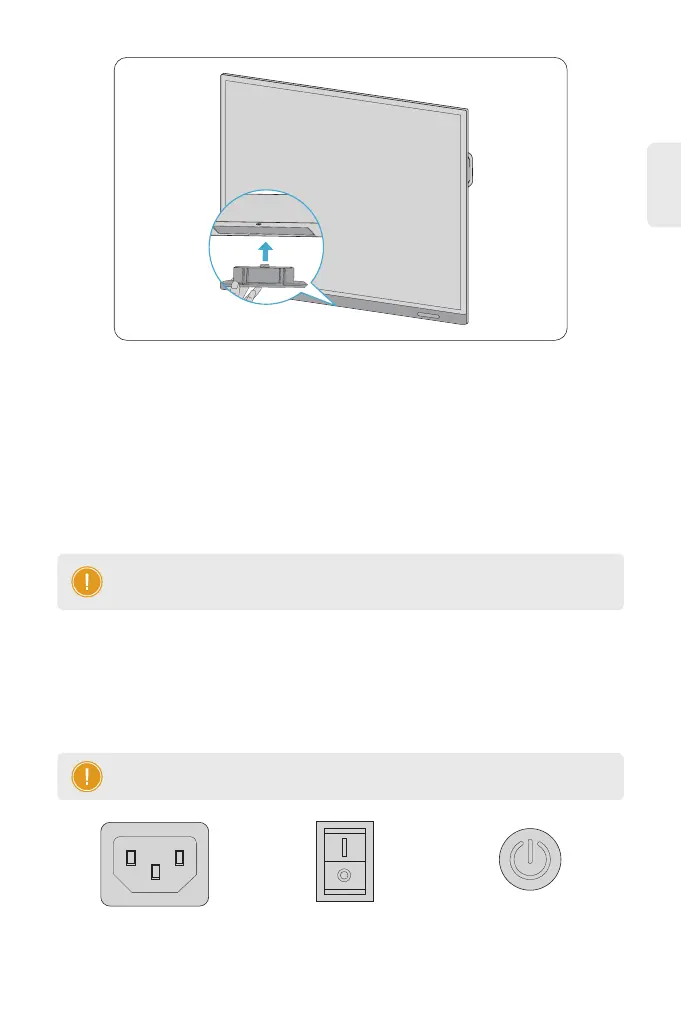
2. Verify the installation direction of the wireless module, and insert the wireless module.
For stable image quality, use high-quality DVI, VGA, or HDMI cables if the cable length
exceeds ve meters.
NOTE: Image noises are possible if the cable connector is loose or the gold
plating is worn out after a long period of use.
Startup
1. For the rst use, connect the device to power and turn the power switch on.
2. After startup, complete the initial conguration according to the startup wizard and set
the network under Settings > Network.
NOTE: You can set the boot mode under Settings > General > Boot Mode.
Power Switch
(Side of the Device)
OFF ON
Power Button
(Bottom of the Device)
Power Connector
(Side of the Device)



 To Next Page