The FS Optical Multimeter is a handheld device designed for fiber-optic line project construction, testing, and maintenance. It integrates the functionalities of a power meter, optical light source, and/or visual fault locator, making it a versatile tool for measuring optical power loss in fiber links. This device is widely used in various applications such as digital data networks, telecommunication networks, and cable television systems.
Function Description
The optical multimeter offers a comprehensive set of functions to facilitate fiber optic testing. Its core capabilities include optical power measurement (OPM), optical light source (OLS) functionality, and in some models, a visual fault locator (VFL).
Optical Power Meter (OPM) Functions:
- Power On/Off and Auto-off: The device can be turned on by a short press of the power button and turned off by pressing it for 2 seconds or longer. To conserve battery, it features an auto-off function that shuts down the instrument after 10 minutes of inactivity. This auto-off function can be disabled for continuous operation by pressing and holding the power button during boot-up, indicated by a "PERM" display.
- Backlight Function: A short press of the backlight button toggles the display backlight on or off. The backlight level can be adjusted from 0 to 9, with 0 disabling the backlight entirely. This feature is particularly useful for working in low-light conditions.
- Menu Setting: The menu button allows users to navigate through various setting interfaces. Parameters can be modified using the up/down buttons, and settings are saved by pressing the menu button for 2 seconds.
- Wavelength Selection: Users can select specific OPM wavelengths (e.g., 850nm, 1300nm, 1310nm, 1490nm, 1550nm, 1625nm) to match the optical signals being measured. Selecting the correct wavelength is crucial for accurate power loss measurements.
- Data Storage/Query: The multimeter can store up to 1000 records. A long press of the record button saves the current power value, displaying "SAVE" and the storage number. Short presses of the record button allow users to query stored data, with up/down buttons for navigation through previous and newest records.
- Reference Setting (REF): The REF button is used to set a reference value or switch between absolute (dBm/uW) and relative (dB) measurements. A long press sets the current measurement as a new reference value, which is then displayed along with the dBm and dB values. Each wavelength can have its own reference value.
- Unit Shift: The unit button shifts the measurement unit between dBm, nW/uW/mW. After pressing the REF button, it shifts to dB. The last selected unit is saved after power off.
- WAVE ID (Optional): A long press of the wavelength button activates the WAVE ID function, displaying "id" and allowing the device to identify the wavelength of the incoming signal. Another long press exits this mode.
Optical Light Source (OLS) Functions:
- Laser On/Off: The laser on/off button controls the OLS function. When off, "OFF" is displayed; when on, the current OLS wavelength is shown.
- Wavelength Selection: The OLS wavelength button allows users to select the desired output wavelength for the optical light source. This is important for ensuring compatibility when testing with an OPM.
- Modulation Output: The modulation button enables the output of modulated laser signals at frequencies such as 270Hz, 1kHz, and 2kHz. This feature is useful for identifying the laser's current load modulation when connected to an optical power meter with frequency identification capabilities.
Visual Fault Locator (VFL) Function (Optional):
- VFL On/Off: The VFL button cycles through different VFL conditions: on, glint, and off. This helps in visually locating breaks or bends in fiber optic cables.
Usage Features
The FS Optical Multimeter is designed for ease of use and versatility in various field conditions.
- Handheld Design: Its compact and handheld form factor makes it portable and convenient for on-site testing.
- Intuitive Interface: The device features clearly labeled buttons and an LCD display for straightforward operation and data visualization.
- Adapter Compatibility: The FHOM-201 model comes with SC, ST, and FC adapters, allowing for connection to various fiber optic cable types. The FHOM-103 model also includes these adapters along with a USB cable and AC adapter for charging.
- Easy Cable Insertion: The manual provides clear instructions for inserting FC, ST, and SC cables using the respective adapters, ensuring secure and proper connections.
- Battery Management: The device includes a battery energy detection system with indicators for sufficient, more, less, and insufficient power. It supports rechargeable batteries and provides guidance on proper charging procedures, including warnings against overcharging and charging non-rechargeable batteries.
- Power-Saving Features: The auto-off function helps extend battery life by automatically shutting down the device after a period of inactivity.
- Data Logging: The ability to store up to 1000 measurement records is a significant feature for documentation and analysis of test results over time. The automatic incrementing of storage numbers and overwriting of the oldest data ensures continuous data capture.
Maintenance Features
Proper maintenance is crucial for ensuring the longevity and accuracy of the optical multimeter. The manual outlines several key maintenance practices:
- Sensitive Interface Handling: Users are advised to carefully plug in and pull out connectors to protect the sensitive interface from damage.
- Consistent Adapter Use: It is recommended to use only one type of optical adapter to prevent excess loss that can occur from switching between different connectors.
- Dust-Proof Protection: The use of dust-proof caps is essential to protect the device from scratches and contamination when not in operation.
- Cleanliness of Optical Components: Maintaining all optical connectors and surfaces free from oil, dirt, and other contaminants is critical for ensuring proper operation and accurate measurements.
- Avoid Disassembly: To prevent electric shock and ensure safety, users are warned against disassembling the components of the device. Disobeying this instruction can lead to safety issues and void the warranty.
- Battery Removal for Storage: When the battery power becomes weak or when the instrument is not in use for extended periods, batteries should be removed. This prevents damage to the multimeter from potential battery leakage.
- Proper Charging Practices: For rechargeable batteries, the device should be turned off and charged when insufficient power is indicated. Long-term under-voltage conditions can shorten battery life. The LCD will flash during charging and show full when complete. Charging should not exceed 48 hours. Only rechargeable batteries should be charged with the AC/DC adapter; attempting to charge non-rechargeable batteries can destroy the device and void the guarantee.
Overall, the FS Optical Multimeter is a robust and user-friendly tool designed to meet the demands of fiber optic network installation, testing, and maintenance, offering a blend of essential functionalities and practical features.

 Need help?
 General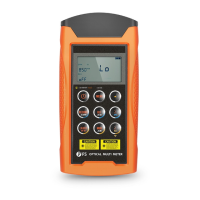

 To Next Page