1010
4. POWER ON / OFF
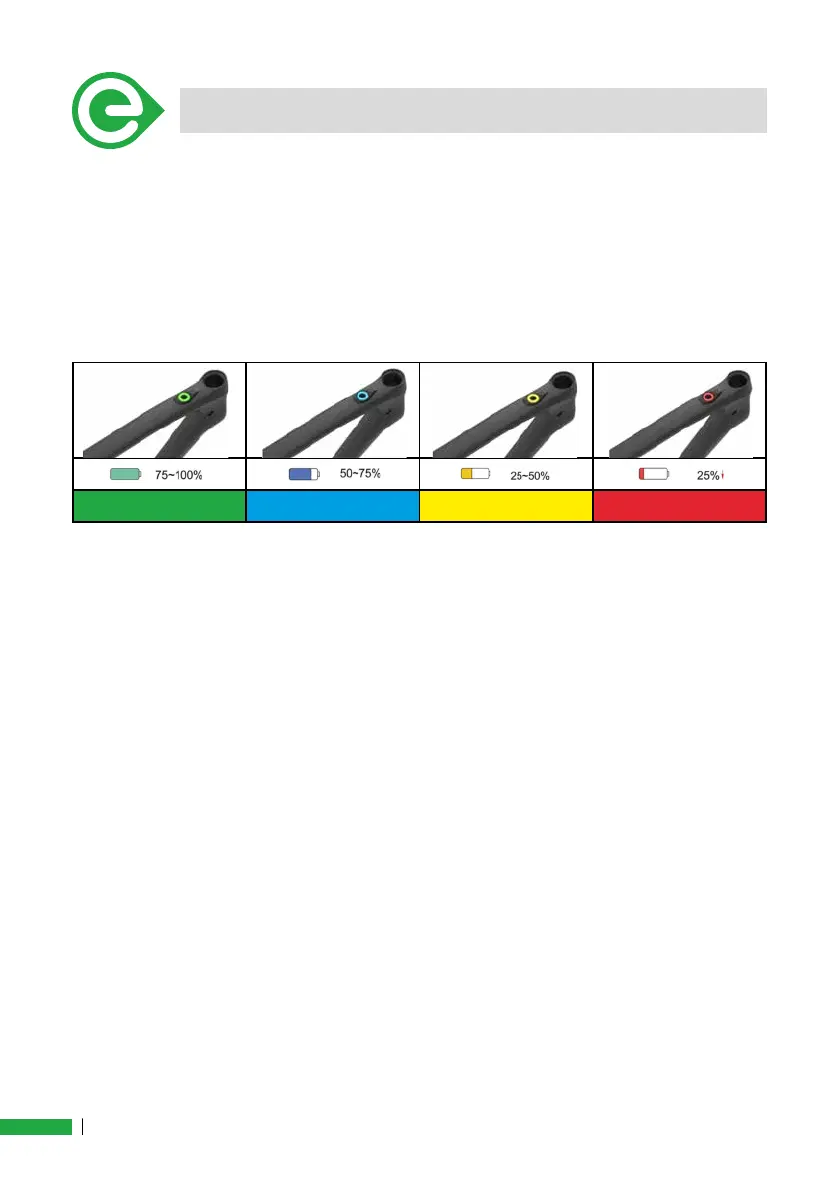
Battery Level:
While using the system, regardless of the level of assistance selected, it
will be possible to check the battery charge level.
A ash of light, will be displayed every 2 seconds, indicating the state of
charge of the battery. An accurate reading of the battery charge level can
be made via the APP.
Green Flash Blue Flash Yellow Flash Red Flash
Recharge Battery step:
Connect the battery charger to the main socket and connect the battery
charger to the e-bike charging socket. The battery charger will automati-
cally switch on and the e-bike button will start ashing every 2 seconds.
(0.5 sec. ON; 1.5 sec. OFF).
Battery charger indicator.
• Red: Charging. (Flashing e-bike button with color level battery; See
above, as battery level).
• Green: Full charge.
Error/fault condition report:
Any error of system or protections (use out of the limits or faults) are
signaled by a ashing of the button.
• Yellow: Temporary error (0.5 sec. ON; 0.5 sec OFF).
• Red:
1. The battery is not connect to controller or CAN-bus. No data
reading (0.5 sec. ON; 9.5 sec OFF).
2. The battery is charging. The level of charge is at the minimum
(0.5 sec. ON; 4.5 sec OFF).
3. Permanent failure, disconnect the battery, isolate it and return
(0.5 sec. ON; 0.5 sec OFF).



 To Next Page