1313
5. RANGE EXTENDER
Use and maintenance:
The range extender is activated by the main IT button: when you turn on
the FSA System, it will
automatically check for a RE connected. If a RE extender is present it
will be activated automatically.
You can use the power button to check the RE level or to force the RE to
turn on, however if it is not connected to a IT battery will turn off by itself.
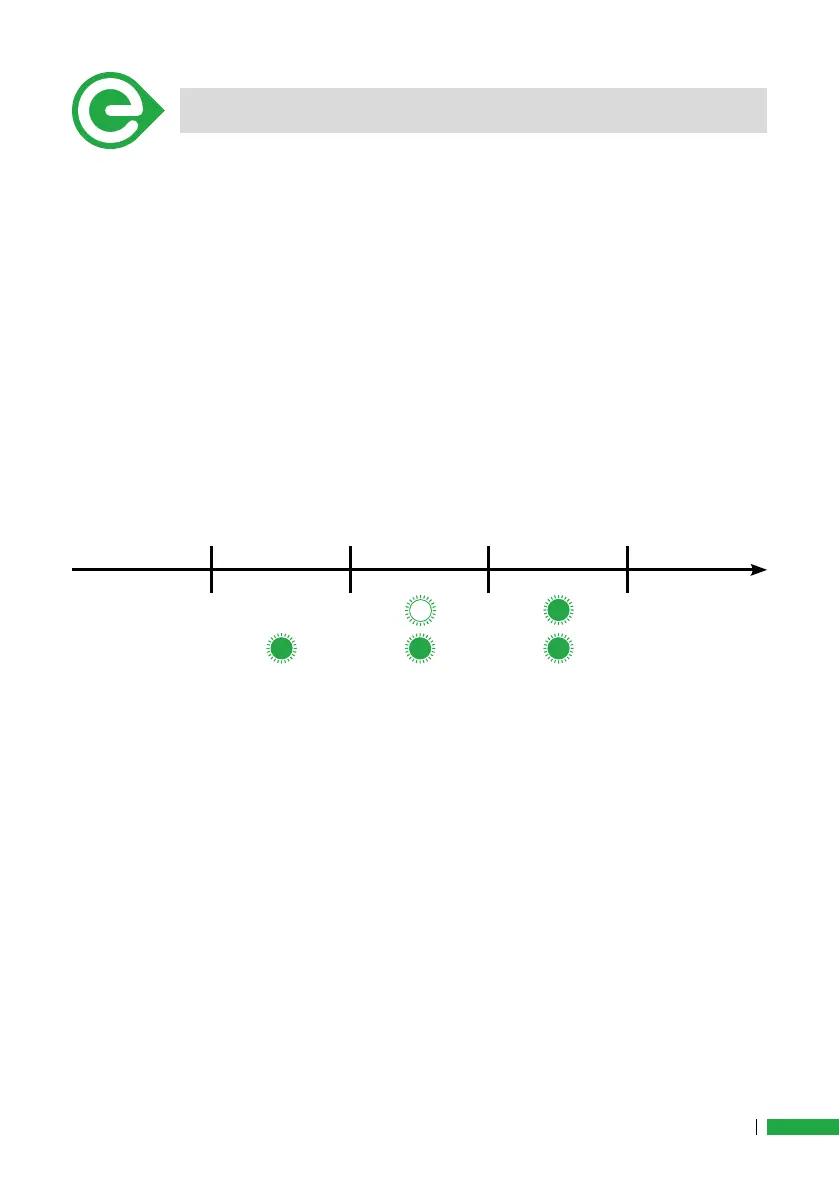
When the RE activation procedure is completed you will see the two led
on, the led combination will depend from the state of charge.
0%-25%: One LED blinking
26%-50%: One solid LED
51%-75%: One Solid LED + One blinking LED
76% -100%: Two solid LED
The system will start using the RE extend rst, when the RE charge
reach 0%, the system will start using the IT. Be aware that during this
phase the IT will turn off, it will be necessary to turn on the system. Ple-
ase be aware during this phase do not apply force on the pedal to avoid
problems with the calibration.
DO not unplug the RE when the system is ON, if you unplug the RE
when the system is on the
system will go in error mode. In case this might happen, turn off the sy-
stem and then turn on again.
Make sure not to use oil or aggressive detergent on the range extender,
this might damage the plastic shell or compromise the waterproong of
the system. Check periodically the cover button to make sure there are
no cracks and it’s not peeling off.
To charge the range extender please use the specic adaptor and plug
it to the same charged used for the main IT battery. Do not use other
adapter or other charger to charge the battery.
25% 50% 75% 100%


 To Next Page
 Loading...