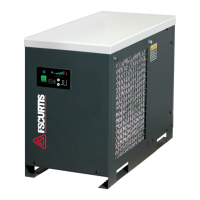
This document is an operator manual for the RNP Series Refrigerated Compressed Air Dryers, manufactured by FS-Curtis. The manual, revision A, was published in August 2012 and covers models RNP75, RNP100, RNP125, RNP150, RNP200, RNP250, RNP300, RNP400, and RNP500.
Function Description
The RNP Series Refrigerated Compressed Air Dryers are designed to remove moisture from compressed air. By cooling the air, the dryers cause water vapor to condense into liquid, which is then automatically drained, preventing re-entrainment. This process helps to ensure that the compressed air is suitable for various applications, particularly those where liquid water in the air system would be detrimental. The dryers are equipped with a refrigeration system that cools the compressed air, and an automatic drain valve to discharge the accumulated condensate.
Important Technical Specifications
The RNP Series dryers come in various models with different capacities and electrical requirements.
Rated Capacity (scfm):
- RNP75: 75 scfm
- RNP100: 100 scfm
- RNP125: 125 scfm
- RNP150: 150 scfm
- RNP200: 200 scfm
- RNP250: 250 scfm
- RNP300: 300 scfm
- RNP400: 400 scfm
- RNP500: 500 scfm
Inlet/Outlet Connections (inches):
- RNP75: 3/4 inch
- RNP100, RNP125, RNP150: 1 inch
- RNP200, RNP250, RNP300: 1-1/2 inches
- RNP400, RNP500: 2 inches
Dimensions (Height x Length x Width in inches):
- RNP75: 20.1 x 19.7 x 18.9
- RNP100, RNP125, RNP150: 20.6 x 28.3 x 13
- RNP200, RNP250: 30.0 x 35.4 x 16.1
- RNP300: 29.9 x 37.4 x 19.3
- RNP400: 29.9 x 37.4 x 19.3
- RNP500: 31.5 x 41.3 x 23.2
Power Supply (V/Ph/Hz):
- RNP75, RNP100, RNP125, RNP150: 115/1/60
- RNP200, RNP250, RNP300, RNP400, RNP500: 460/3/60
Refrigerant Compressor Capacity (BTU/hr):
- RNP75: 3,414
- RNP100, RNP125: 3,953
- RNP150: 5,406
- RNP200: 8,787
- RNP250, RNP300: 13,969
- RNP400: 17,574
- RNP500: 22,151
Input Power (kW):
- RNP75: 0.72
- RNP100: 0.74
- RNP125: 0.76
- RNP150: 1.11
- RNP200: 1.42
- RNP250: 1.98
- RNP300: 2.05
- RNP400: 2.50
- RNP500: 3.06
Refrigerant Type: All models use R-134a.
Minimum - Maximum Operating Conditions (All Models):
- Inlet Air Pressure: 10 - 232 psig
- Inlet Air Temperature: 40°F - 120°F
- Ambient Temperature: 40°F - 110°F
- Continuous operation in maximum/minimum conditions is not allowed.
Refrigerant Pressure Switch Settings (R-134a):
- Fan Cycle Control (Models 75 to 500): Cut-In 199 psig, Cut-Out 142 psig.
- Refrigerant Compressor Control - High Pressure Switch (Models 200 to 500): Cut-Out 298 psig, Cut-In 201 psig (Manual Reset).
Usage Features
Installation:
- Ambient Air Temperature: The dryer should be located indoors where ambient air temperature is between 45°F and 110°F. Operation below 40°F can cause freeze-up, and intermittent operation up to 113°F may lead to higher dew points or shutdown.
- Location and Clearance: Mount the dryer on a level base, preferably with vibration dampeners if the base vibrates. For air-cooled models, install in a clean, well-ventilated area with at least 24 inches of clearance on the sides and front for cooling airflow and service access.
- System Arrangement: Install the dryer downstream of an aftercooler or separator to ensure inlet air temperature does not exceed 120°F and contains no liquid water. For constant airflow, placement downstream of the receiver tank is recommended. For fluctuating air demand, upstream of the receiver is better. Inlet and outlet shutoff valves and depressurization valves are recommended for servicing. Bypass piping can be installed for uninterrupted airflow during service. An oil-removal filter, if used, should be installed downstream of the refrigerated dryer to prolong its element life.
- Piping and Connections: User-furnished piping and fittings must be rated for the maximum operating pressure on the dryer data plate and comply with applicable codes. Piping should be supported to prevent stress on dryer connections and be at least the size of the inlet/outlet connections.
- Removing Condensate: Dryers are equipped with automatic drain valves and internal drain hoses. Users must install a separate discharge line to an environmentally approved condensate collection/disposal system, recommending 1/2 inch or larger piping/tubing. Drain lines should allow condensate to be seen as it drains.
- Electrical Connections: Dryers conform to NEMA Type 1 electrical standards. Field wiring must comply with local and national codes. Line voltage must match the dryer data plate. Operating with improper line voltage can void the warranty.
Instrumentation:
- ON/OFF Switch: Located on the front panel, with a light indicating when the dryer is on.
- Dew Point Indicator (RNP75-RNP150): Indicates dryer conditions. Red zone is normal during startup, then moves to green for normal operation. Red during normal operation indicates a need for checking or service.
- Dryer System Monitor (DSM) (RNP200-RNP500): Features LED dew point temperature indicators and electronic drain valve timing controls. Green LEDs indicate normal operation; red LED indicates a need for checking. All LEDs illuminate for 15 minutes upon startup, then red and yellow LEDs should extinguish.
- Automatic Drain Valve: Electronically controlled to discharge condensate.
- Drain Timer (RNP75-RNP150): Mounted directly on the drain valve. Adjustment knobs for open time (0.5-9 seconds) and closed time (0.5-9 minutes). Includes LEDs for open/closed status and a "TEST" button.
- DSM Drain Valve Controls (RNP200-RNP500): Adjustments for open time (seconds) and closed time (minutes) are made on the DSM. Includes LEDs for open/closed status and a "TEST" button.
- Electronic Drain Valve Adjustment: To minimize air losses, adjust the drain valve control time to open just long enough to discharge accumulated condensate. Initial settings are 1-2 seconds open and 30 seconds closed. Adjust if liquid still discharges at closing or if only air discharges.
Start-Up/Operation:
- Turn the dryer ON/OFF switch to OFF.
- Verify main electrical supply voltage matches the data plate.
- Check compressed air line connections and support; check bypass valve system if installed.
- SLOWLY pressurize the dryer, with outlet valves closed to prevent flow.
- Turn on main electrical power.
- Ensure adequate ventilation for air-cooled dryers.
- Turn the power switch to ON; the refrigerant compressor will start.
- Allow 15 minutes for the dryer to run; confirm temperature indicators are in the green zone.
- SLOWLY open the dryer outlet valves.
- Confirm condensate discharge from the drain valve by pressing the "TEST" button.
- Check drain valve timing and adjust if necessary.
- Confirm inlet air temperature, pressure, and airflow meet specified requirements.
- Confirm condensate lines discharge into an approved collection/disposal system.
The dryer is designed for continuous operation and will not freeze up if demand is interrupted.
Shutdown:
- For electrical repairs: Turn off power switch, disconnect main power supply, and lock out/tag per OSHA.
- For mechanical repairs/service: Vent internal pressure to atmospheric pressure.
- WARNING: Disconnect power supply and depressurize before servicing to prevent injury and equipment failure.
Maintenance Features
The dryers require minimal maintenance for satisfactory operation. Refrigeration system maintenance should be performed by a competent refrigeration mechanic.
Daily Maintenance:
- Check the operation of the automatic drain valve at least once daily. Refer to the Field Service Guide for remedies to malfunctions and the AUTOMATIC DRAIN VALVE section for adjustment.
Weekly Maintenance:
- Ambient Air Filter: Inspect weekly and clean if necessary. Dirty filters reduce efficiency and can damage the product.
- Open ambient filter side door.
- Remove air filter by sliding upwards.
- Wash with soap and water, allow to dry. Do not use solvents.
- Reinstall air filter and right side door.
- Replace damaged filters.
- WARNING: Do not operate the dryer without the ambient air filter, as this can cause permanent condenser damage.
Monthly Maintenance:
- Air-cooled condensers: Inspect condenser coils monthly. If necessary, remove dirt or particles with compressed air from an OSHA-approved air nozzle (max 30 psig).
Electronic Drain Valve Disassembly and Servicing:
- CAUTION: Do not disassemble the drain valve timer or attempt electrical repairs; replace if defective.
- The valve body may need cleaning due to particulate contamination.
- Disassembly Procedure:
- Turn power switch off.
- Disconnect main power supply.
- Depressurize unit.
- Lock out and tag power supply per OSHA.
- Remove hoses connecting drain valve to strainer.
- Remove screw and washer from front of drain valve.
- Remove power supply connector and gasket (with timer assembly if attached) from solenoid coil housing.
- Remove coil fixing nut and spring washer from top of solenoid coil housing.
- Lift solenoid coil housing off solenoid core.
- Unscrew solenoid core from valve body.
- Post-Disassembly Maintenance:
- Inspect internal parts of valve body; clean or replace as needed. Replace solenoid valve if damaged.
- Remove debris from valve body.
- Wipe solenoid core components with a clean cloth or blow out debris with compressed air (max 30 psig).
- Check plunger assembly for cleanliness and free movement.
- If timer is attached, check electrical continuity across it.
- Reassembly: Reverse the disassembly steps. After reassembly, connect power, check for air/condensate leaks, tighten connections, and adjust the drain cycle.
Returns to Manufacturer:
- Contact your local distributor for a return authorization number and shipping address before returning any dryer or component. Mark the package with the return authorization number and ship freight prepaid as directed.
Warranty:
- The manufacturer warrants products free from defects in material or workmanship for two years from shipment date (parts and labor). Heat exchangers are covered for an additional three years (parts only), totaling five years.
- Unauthorized service voids the warranty.
- The maximum damages liability is the original purchase price of the product or part.
- The warranty is exclusive and in lieu of all other warranties, including implied warranties of merchantability and fitness for a particular purpose.
- The manufacturer is not liable for loss of use, incidental, or consequential costs/damages.
- Authorization from the service department is required before returning material or performing in-warranty repairs.

 Need help?

 To Next Page
 General