This document provides a quick reference guide for the FUJIFILM ApeosPort® 5570 / 4570 multifunction device, focusing on daily care and maintenance procedures. The guide covers essential tasks such as clearing paper jams, replacing toner cartridges, and replacing the waste toner container.
Function Description:
The FUJIFILM ApeosPort® 5570 / 4570 is a multifunction device designed for office environments, capable of handling various document-related tasks. While the manual primarily focuses on maintenance, it implies the device's core functions include printing, copying, and scanning, given the presence of a document feeder and scanner components mentioned in the paper jam clearing sections. The device is designed for efficient document processing, with features that facilitate user maintenance to ensure continuous operation.
Important Technical Specifications (Inferred from Maintenance Procedures):
- Paper Handling: The device supports multiple paper input sources, including a standard tray and a bypass tray, as indicated by the paper jam clearing sections (1.4 Standard Tray and 1.5 Bypass Tray). It also features a document feeder for scanning or copying multiple originals (1.1 Document Feeder).
- Toner System: It uses replaceable toner cartridges (Section 2: Replacing Toner) and a separate waste toner container (Section 3: Replacing Waste Toner Container), indicating a dry toner-based printing system.
- Accessibility for Maintenance: The design incorporates easily accessible covers and levers for maintenance, such as the document feeder left cover, upper left cover, lower left cover, and front cover, to facilitate clearing paper jams and replacing consumables.
- Scanning Capability: The mention of a "Side 2 scanner" (1.1 Document Feeder, step 4) suggests the device has duplex scanning capabilities, allowing it to scan both sides of a document in a single pass.
Usage Features (Inferred from Maintenance Procedures):
- User-Friendly Jam Clearing: The manual details a step-by-step process for clearing paper jams from various locations, including the document feeder, inside the upper left cover, inside the lower left cover, the standard paper tray, and the bypass tray. This indicates a design that prioritizes ease of access for users to resolve common issues without requiring technical support. Each step is accompanied by clear illustrations, making the process intuitive.
- Document Feeder Jam Clearing: Users are instructed to open the document feeder left cover, remove the jammed document, and turn a knob to eject any remaining paper. If the document is still not found, opening the document cover and gripping a lever to access the Side 2 scanner is advised.
- Inside Upper Left Cover Jam Clearing: This involves pulling three distinct levers (A1, A2, A3) in sequence to open internal sections and access jammed paper.
- Inside Lower Left Cover Jam Clearing: Users need to lift a release lever to open the cover and then remove the jammed paper.
- Standard Tray and Bypass Tray Jam Clearing: For these trays, the procedure involves pulling out the tray (for the standard tray), removing the jammed paper, and then pushing the tray back in (for the standard tray).
- Intuitive Consumable Replacement: The procedures for replacing toner and the waste toner container are designed to be straightforward.
- Toner Replacement: Users are guided to open the front cover, slowly pull out the empty toner cartridge, gently shake the new cartridge, and then insert it with the arrow facing up before closing the front cover. This process minimizes the risk of spills and ensures correct installation.
- Waste Toner Container Replacement: This involves opening the front cover, taking out the full waste toner container, properly inserting the new one, and closing the front cover. The clear steps help prevent improper disposal and ensure the device continues to operate cleanly.
- Safety and Operational Checks: Before any maintenance, the manual emphasizes confirming that the machine is not operating (Sections 2 and 3), which is a crucial safety measure and ensures that internal components are not moving during the process.
Maintenance Features:
- Self-Serviceability: The guide is a testament to the device's design for user-level maintenance. Common issues like paper jams and consumable replacements are intended to be resolved by the end-user, reducing the need for service calls.
- Modular Design (Inferred): The presence of distinct, replaceable components like toner cartridges and waste toner containers, along with various access covers, suggests a modular design that simplifies maintenance and part replacement.
- Visual Guidance: The inclusion of detailed illustrations for each step of the maintenance procedures is a key feature, making the instructions easy to follow even for users who may not be familiar with technical manuals. The arrows in the illustrations clearly indicate the direction of movement for pulling levers, removing paper, or inserting cartridges.
- Clear Labeling: The levers for clearing jams inside the upper left cover are labeled (A1, A2, A3), providing clear points of reference for users.
- Preventive Maintenance (Implicit): While not explicitly stated as "preventive maintenance," the routine replacement of toner and waste toner containers is a form of scheduled maintenance that ensures the device continues to function optimally and prevents issues related to depleted consumables or full waste containers.
- Troubleshooting Support: The document serves as a primary troubleshooting resource for common operational interruptions, specifically paper jams and consumable alerts.
In summary, the FUJIFILM ApeosPort® 5570 / 4570 is a robust multifunction device designed with user-friendly maintenance in mind. Its features facilitate easy paper jam clearing and straightforward replacement of consumables, supported by clear, illustrated instructions to ensure minimal downtime and efficient operation in an office environment. The emphasis on self-serviceability underscores its practical design for daily use.

 Need help?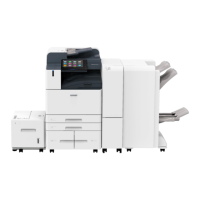

 To Next Page
 General