
 To Next Page
J
jason53Sep 23, 2025
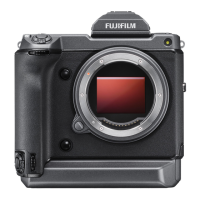
Why does the EVF not turn on in my FujiFilm GFX100 Digital Camera?
- IiwileySep 23, 2025
If the EVF (electronic viewfinder) does not turn on, slide the EVF on until it clicks into place.

Why does the EVF not turn on in my FujiFilm GFX100 Digital Camera?
If the EVF (electronic viewfinder) does not turn on, slide the EVF on until it clicks into place.
How to fix a FujiFilm GFX100 Digital Camera that won't turn on?
If your FujiFilm Digital Camera isn't turning on, here are a few things you can check: * Make sure the battery isn't exhausted. Charge it or try a fully-charged spare. * Ensure the battery is inserted correctly. * Check that the battery tray is properly latched.
Why does my FujiFilm GFX100 turn off suddenly?
If your FujiFilm Digital Camera turns off suddenly, it is likely due to an exhausted battery. Charge the battery or insert a fully-charged spare battery.
Why are my FujiFilm Digital Camera pictures blurred?
Blurred pictures on your FujiFilm Digital Camera can result from: * A dirty lens. Clean the lens. * Something blocking the lens. Keep objects away from the lens. * If 's' is displayed during shooting and the focus frame is red, check the focus before shooting. * If shutter speed is slow and the ambient temperature is high, use pixel mapping. * If the camera has been used continuously at high temperatures or a temperature warning is displayed, turn the camera off and let it cool down.
Why does pressing the Q button not display the quick menu on my FujiFilm Digital Camera?
If pressing the Q button does not display the quick menu, it may be because TTL-LOCK is active. End TTL-LOCK.
Why is my FujiFilm Digital Camera upload failing or being interrupted?
If your FujiFilm Digital Camera upload fails or is interrupted: * The smartphone may be connected to another device. The smartphone and camera can connect to only one device at a time. End the connection and try again. * There may be several smartphones in the vicinity. Try connecting again, as the presence of multiple smartphones can make connection difficult.
Why is FUJIFILM X RAW STUDIO or FUJIFILM X Acquire failing to correctly detect my camera?
Check the option selected for PC CONNECTION MODE on the camera. Select USB RAW CONV./BACKUP RESTORE before connecting the USB cable.
Why can't I connect my FujiFilm GFX100 Digital Camera to my smartphone?
If you're having trouble connecting your FujiFilm Digital Camera to your smartphone: * Make sure the smartphone is not too far away. Move the devices closer. * Nearby devices may be causing radio interference. Move the camera and smartphone away from microwave ovens or cordless phones.
How do I change the language on my FujiFilm GFX100 from another language to English?
To change the display language on your FujiFilm Digital Camera to English, select ENGLISH for D USER SETTING > Qa.
Why is my FujiFilm GFX100 Digital Camera flash not fully lighting the subject?
If the flash on your FujiFilm Digital Camera isn't fully lighting the subject: * Make sure the subject is within the flash range. * Ensure that the flash window is not obstructed; hold the camera correctly. * Check that the shutter speed isn't faster than the sync speed. Choose a slower shutter speed.
 General
| Sensor Type | CMOS |
|---|---|
| Sensor Size | 43.8 x 32.9 mm |
| Effective Pixels | 102 Megapixels |
| Image Stabilization | 5-axis in-body image stabilization |
| Weight | Approx. 1400 g (including battery and memory card) |
| Image Processor | X-Processor 4 |
| Continuous Shooting | 5 fps |
| Dimensions | 156.2 x 163.6 x 102.9 mm |
| Weather Sealing | Yes |
| ISO Sensitivity | ISO 100-12800 (expandable to 50-102400) |
| Viewfinder | 5.76M-dot OLED electronic viewfinder |
| LCD Screen | 3.2-inch, 2.36M-dot tilting touchscreen |
| Video Recording | 4K/30p |
| Battery Life | Approx. 800 shots |
| Camera Type | Mirrorless medium format |
| Shutter Speed | 1/16000 sec to 60 min |
| Storage Media | Dual SD card slots (UHS-II) |
| Battery | NP-T125 |
| Connectivity | Wi-Fi, Bluetooth, USB Type-C, HDMI |
| Autofocus System | Hybrid AF (TTL contrast AF / TTL phase detection AF) |