EasyManua.ls Logo

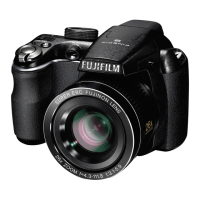
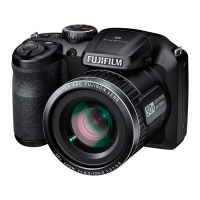
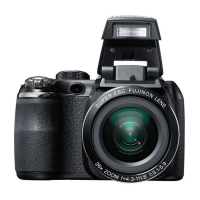
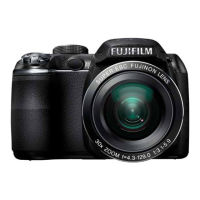
FujiFilm S4000 Series - User Manual

FujiFilm S4000 Series
147 pages
Print Icon
To Next Page IconTo Next Page
Loading...
DIGITAL CAMERA
FINEPIX
S4000
/
S4000A
/
S3900
Series
S3400
/
S3300
/
S3200
Series
Owners Manual
Thank you for your purchase of this prod-
uct. This manual describes how to use your
FUJIFILM FinePix S4000/S4000A/S3900 se-
ries, S3400/S3300/S3200 series digital cam-
era and the supplied software. Be sure that
you have read and understood its contents
before using the camera.
For information on related products, visit our website at
http://www.fujifilm.com/products/digital_cameras/index.html
Before You Begin
First Steps
Basic Photography and Playback
More on Photography
More on Playback
Movies
Connections
Menus
Technical Notes
Troubleshooting
Appendix
BL01268 -200
EN
Downloaded From camera-usermanual.com Fujifilm Manuals

Table of Contents

Questions and Answers

  • J
    Jared ReevesAug 14, 2025
    Why won't my FujiFilm S4000 turn on?
    • J
      jacqueline16Aug 14, 2025
      Your FujiFilm Digital Camera might not be turning on because the batteries are exhausted. Try inserting fresh or fully-charged spare batteries. Also, check if the batteries are in the correct orientation and that the battery-chamber cover is latched. If you're using an AC power adapter and DC coupler, ensure they are properly connected. If the camera has been left for an extended period without batteries or the adapter, wait a few moments after inserting batteries or connecting the adapter before turning it on.
  • P
    Paul LeeAug 17, 2025
    What to do if my FujiFilm S4000 is not taking pictures?
    • M
      Marissa GatesAug 17, 2025
      If your FujiFilm Digital Camera isn't taking pictures when you press the shutter button, it might be due to a full memory card. Try inserting a new memory card or deleting existing pictures. The memory card may also need to be formatted, or the contacts might be dirty; clean them with a soft, dry cloth. If the memory card is damaged, insert a new one. Make sure the batteries aren't exhausted and that the camera is turned on.
  • X
    xdodsonAug 20, 2025
    Why does my FujiFilm Digital Camera battery drain so fast?
    • M
      Melissa SellersAug 20, 2025
      If the batteries in your FujiFilm Digital Camera are running down quickly, it could be due to several reasons. If the batteries are cold, warm them up before use. Also, dirt on the battery terminals can cause this, so clean them with a soft, dry cloth. Using M mode or having u CONTINUOUS selected for F AF MODE can also drain the battery. Select another shooting mode or a different focusing option. If you are using Ni-MH batteries, discharge them using the P DISCHARGE option and recharge them. If the batteries are exhausted, insert fresh or fully-charged spare batteries.
  • S
    Stephen CarlsonAug 25, 2025
    Why are my FujiFilm Digital Camera pictures blurred?
    • W
      William CurryAug 25, 2025
      Blurred pictures on your FujiFilm Digital Camera can be caused by a dirty or blocked lens; clean the lens and keep objects away from it. If 's' is displayed during shooting and the focus frame is red, check the focus before shooting. If 'k' is displayed, use the flash or a tripod.
  • J
    James DixonAug 27, 2025
    Why FujiFilm S4000 Digital Camera does not focus?
    • C
      Clifford BlankenshipAug 27, 2025
      If your FujiFilm Digital Camera isn't focusing, it could be because the subject is too close. Select macro mode. If the subject is far away, cancel macro mode. If the subject isn't suited to autofocus, use focus lock.
  • D
    Dawn HarrisAug 30, 2025
    What to do if my FujiFilm S4000 Digital Camera flash does not fire?
    • Z
      Zachary FisherAug 30, 2025
      If the flash on your FujiFilm Digital Camera isn't firing, make sure the flash is raised and not charging. Also, the flash might not be available in the current shooting mode, so try choosing a different mode. Ensure your batteries aren't exhausted by inserting fresh ones. If you're in super macro or continuous shooting mode, turn those off.
  • D
    Daniel NewtonSep 2, 2025
    What to do if my FujiFilm S4000 Digital Camera is not working as expected?
    • K
      Kelsey HudsonSep 3, 2025
      If your FujiFilm Digital Camera isn't functioning as expected, it may be due to a temporary malfunction. Try removing and reinserting the batteries or disconnecting and reconnecting the AC power adapter/DC coupler. Also, ensure that the batteries are not exhausted by inserting fresh, fully-charged ones.
  • B
    Brian ClarkSep 6, 2025
    Why is face detection not available on my FujiFilm S4000?
    • K
      Kevin JonesSep 6, 2025
      Intelligent Face Detection may not be available on your FujiFilm Digital Camera because you are in the current shooting mode. Choose a different shooting mode.
  • M
    Mr. Kenneth WoodsSep 9, 2025
    Why does the monitor go dark after shooting with my FujiFilm S4000 Digital Camera?
    • S
      Stephen MuellerSep 9, 2025
      The monitor on your FujiFilm Digital Camera may darken after shooting because the flash has fired. The monitor may darken while the flash charges, so wait for the flash to charge.

Summary

Important Safety Instructions

General Safety Precautions

Covers essential safety guidelines for operation, installation, and hazard avoidance.

About Safety Icons

Explains the meaning of warning, caution, and prohibition icons used in the manual.

Battery and Power Supply Safety

Details safe handling, charging, and usage of batteries and AC power adapters.

Camera Handling and Environmental Safety

Covers precautions for camera use, environment, electrical interference, and legal notices.

Introduction and First Steps

Symbols, Accessories, and Parts

Explains manual symbols, lists camera parts, accessories, displays, and mode dial functions.

Initial Setup Procedures

Guides on initial setup: attaching strap, inserting batteries/card, powering camera, language, date/time.

Basic Photography

Shooting Modes Explained

Details various shooting modes from auto to manual for controlling exposure and scenes.

Viewing Pictures

Basic steps for viewing pictures on the camera and deleting unwanted images.

Photography Techniques

Covers advanced features like face detection, focus lock, flash usage, self-timer, and exposure adjustments.

Movies and Connections

Recording and Viewing Movies

Instructions for shooting, zooming, and playing back video recordings.

Connecting and Printing

Guides on connecting to devices, installing software, and printing pictures via USB.

Menus and Settings

Shooting Menus

Explains the F-Mode and Shooting menus for camera configuration.

Playback Menus

Details the F-Mode and Playback menus for managing stored images.

Setup Menu

Configuring Camera Settings

Covers camera setup options like date, time, language, formatting, and system settings.

Troubleshooting and Maintenance

Camera Care and Maintenance

Provides guidelines for proper storage, cleaning, and maintenance of the camera.

Common Problems and Solutions

Addresses common issues encountered during camera operation and their solutions.

Warning Messages and Displays

Explains warning messages displayed on the monitor and how to resolve them.

Appendix and Specifications

Glossary and Specifications

Provides definitions, memory card info, detailed technical specs, and TV system info.

Restrictions on Camera Settings

Shooting Mode Settings Overview

A reference table showing option availability across different shooting modes.

FujiFilm S4000 Series Specifications

General IconGeneral
Sensor TypeCCD
Optical Zoom30x
Focal Length4.3 - 129mm (35mm equivalent: 24 - 720mm)
Digital Zoom6.7x
Sensor Size1/2.3 inch
Effective Pixels14.0 million
Aperture Rangef/3.1 - f/5.9
LCD Screen Size3.0 inch
Video Resolution1280 x 720 (720p)
Storage MediaSD / SDHC card
Dimensions118 x 81 x 100 mm
Battery TypeAA batteries (4) (included)
Shutter Speed8 - 1/2000 sec

Related product manuals