EN-1ENGLISH
Changes and Additions
Flash Photography
X-Pro2 Owner’s Manual: P 78, 79
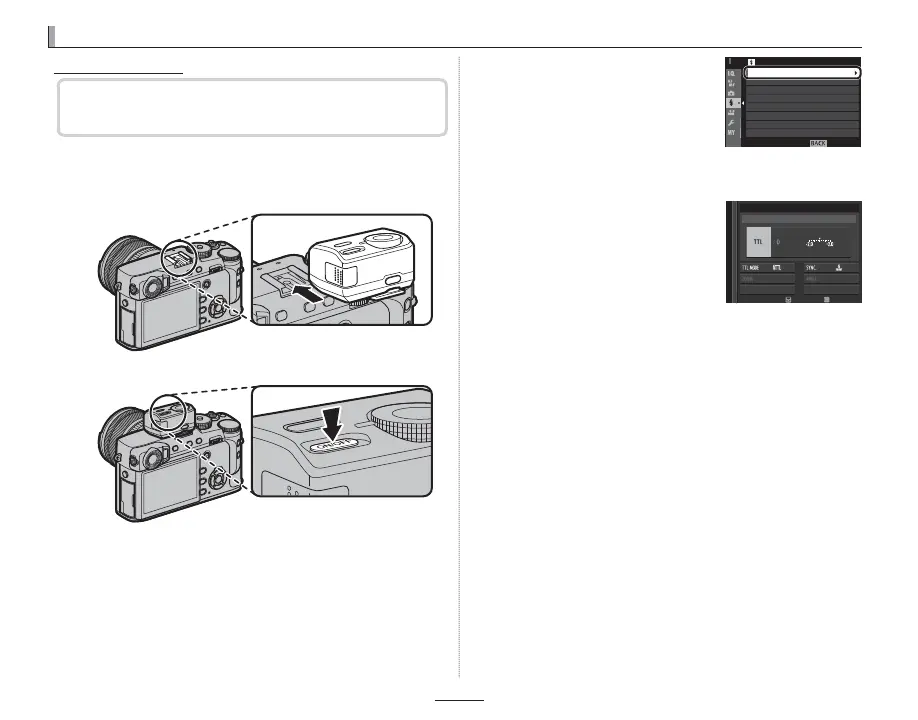
Flash setup has changed.
1
Remove the hot shoe cover and slide the ash onto
the hot shoe as shown, stopping when it clicks into
place.
2
Turn the ash on.
R For more information, see the documentation
provided with the ash unit.
3
Select FLASH FUNCTION
SETTING in the F FLASH
SETTING menu.
EXIT
FLASH SETTING
RED EYE REMOVAL
TTL-LOCK MODE
FLASH FUNCTION SETTING
LED LIGHT SETTING
MASTER SETTING
CH SETTING
Q If the ash is not raised, settings will be adjusted
for units connected via the sync terminal (EN-3).
4
Highlight items using the
selector and rotate the rear
command dial to change the
highlighted setting.
MODE
SUPPLIED FLASH
ADJUST
END
5
Press DISP/BACK to put the changes into e ect.
Q Depending on the distance to the subject, some
lenses may cast shadows in photos taken with the
ash.
Q The ash will not re at some settings, for example
when the electronic shutter is used.
Q Choose shutter speeds slower than 250X when us-
ing the ash in exposure mode S (shutter-priority
AE) or manual (M).
R In TTL mode, the ash may re several times with
each shot. Do not move the camera until shooting
is complete.



 To Next Page