0.Trouble shooting(Premium 4S/ Premium 4.0)
■Precautions for repair or exchange
a. Make sure to unplug when you exchange parts, teardown, inserting or removing the connector.
b. Make sure to work for repair after following actions when you touch main circuit board(each board) as
semiconductor(Ex. IC) is static-sensitive.
※Remove human earth or touch an earth(Ex. refrigerator, washing machine) directory by hand and release the static
from electrically charged body.
c. Do not touch power supply board without discretion as high(AC100V~240V) and low(24V・12V・5V) pressure
are mixed in the power supply board. It may cause electric shocks. Please be very careful with checking voltage.
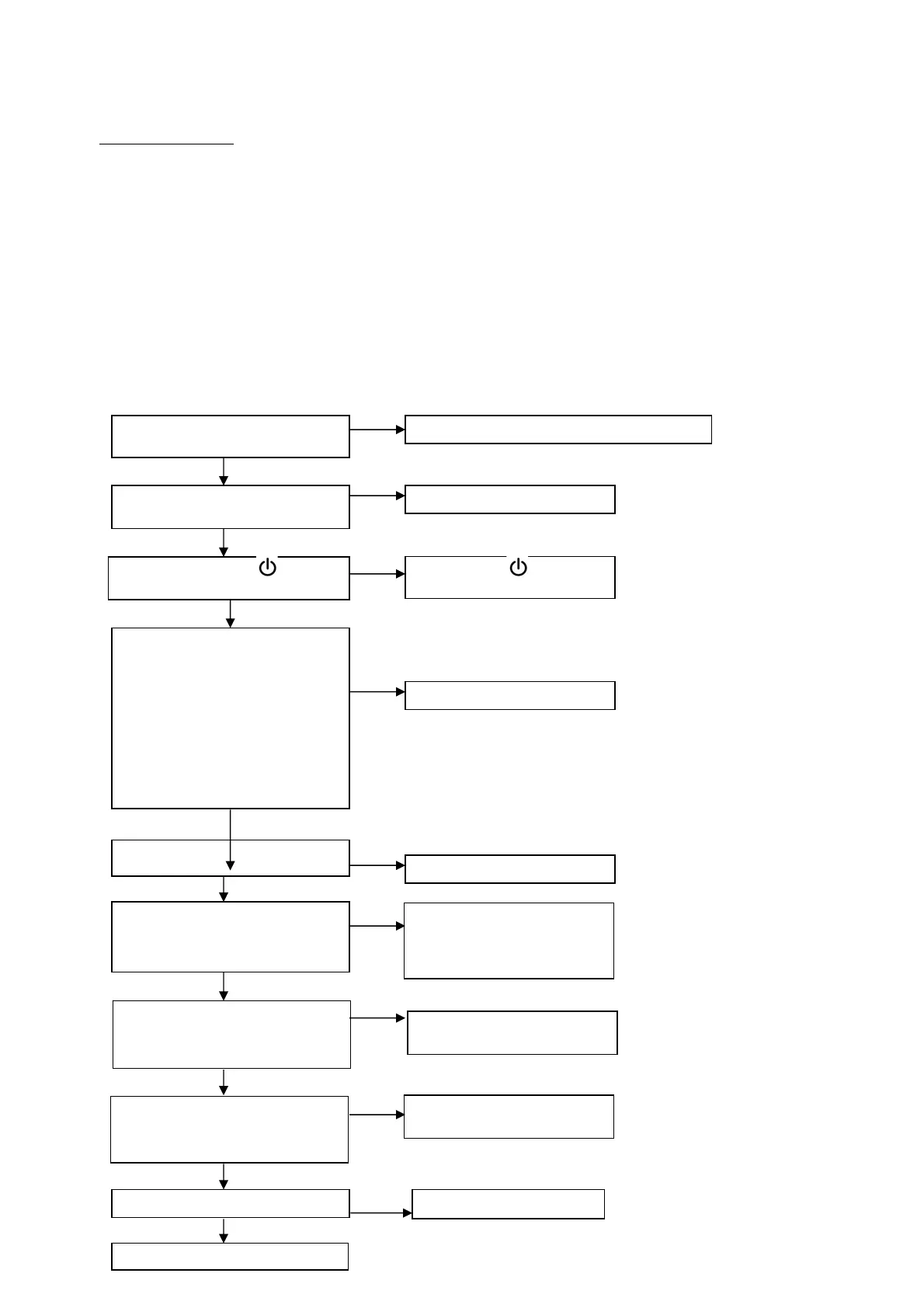
1.Power does not turn ON
(Premium 4S:LCD does not light up/Premium 40:ON/OFF button does not light up)
Is the power cord plug connected?
Is the main power switch on?
Connect the power cord plug with the receptacle.
No
es
Switch ON
Did you press “ON/OFF “ button?
Press “ON/OFF “ button.
Check if each cord in the main circuit
board is connected to appropriate
connector.
Power cord・Main circuit board(CN1)
Remote cord・Main circuit boardCN4)
8 pin cord・
Power supply board(CN301),
Main circuit board(CN1)
2 pin cord・
Power supply board(CN601)
Main circuit board(CN2)
Make sure to connect each cord.
Power mark overvoltage is appeared
on power supply board connector of
power cord(CN1)?
Check with the tester.
Breaking or cut of power cord or
disconnection of power switch.
Repair to exchange.
No cut or breaking of remote cord?
Exchange remote control.
Exchange remote cord.
es
es
es
es
No
No
No
No
No
Below voltage is shown from the
connector of power supply board
(CN301)? Check with the tester.
Between Pin # 1 - #2:DC12V
Exchange the power supply
board.
No
es
Remote cord is firmly connected to
remote board connector(CN1)
Make sure to connect it.
es
No
Below voltage is shown from the
connector of main circuit
board(CN4)? Check with the tester.
Between Pin# 1 - #2:DC5V
Exchange main circuit board.
No
es


 To Next Page