1. VERTICAL LOUVER CONTROL
3. SWING OPERATION
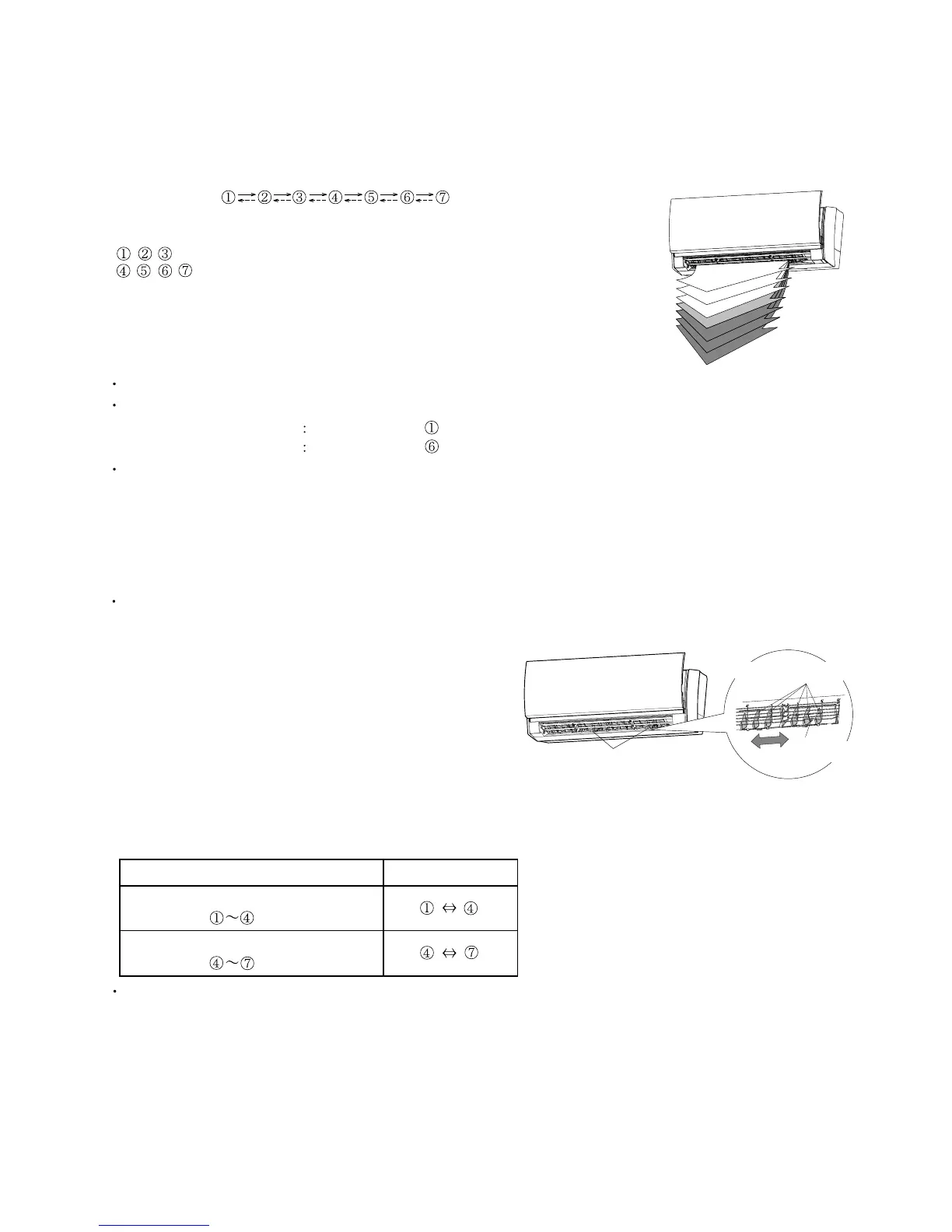
Each time the button is pressed, the air direction range will change as follow:
(Function Range)
01-12
The vertical airflow direction is set automatically as shown, in accordance with the type of operation selected.
Cooling / Dry mode
Horizontal flow
Heating mode Downward flow
When the swing signal is received from the remote controller, the vertical louver starts to swing.
(Table9 : Swinging Range)
(Fig.9 : Air Direction Range)
Cooling / Dry mode
Fan mode ( )
Types of Air flow Direction Setting:
, , : During Cooling/Dry modes
, , , : During Heating
The Remote Controller's display does not change.
Use the air direction adjustments within the ranges shown above.
During AUTO mode operation, for the first a few minutes after beginning operation,
air-flow will be horizontal 1; the air direction cannot be adjusted during this period.
The air flow direction setting will temporarily become 1 when the temperature of the air -flow is
low at the start of the Heating mode.
Range
Heating mode
Fan
m
ode ( )
The SWING operation may stop temporarily when the air conditioner’s fan is not operating,
or when operating at very low speeds.
1
2
3
4
5
6
7
2. ADJUST THE RIGHT-LEFT LOUVERS
Move the Right-Left louvers to adjust air flow in the direction you prefer.
Knob (2 places)
Right-Left Louvers
Knob
To select Vertical Airflow Swing Operation
To select Horizontal Airflow Swing Operation
(No function)
For Wall Mounted Type < AS*G07/09/12/14LUCA >


 To Next Page
 Loading...