8
EN
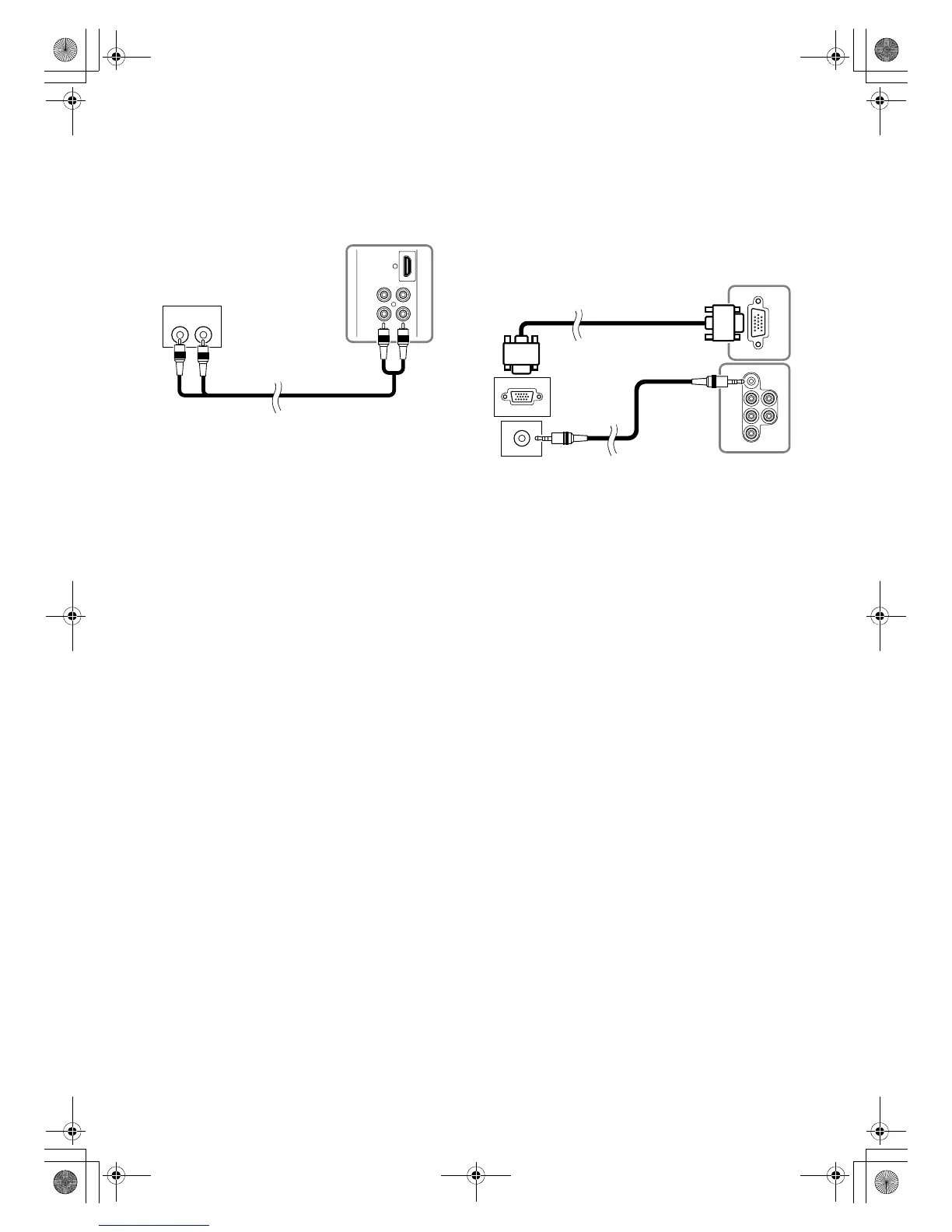
[AUDIO OUT CONNECTION]
If you connect this TV to an external audio device, you can enjoy
stereo (2 channel) audio.
Connect the audio input jacks of your video device to the
AUDIO OUT jacks of this unit. Use the RCA audio cable
(commercially available).
[PC CONNECTION]
This TV is equipped with a PC-IN jack. If you connect this to
your PC, you can use this unit as a computer monitor.
1) Connect the monitor jack of your PC to the PC-IN jack of
this unit. Use a VGA cable (commercially available).
2) Connect the audio line out jack of your PC to the PC-IN
AUDIO jack of this unit. Use a mini-plug audio cable
(commercially available).
AUD IO IN
LR
Rear of this TV
To
AUDIO OUT
jacks
audio cable (not supplied)
To audio
input jacks
Rear of this TV
mini-plug
audio cable
(not supplied)
To PC-IN jack
VGA cable (not supplied)
To PC-IN
AUDIO jack
To monitor jack
To audio line out jack
A73F0EP_EN.fm Page 8 Monday, July 30, 2007 3:38 PM


 To Next Page