
 Need help?
Do you have a question about the Funsnap DIVA and is the answer not in the manual?
Overview of the DIVA drone's features, flight control, camera, and app.
Lists essential documents provided with the DIVA drone for user reference.
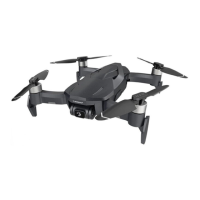
Identifies and illustrates the physical parts of the DIVA drone.
Details the drone's intelligent battery features and indicators.
Explains the meaning of various LED indicators on the aircraft.
Describes the location and types of propellers used on the drone.
Details the drone's gimbal and camera specifications and capabilities.
Instructions for powering, checking, and charging the intelligent battery.
Step-by-step guide for installing and removing the drone's battery.
Important safety guidelines for handling and charging the battery.
Detailed explanation of front and rear LED indicators for aircraft status.
Describes propeller placement and types (CW/CCW).
Describes the two available gimbal operation modes: Stabilized and FPV.
Safety precautions to avoid damage or malfunction of the gimbal.
Details the camera sensor, lens, video/photo capabilities, and app preview.
Lists compatible SD card brands and capacities for the drone.
Information on using USB for file transfer.
Identifies and labels the parts of the remote controller.
Instructions on how to charge the remote controller.
Steps to power the remote controller on and off.
Explains battery level indicators on the remote controller.
Covers auto take-off/land and basic flight control modes.
Details stick controls for Mode 1 and Mode 2 flight operations.
How to activate and manage the RTH function.
Using the remote dial to adjust camera tilt.
How to capture photos and record videos using the remote.
Optimizing signal transmission with antenna positioning.
Steps to activate DIVA devices for the first time.
Guide to connect mobile device to aircraft via Wi-Fi and the app.
Explanation of the elements displayed on the flight screen interface.
Accessing settings for geofencing, control rates, and firmware.
Switching between photo and video capture modes.
Using the button to start/stop photos or videos.
Adjusting parameters like ISO, shutter, resolution, and filters.
Previewing captured photos and videos.
Adjusting the camera's tilt angle.
How to perform an emergency stop of the aircraft motors.
Selecting and using advanced flight modes.
Initiating the automatic return to home function.
Triggering automatic take-off and landing.
Switching between map and preview screens.
Explains map view elements like location, waypoints, and geofencing.
Changing the map display mode.
Creating and following waypoints for autonomous flight.
Details camera modes, settings, and playback within the app.
Instructions for updating firmware for aircraft components.
Safety measures and requirements for firmware updates.
Guidelines for suitable flying environments.
Instructions for IMU and Compass calibration.
Step-by-step guide for IMU horizontal calibration.
Procedures for compass calibration, including phase 1.
Guidance for performing IMU 6-direction calibration.
Describes optical flow mode for hovering.
Explains GPS and Attitude modes for hovering.
Procedures for auto, manual, and forced take-off and landing.
Explains stick controls and flight speed limits.
How RTH works, trigger methods, and cancellation.
Descriptions of various intelligent flight modes like Rocket, Orbit.
Methods to exit intelligent flight modes.
Detailed technical specifications for camera and aircraft.
Lists all items included in the DIVA drone package.
Critical warnings about lithium polymer battery hazards.
Pre-charge checks for battery and charger.
Precautions to take before and during battery charging.
General precautions for battery use, handling, and storage.
Guidelines for storing and transporting the battery.
Tips for maintaining battery health.
Instructions for proper battery disposal.
User responsibilities, product usage terms, and warnings.
FCC compliance and general product warnings.
Warnings about product modification, usage under influence, and flight restrictions.
Safety rules for users, including age limits and propeller rotation.
Further safety instructions regarding environments, maintenance, and lending.
Section for recording repair history.
List of conditions that void the product warranty.
Advice on backing up data before service.
Policy on ownership of replaced parts.
Information on charges for paid maintenance services.
 General
| Camera Resolution | 12 MP |
|---|---|
| Gimbal | 3-axis |
| GPS | Yes |
| Max Flight Distance | 4 km |
| Control Range | 4 km |
| FPV | Yes |
| Video Resolution | 4K |

 To Next Page
