- 5 -
ENGLISHFRAN
Ç
AISESPAÑOLDEUTSCH
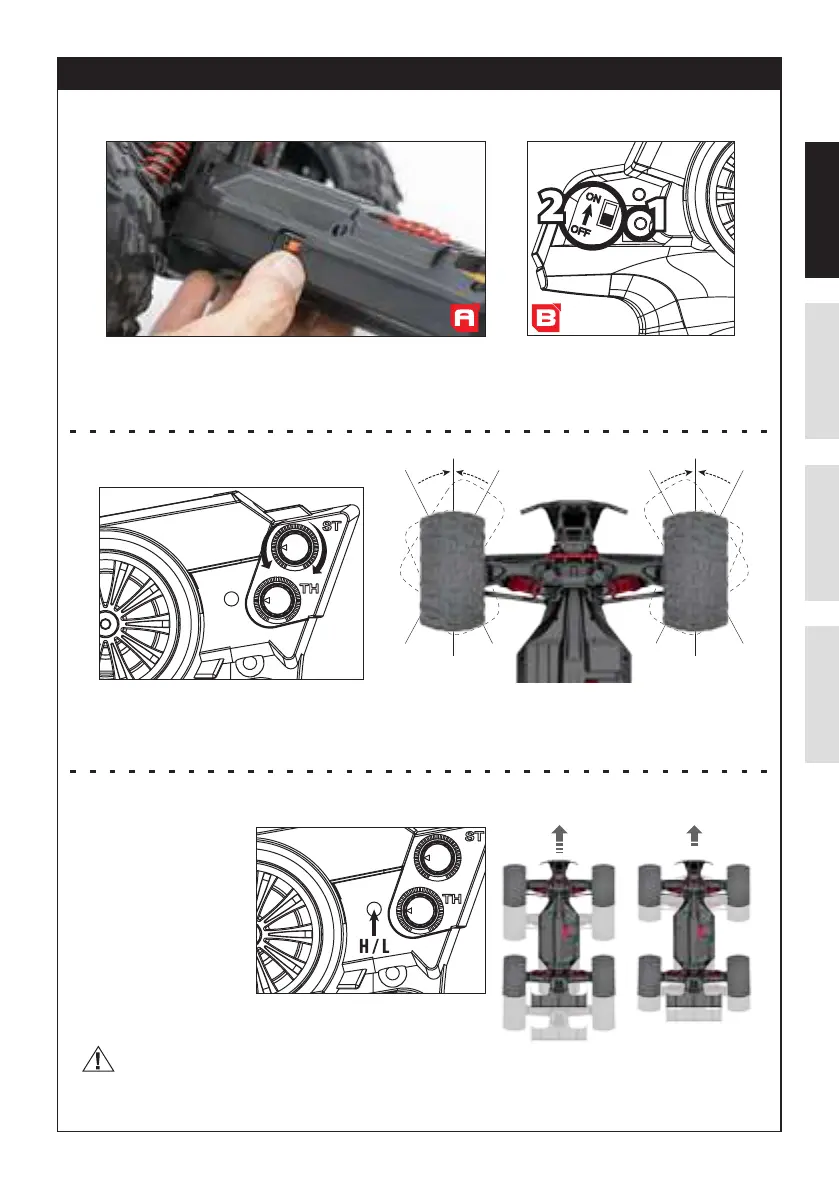
TRANSMITTER SWITCH INSTRUCTIONS
When pairing for the rst time, FIRST switch the car ON (A). Then on the transmitter (B), keep the BIND button pushed (1) and
switch it ON (2). Red LED on the transmitter will quickly ash.
When pairing with the car is done, the LED will become green solid.
When the chassis switch is turned on and the front tires are not straight, use the ST.TRIM to adjust the position.
• When the car oversteers to the left , ST.TRIM should be adjusted clockwise.
• When the car oversteers to the right , ST.TRIM should be adjusted anticlockwise.
A. Power Switch
B. Steering Trim
• Push button to select H :
Full speed mode (the speed
is about 50Km/h)
• Push button to select L :
Half speed mode (the speed
is about 30Km/h)
SUGGEST:
Please push button to select half speed mode (L).
When you play with the car for the rst time to avoid damaging
the car !
E. Speed Mode (Full Speed & Half Speed Mode)


 To Next Page