
 Need help?
Do you have a question about the Furo Systems Furo X and is the answer not in the manual?
A comprehensive checklist to ensure the bike is safe to ride, covering brakes, folding mechanism, stem, seat post, and quick release levers.
Emphasizes the importance of always wearing a properly fitted helmet when riding the Furo X.
Highlights that cycling is dangerous and incorrect installation of parts can lead to accidents.
Lists all items included in the Furo X bike package, such as tools, charger, battery, and accessories.
Instructions on how to power on the bike and start it using the mode button.
Guide on how to choose the desired power assist level for riding.
A step-by-step guide for initial bike setup, including unpacking, unfolding, and adjusting components.
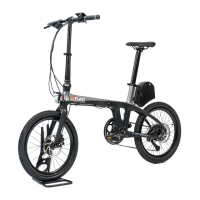
Identifies the key external components and parts of the Furo X bicycle.
Explains the function of the on-board computer display and handlebar controls.
Provides detailed technical data for the Furo X, including motor, speed, range, and components.
Step-by-step instructions on how to safely fold the Furo X bicycle.
Instructions for connecting the charger and understanding charging status indicators.
Explains the on-board computer display layout and the function of its buttons.
Guide to operating the indicator lights via buttons or remote, and how to recharge them.
Instructions for turning the computer display on/off and controlling its LED backlight.
How to engage the 6 Km/h walk assist feature for easier pushing.
Guide to selecting motor power assistance levels from 1 to 5.
Steps to enter and navigate the computer's settings for customization.
Reminder of critical safety checks including brakes, stem, and seat tube extension before riding.
Key maintenance advice for tire pressure, chain lubrication, and battery care.
Precautions for using the battery charger, including location, environment, and plug care.
Advice on ensuring battery health, including charging frequency and storage recommendations.
Warnings regarding legal compliance, maintenance, helmet use, third-party products, and modifications.
Details the warranty period and coverage for the bicycle frame and components.
Limits FuroSystems' liability for damages arising from product use or manual information.
Warns about wear and tear, stress, and potential failure of mechanical components.
States copyright ownership and restrictions on material use.
Lists directives and standards the FX complies with, including EN 15194.
Provides company details, registration number, and website for FuroSystems LTD.
 General
| Brand | Furo Systems |
|---|---|
| Model | Furo X |
| Category | Bicycle |
| Language | English |

 To Next Page