This document is a user manual for an L-shaped desk with a file drawer and two monitor stands. It provides detailed instructions for assembly, a list of parts, and troubleshooting information.
Function Description
The device is an L-shaped desk designed for home or office use, offering a spacious work surface, integrated storage, and dedicated monitor stands. Its L-shape allows for efficient use of corner spaces and provides ample room for multiple tasks or setups. The desk includes a file drawer for organized storage of documents and other items, helping to keep the workspace tidy. Additionally, it features two monitor stands, which elevate monitors to an ergonomic viewing height, reducing strain on the neck and eyes. The overall design aims to provide a functional, organized, and comfortable workstation.
Important Technical Specifications
The manual includes a detailed list of parts and hardware, indicating the quantity and dimensions of various components.
Hardware:
- A: M4*8MM (2 PCS) - Likely for attaching handles or small components.
- B: M6*8MM (8 PCS) - Screws for connecting metal bars.
- C: M6*23MM (10 PCS) - Screws for monitor stands and other connections.
- D: M6*30MM (18 PCS) - Longer screws for attaching desk boards.
- E: M6*35MM (20 PCS) - Even longer screws for various frame connections.
- F: M6*50MM (8 PCS) - Longest screws, possibly for critical structural connections.
- G: Adjustable Feet (10 PCS) - For leveling the desk and protecting floors.
- H: Connecting Pins (2 PCS) - For joining larger desk sections.
- J: Assembly Tool (1 PC) - A wrench or screwdriver for assembly.
- K: M5*12MM (4 PCS) - Screws for the file cabinet.
- L: M6*28MM (4 PCS) - Screws for specific frame connections.
- M: File Hangers (1 PC) - For the file cabinet.
- N: Drawer Bottom (1 PC) - For the drawer.
- O: File Cabinet Bottom (1 PC) - For the file cabinet.
Desk Components:
- 1: Side Frame (1 PC) - Part of the file cabinet structure.
- 2: Side Frame (1 PC) - Part of the file cabinet structure.
- 3: Side Frame (1 PC) - Main desk side frame.
- 4: Side Frame (1 PC) - Main desk side frame.
- 5: Metal Bar (1 PC) - Under the top board.
- 6: Metal Bar (2 PCS) - For the file cabinet.
- 7: Metal Bar (2 PCS) - Under the desk top board.
- 8: Metal Bar (2 PCS) - For desk side frames.
- 9: Metal Bar (2 PCS) - For the bottom board of the desk.
- 10: Metal Bar (1 PC) - Under the other top board.
- 11: Side Frame (1 PC) - For the desk's side shelf.
- 12: Side Frame (1 PC) - For the desk's side shelf.
- 13: Metal Bar (1 PC) - Bottom metal bar of the desk.
- 14: Metal Bar (1 PC) - Bottom metal bar of the desk.
- 15: Monitor Stand Frame (4 PCS) - Frames for the monitor stands.
- 16: Desk Top Board (1 PC) - Main desk surface.
- 17: Desk Top Board (1 PC) - Other desk surface.
- 18: Shelf (1 PC) - For the file cabinet.
- 19: Middle Board (1 PC) - For the desk's side shelf.
- 20: Bottom Board (1 PC) - For the desk's side shelf.
- 21: Monitor Stand Board (2 PCS) - Boards for the monitor stands.
These specifications indicate a sturdy construction, likely involving metal frames and wooden or composite boards, designed for durability and stability. The inclusion of adjustable feet (G) suggests attention to stability on uneven surfaces.
Usage Features
- L-Shaped Design: Maximizes workspace in corners, providing a large surface area for computers, documents, and other office essentials.
- Integrated File Drawer: Offers convenient storage for files and office supplies, helping to maintain a clutter-free desk. The drawer assembly (Step 13) and file cabinet assembly (Step 14) are clearly outlined.
- Two Monitor Stands: Elevates monitors to an ergonomic height, promoting better posture and reducing neck and eye strain. These stands are assembled in Step 15.
- Adjustable Feet: Allows for leveling the desk on uneven floors, ensuring stability and preventing wobbling (Step 16).
- Modular Assembly: The desk is assembled in multiple steps, suggesting a modular design that might allow for easier transport or customization, although the manual focuses on a fixed L-shape.
Maintenance Features
The manual primarily focuses on assembly and troubleshooting rather than ongoing maintenance. However, some aspects can be inferred:
- Troubleshooting Guide: A dedicated "Problems You May Encounter" section provides solutions for common issues such as missing/defective parts, non-human caused damage, broken/scratched board surfaces, misaligned screw holes, uneven/loose desk boards, bent/broken/rusted/damaged steel frames, and unstable tables. This indicates a focus on resolving issues that might arise during or shortly after assembly.
- Customer Support: The manual emphasizes contacting customer service via Amazon Orders or email (Furologeeservice@sincerehl.com) for any concerns or questions, especially if problems cannot be resolved using the provided guide. This suggests a robust support system for addressing product issues.
- 1-Year Warranty: A 1-year warranty covers defects in material and workmanship under normal household conditions. This provides assurance regarding the product's quality and offers a free replacement for covered defects, including shipping costs.
- Quick Response: Customer support promises a response within 24 hours, even if the product has already been installed. Attaching a video or picture of the issue is recommended for efficient problem confirmation.
While specific cleaning or material care instructions are not provided, the troubleshooting section implies that issues like damaged steel frames or board surfaces would be addressed through replacement or repair under warranty, rather than user-performed maintenance. The adjustable feet (G) can also be considered a maintenance feature, as they allow users to correct minor stability issues over time.

 Need help?
 General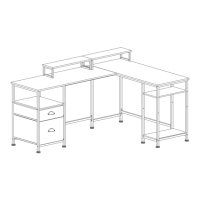

 To Next Page