EasyManua.ls Logo

FuroSystems Fuze - Getting To Know The On-Board Computer; Display Overview; Mode Selection Guide; Main Mode Selection

FuroSystems Fuze
11 pages
Print Icon
To Next Page IconTo Next Page
To Previous Page IconTo Previous Page
Loading...
4
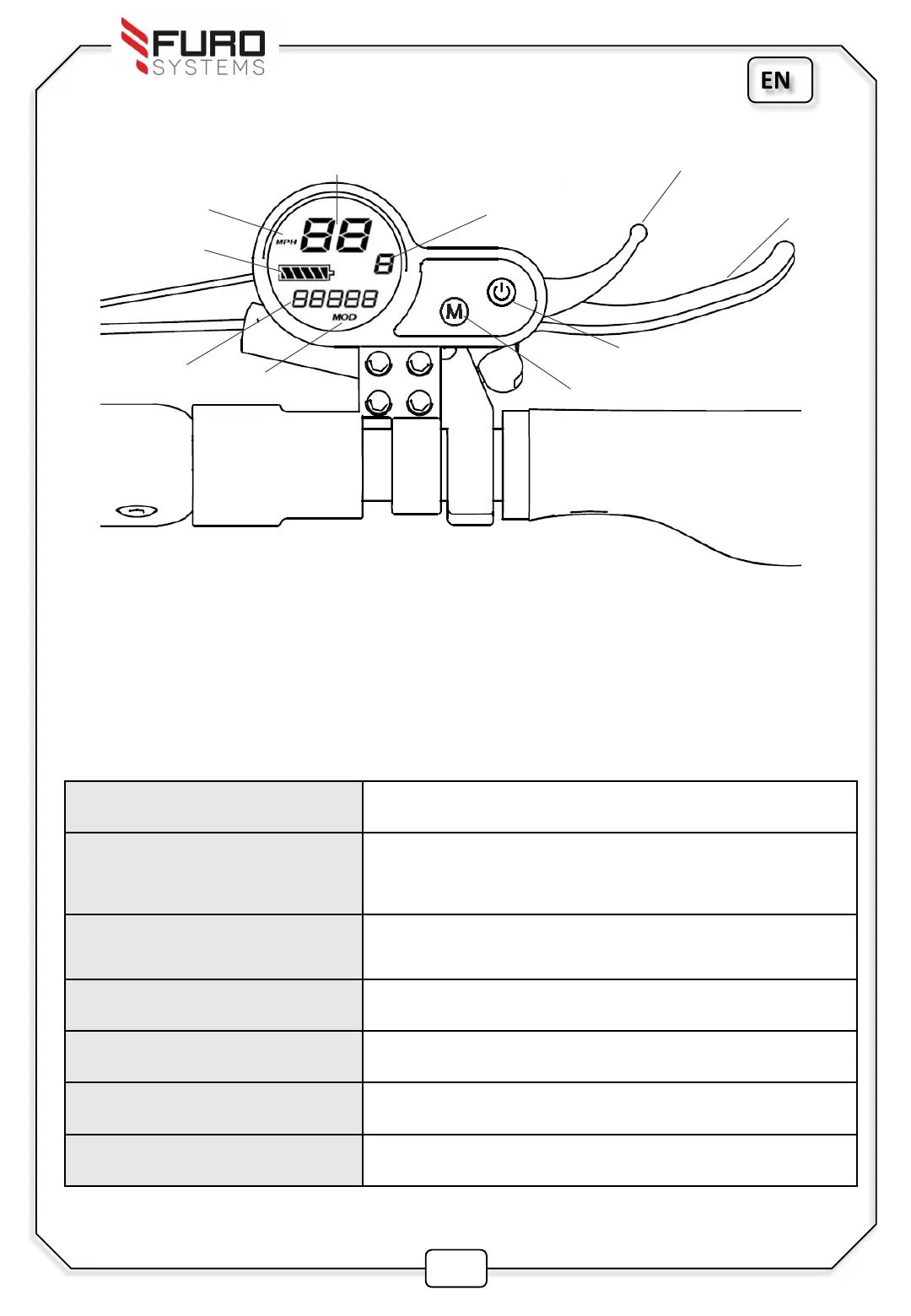
Getting To Know The On-Board Computer
Speed Indicator
Front Brake
Battery Life
Indicator
Power Level
Speed unit
Throttle
Power Button
Mode Button
Trip Data
Indicator
Display Mode
Main Mode Selection
Press and hold the Power button (2-3s) to switch on the Fuze Display.
Tap the Mode button to toggle between the 3 levels of power( 1 2 3)
Tap the power button to cycle through the display modes.
Display Mode Description
TRIP
Current Trip Mileage (Long press Mode button to
reset)
ODO Total Mileage
CHA (Unused)
VOL Current Voltage
DST (Unused)
TIME Time Elapsed
EN