
 Need help?
Do you have a question about the Furrion DV7200S and is the answer not in the manual?
Details buttons for power, muting, volume adjustment, and zone selection.
Explains buttons for selecting radio bands, USB, Bluetooth, and input sources.
Describes controls for track/station navigation, play, pause, stop, repeat, and random.
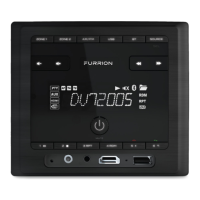
Details controls for system reset, backlight, clock, alarm, and connectivity ports like USB, HDMI, Aux, Headphone, NFC.
Buttons for power, changing modes, and scanning stations/tracks.
Controls for play, pause, stop, next, previous, and repeat/random functions.
Buttons for adjusting volume, muting audio, and selecting zones.
Controls for handling calls, accessing logs, and system settings.
Guidance on selecting an appropriate and safe location for mounting the unit.
Step-by-step instructions and illustration for physically installing the unit.
Details compatible audio file formats, codecs, bit rates, and sampling rates.
Illustrates the rear panel connections for various audio and remote signals.
Details the function and wire color for each pin in the connecting socket.
Shows specific wiring examples for 4-speaker and 2-speaker mono setups.
Covers turning the unit on/off, volume control, mute, and zone management.
Covers sound settings (BASS/TREBLE), beep, volume behavior, radio sensitivity, time, backlight, alarm, and unit reset.
Explains radio tuning, USB playback controls, and track/station management.
Details Bluetooth pairing, connection, and hands-free calling features.
Details general unit dimensions, power, and AM radio band specifications.
Provides specifications for FM radio reception and USB playback capabilities.
 General
| Model | DV7200S |
|---|---|
| HDMI Output | Yes |
| Color | Black |
| Type | Docking Station |
| Ports | HDMI, USB |
| Disc Playback | No |
| Tuner | No |

 To Next Page