This
quick start guide will help you install and use
the device properly. Forfurther support please visit
support.lci1.com/furrion.
PRODUCT OVERVIEW
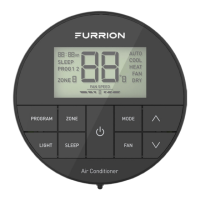
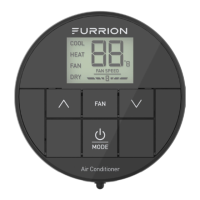
Press to select
program 1 or 2
Press to select
zone
Press to increase
temperature set-point
Press to decrease
temperature set-point
Press to select fan
speed
Press to select
dierent mode
Press to select
mood light
Press to turn
on/o the sleep
mode
Press to turn
on/o the air
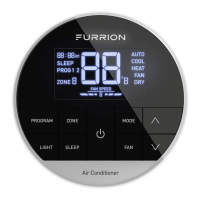
Fan Speed
Operation Mode
Room
Temperature or
Error Code
Zone
Program
Sleep Icon
Time of Day
WHAT’S IN THE BOX
Wa rra nty Man ual
Wa rni ng C ard
Qu ick St art Gu ide
Wa rra nty Ma nual
Wa rni ng C ard
Qu ick Sta rt Gui de
Thermostat x 1
QSG x 1
Warranty Manual x 1
NOTE: Product design and packaging may change without
notice.
INSTALLATION
WARNING: Risk of electric shock. Always verify that the
electrical power to the circuit has been disconnected
before performing the installation procedures.
Thermostat Location
This thermostat is a regulating device which senses the
room real-time temperature and performs actions to
maintain the temperature near a desired set-point. For
accurate temperature control, the following considerations
should be taken into account:
1. Mount the thermostat on an interior wall, approximately
5 ft. (1.5m) above the floor. Install in a location with good
air circulation and avoid damp areas.
2. Avoid to install the thermostat in areas that are
exposed to temperature variances, such as direct
sunlight, near windows and doors, above or below
supply vents. Do not install the thermostat in locations
near heat sources like televisions, lamps, or fireplaces.
Wiring and Mounting the Thermostat
1. Rotate the thermostat cover counterclockwise and pull
out the base plate.
2. Use the base plate as a template and drill a hole on
the vehicle wall. Extend the four wire cables from the
cutout area. Refer to the cable tag label for each cable
definition.
3. Mount the thermostat base on the wall using screws
included with the thermostat.
NOTE: Make sure the base is not covering the hole and
squeezing the thermostat cables. Take care in case of
damaging the temperature sensor.
4. Connect the cables to thermostat.
5. Replace the thermostat to the base and rotate
clockwise until it snaps into place.
Thermostat Cables
Thermostat Cables
Thermostat
cables
2
34
5
2
43
5
1
MULTI ZONE WALL
THERMOSTAT
MODEL:
FACWESZA2BL
QUICK START GUIDE
OPERATION
Your Furrion wall thermostat has been preprogrammed
with factory default settings. Review the settings below and
adjust to your comfort level.
Factory Settings
Heating 68°F / 20°C
Cooling 72°F / 22°C
Fan Speed Auto
Mode Auto
Turn On/Off the Thermostat
To turn on, press the button to turn on the thermostat. To
turn off, press and hold button for 3 seconds to turn off
the thermostat.
Change the Temperature Format
Press both the or buttons for 3 seconds to toggle the
temperature format between Centigrade and Fahrenheit.
NOTE: °F indicates Fahrenheit and °C indicates
Centigrade.
Change the Operating Mode
After the thermostat has been turned on, press the MODE
button to toggle through AUTO, COOL, HEAT, FAN and
DRY modes. The activated mode icon and temperature
set-point will be displayed on the LCD. The mode will
be selected automatically after 2 seconds without any
operation.
NOTE: To activate the heating function, the furnace and/
or heatstrip DIP switches in the air conditioner control box
must be enabled:
– Furnace ON, Heatstrip OFF - Furnace heat only, HEAT
F will be displayed on LCD after selected.
– Heatstrip ON, Furnace OFF - Heatstrip heat only, H EAT
H will be displayed on LCD after selected.
– Furnace ON, Heatstrip ON - Furnace and heatstrip
heat, default is furnace heat mode (HEAT F), press the
MODE button to switch to heatstrip heat mode (H EAT
H).
– Furnace OFF, Heatstrip OFF - The heat mode is
disabled.
CCD-0009287
Rev. 08.28.24


 To Next Page
 Need help?
 General