EasyManua.ls Logo

Furrion FACW12ZA-BL - User Manual

Furrion FACW12ZA-BL
20 pages
Print Icon
To Next Page IconTo Next Page
Loading...
Multi Zone Wall Thermostat
Instruction Manual
Model: FACW12ZA-BL
Question and Answer IconNeed help?

Do you have a question about the Furrion FACW12ZA-BL and is the answer not in the manual?

Summary

About your Thermostat

Product Features

Details the key features of the Multi Zone LCD thermostat, including its display and capabilities.

Control Buttons

Explains the function and operation of each physical button on the thermostat interface.

Installation

Whats in the Box

Lists all the components included in the thermostat packaging for user verification.

Thermostat Installation

Provides step-by-step instructions for mounting and connecting the thermostat to the system.

Operation

Temperature Format

Guides users on how to switch between Fahrenheit (°F) and Centigrade (°C) display.

Turn On;Off the Thermostat

Instructions on powering the thermostat on and off using the dedicated button.

Operation Mode

Explains how to cycle through and select available operating modes like Auto, Cool, Heat, Fan, and Dry.

AUTO MODE

Details the automatic mode, which adjusts between heating and cooling based on room temperature.

COOL MODE

Explains the function of the cooling mode, compressor cycling, and fan speed options.

HEAT MODE

Describes the heating mode, its reliance on the furnace, and fan speed control.

FAN MODE

Information on using the thermostat solely for fan operation, including speed selections.

DRY MODE

Details the dry mode for humidity control, including compressor and fan operation.

Clock Setting

Instructions for setting the current time on the thermostat's clock.

Program Setting

Guides on setting up custom heating/cooling schedules using programmable timers.

Zone Selection

Explains how to select and control different HVAC zones connected to the thermostat.

Set the Temperature

Instructions on how to adjust the desired temperature set-point for optimal comfort.

Set the Fan Speed

Details how to adjust the fan speed settings for various operating modes.

Mood Light

Information about the thermostat's ambient LED mood lighting feature and its color options.

Sleep Mode

Explains how to activate sleep mode, which adjusts temperature and fan speed for comfort at night.

Special Features

Auto Fan

Explains how auto fan mode adjusts fan speed based on temperature differences.

Compressor Time Delay

Describes the built-in time delay to protect the compressor during cooling cycles.

Power Interruption

Details how the thermostat resumes operation after a loss of power.

LCD Error Code

Lists and explains common error codes displayed on the LCD for troubleshooting.

Programmable Timers

Information on setting up two distinct timers per zone for automated operation.

Wiring Diagram

Specifications

Warranty

Summary

About your Thermostat

Product Features

Details the key features of the Multi Zone LCD thermostat, including its display and capabilities.

Control Buttons

Explains the function and operation of each physical button on the thermostat interface.

Installation

Whats in the Box

Lists all the components included in the thermostat packaging for user verification.

Thermostat Installation

Provides step-by-step instructions for mounting and connecting the thermostat to the system.

Operation

Temperature Format

Guides users on how to switch between Fahrenheit (°F) and Centigrade (°C) display.

Turn On;Off the Thermostat

Instructions on powering the thermostat on and off using the dedicated button.

Operation Mode

Explains how to cycle through and select available operating modes like Auto, Cool, Heat, Fan, and Dry.

AUTO MODE

Details the automatic mode, which adjusts between heating and cooling based on room temperature.

COOL MODE

Explains the function of the cooling mode, compressor cycling, and fan speed options.

HEAT MODE

Describes the heating mode, its reliance on the furnace, and fan speed control.

FAN MODE

Information on using the thermostat solely for fan operation, including speed selections.

DRY MODE

Details the dry mode for humidity control, including compressor and fan operation.

Clock Setting

Instructions for setting the current time on the thermostat's clock.

Program Setting

Guides on setting up custom heating/cooling schedules using programmable timers.

Zone Selection

Explains how to select and control different HVAC zones connected to the thermostat.

Set the Temperature

Instructions on how to adjust the desired temperature set-point for optimal comfort.

Set the Fan Speed

Details how to adjust the fan speed settings for various operating modes.

Mood Light

Information about the thermostat's ambient LED mood lighting feature and its color options.

Sleep Mode

Explains how to activate sleep mode, which adjusts temperature and fan speed for comfort at night.

Special Features

Auto Fan

Explains how auto fan mode adjusts fan speed based on temperature differences.

Compressor Time Delay

Describes the built-in time delay to protect the compressor during cooling cycles.

Power Interruption

Details how the thermostat resumes operation after a loss of power.

LCD Error Code

Lists and explains common error codes displayed on the LCD for troubleshooting.

Programmable Timers

Information on setting up two distinct timers per zone for automated operation.

Wiring Diagram

Specifications

Warranty

Overview

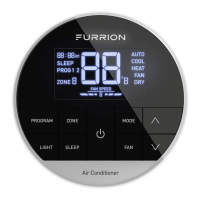
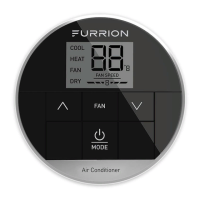
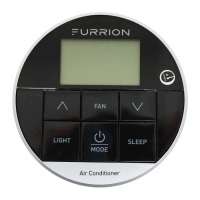
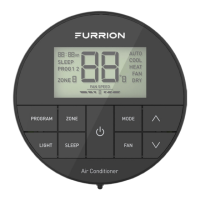
The Furrion Multi Zone Wall Thermostat (Model: FACW12ZA-BL) is a sophisticated control unit designed for RV climate management, offering precise temperature and fan speed control across multiple zones. This device features a liquid crystal display (LCD) with a blue backlight and mode indicators, providing clear visual feedback of its operational status.

Function Description:

The thermostat serves as the central interface for controlling an RV's heating, cooling, and fan systems. It allows users to select from various operation modes, set desired temperatures, adjust fan speeds, and program timers for automated climate control. The multi-zone capability enables independent control of different areas within the RV, provided they are connected to the system. It also includes a mood light feature with predefined LED colors and a sleep mode for enhanced comfort during rest.

Important Technical Specifications:

  • DC Input Power: DC 12V
  • Power Consumption: <0.5W
  • Baud Rate: 9600bps
  • Dimension: 3 x 3 x 15/16" (75 x 75 x 22.5mm)
  • Weight: 0.11kg
  • LCD Viewing Angle: 12 o'clock
  • LCD Backlight: Blue
  • Temperature Set-point Range: 60°F~86°F (16°C~30°C)
  • Factory Default Settings:
    • Heating: 68°F / 20°C
    • Cooling: 72°F / 22°C
    • Fan Speed: AUTO
    • Mode: AUTO
    • Furnace Differential: 2°F

Usage Features:

Control Buttons:

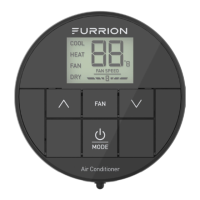
The thermostat features several control buttons for intuitive operation:

  • PROGRAM: Used for clock setting and program setting (PROG 1 and PROG 2).
  • ZONE: Selects different zones (ZONE 1, ZONE 2, ZONE 3, ZONE 4) if connected.
  • LIGHT: Turns on/off the mood light and cycles through predefined colors.
  • SLEEP: Activates/deactivates sleep mode.
  • MODE: Toggles through available operation modes (AUTO, COOL, HEAT, FAN, DRY).
  • FAN: Selects fan speed (AUTO, HIGH, MEDIUM, LOW).
  • Up/Down Arrows (∧/∨): Increases/decreases temperature set-point, adjusts hour/minute during clock setting.
  • Power Button (⏻): Turns the thermostat on/off.

LCD Icons:

The LCD displays various icons to indicate the current status:

  • Time of Day: Shows the current time (e.g., 88:88 AM).
  • Sleep Icon: Indicates sleep mode is active.
  • Program (PROG 1 2): Shows which program is active.
  • Zone (ZONE 8): Displays the currently selected zone.
  • Room Temperature or Error Code (88): Shows the current room temperature or an error code.
  • Operation Mode (AUTO, COOL, HEAT, FAN, DRY): Indicates the active operation mode.
  • Fan Speed (FAN SPEED 8): Displays the current fan speed.
  • DRY: Indicates dry mode is active.

Operation Modes:

The thermostat supports five operation modes:

  • AUTO Mode: Automatically switches between COOL and HEAT based on room temperature. Operates Dry Mode between 68°F (20°C) and 77°F (25°C).
  • COOL Mode: Cycles the compressor on/off to maintain the set-point. Offers 4 fan speed selections.
  • HEAT Mode: Cycles the furnace on/off to maintain the set-point. Available only when the furnace is enabled. Offers 4 fan speed selections for the rooftop fan.
  • FAN Mode: Circulates air without heating or cooling. Offers 3 fan speed selections. Temperature set-point is not available.
  • DRY Mode: Runs the compressor continuously when room temperature is higher than set-point, and cycles ON for 10 minutes/OFF for 6 minutes when lower. Fan runs continuously at low speed.

Temperature Format:

Users can toggle between Fahrenheit (°F) and Centigrade (°C) by simultaneously pressing the up and down arrow buttons for 3 seconds.

Clock Setting:

In OFF mode, the clock needs to be set. Press and hold the PROGRAM button for 3 seconds to enter clock setting mode. Use the up/down arrows to adjust the hour (including AM/PM) and minute, then press PROGRAM to save.

Program Setting:

The system allows setting two time programs (PROG 1 and PROG 2) for each zone. Users can define start/finish times, operation modes, and fan speeds for automated climate control.

Zone Selection:

Pressing the ZONE button repeatedly cycles through available zones. Once a zone is selected, its operating status is displayed, and control buttons can be used to adjust its settings independently.

Set the Temperature:

The temperature set-point can be adjusted from 60°F to 86°F (16°C to 30°C) using the up/down arrow buttons in COOL or HEAT modes.

Set the Fan Speed:

In applicable modes (AUTO, COOL, HEAT, FAN), the FAN button allows selection of AUTO, HIGH, MEDIUM, or LOW fan speeds. Fan speed selection is not available in DRY mode.

Mood Light:

The thermostat includes a mood light with 7 predefined LED colors. Pressing the LIGHT button turns it on and cycles through the colors. Repeated presses turn it off.

Sleep Mode:

Activating SLEEP mode (via the SLEEP button) adjusts the temperature set-point over time for enhanced comfort. In Cool Mode, the set-point increases by 2°F after 1 hour and another 2°F after 2 hours, with fan speed fixed to LOW. In Heat Mode, the set-point decreases similarly.

Special Features:

Auto Fan:

In auto fan mode, the fan speed varies based on the temperature difference between the set-point and room temperature:

  • 3°F difference: High level

  • 1°F difference: Med level

  • <-1°F difference: Low level

Compressor Time Delay:

A three-minute time delay occurs before the compressor starts its cooling cycle. This ensures pressure equalization, preventing damage to the unit.

Power Interruption:

In case of a power interruption, the system automatically restarts with the last saved operational settings once power is restored.

LCD Error Code:

The LCD displays specific error codes to indicate system faults:

  • E1: Indoor temperature sensor out of order.
  • E2: Evaporator temperature sensor out of order.
  • E3: Loss of communication between thermostat and control box.
  • E4: Condenser temperature sensor out of order.
  • E5: Outdoor temperature sensor out of order.
  • LO: Insufficient low level of +12V power supply.

Programmable Timers:

The multizone thermostat can store two timers per zone, allowing users to schedule unique mode and fan selections for different times of the day (e.g., a COOL mode with auto fan at 8:00 AM and an AUTO mode with low fan at 7:00 PM).

Maintenance Features:

The manual emphasizes keeping the instruction manual for future reference to ensure safe use and reduce injury risk. It also states that the manufacturer is not responsible for damages due to not observing the instructions. For further questions or support, users are directed to contact support@furrion.com. The warranty information outlines a 1-year warranty period from the date of retail purchase, covering manufacturing defects and workmanship. It also specifies conditions that void the warranty, such as product modification or misuse.

Furrion FACW12ZA-BL Specifications

General IconGeneral
BrandFurrion
ModelFACW12ZA-BL
CategoryThermostat
LanguageEnglish

Related product manuals