3
About your Thermostat
Product Features
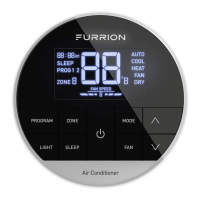
Your Multi Zone LCD thermostat is equipped with a liquid crystal display (LCD) to
indicate the temperature set-point in Fahrenheit(°F)/Centigrade(°C) and fan speed. It
is also equipped with LCD to indicate the system available operation modes.
NOTE: The available operation modes will be different depending on the system
installed in your RV.
● Liquid Crystal Display with Blue Backlight and Mode Indicators
● Auto Fan
● Room Temperature Display
● Fahrenheit(°F)/Centigrade(°C) Display
● Sleep Mode
● LED Mood Light
● Time Program
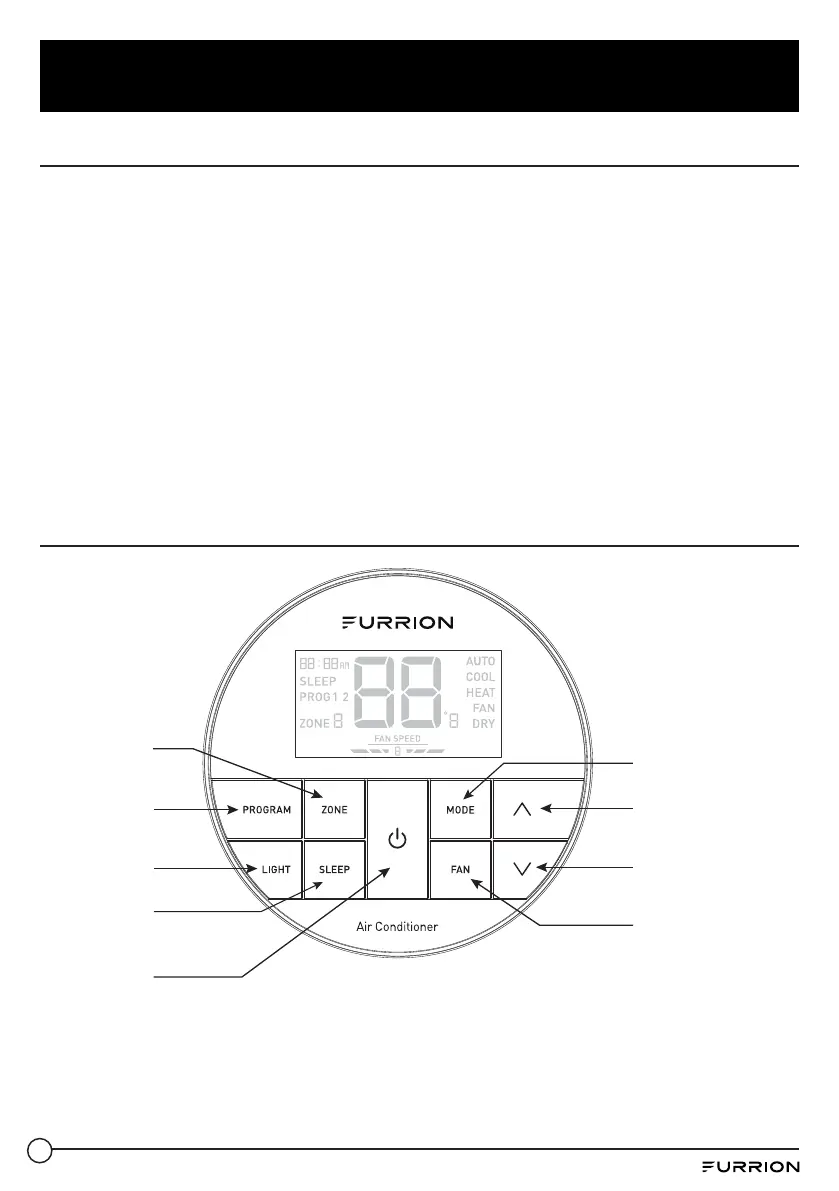
Control Buttons
Press to select
program 1 or 2
Press to select
zone
Press to increase
temperature set-point
Press to decrease
temperature set-point
Press to select fan
speed
Press to select
different mode
Press to select
mood light
Press to turn
on/off the sleep
mode
Press to turn
on/off the air
conditioner


 To Next Page